
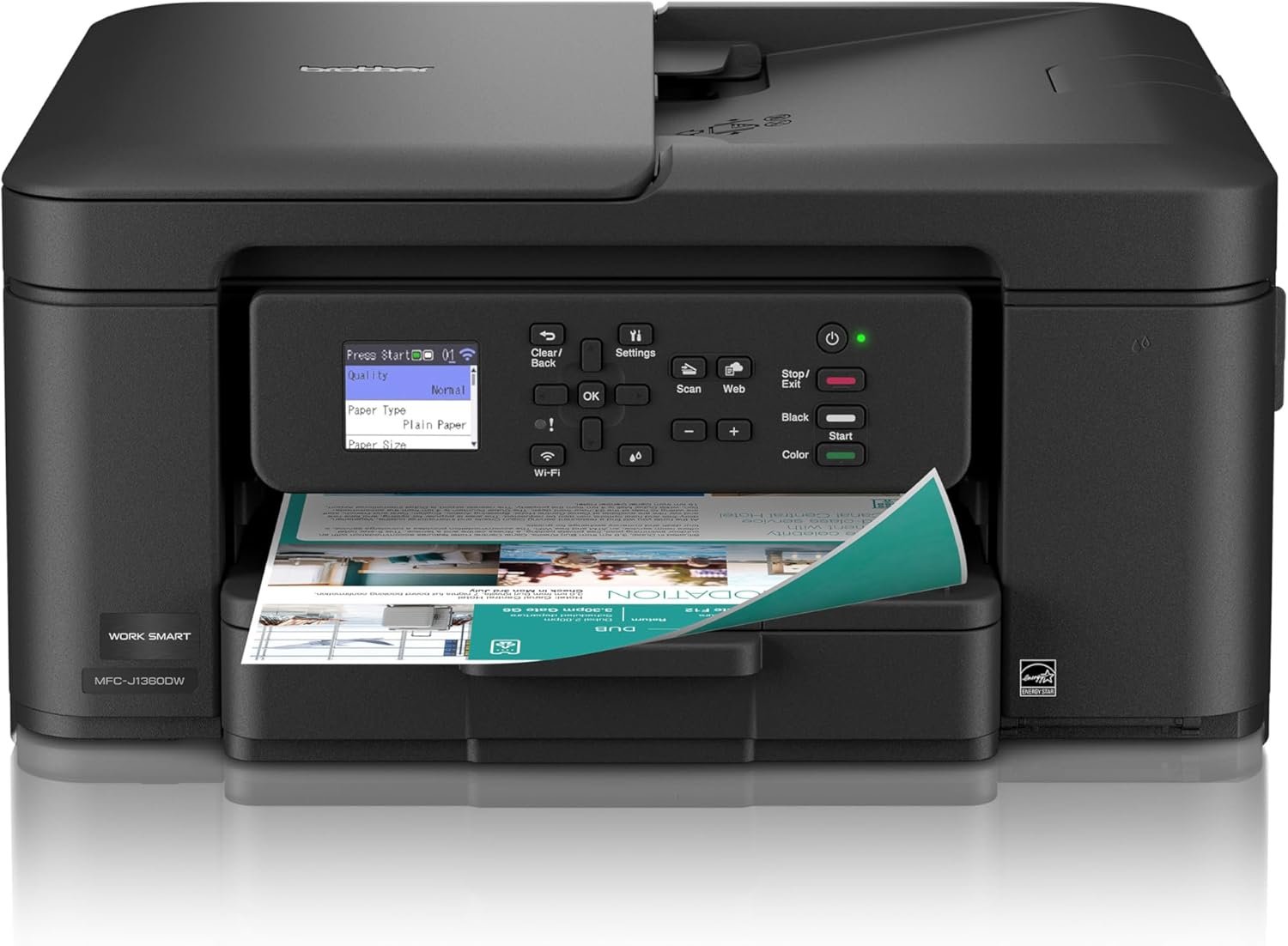
Brother Work Smart 1360 Wireless Color Inkjet All-in-One Printer with Automatic Duplex Printing and 1.8” Color Display | Includes Refresh Subscription Trial(1) (MFC-J1360DW) (Uses LC501 Series Inks)
$89.99
Related Products


Looking for reliable printing with robust efficiency-boosting features? The Brother Work Smart 1360 Wireless Color Inkjet All-in-One Printer delivers. With versatile tools like automatic duplex (2-sided) printing, a 20-page single-sided automatic document feeder(3) and flatbed scanner capabilities, wireless(7), Wi-Fi Direct, AirPrint®, and Mopria® compatibility, plus Cloud connectivity(2) options available on the 1.8” color display, this multifunction printer makes getting your work done simple. Perfect for printing anything you need, from to-do lists to business reports, this color inkjet printer outputs vibrant colors and bold, rich blacks at fast print speeds, and Page Gauge(6) monitors your ink usage so you know when you’re running low. When paired with the Brother Mobile Connect app, setup is quick and easy – plus, you can print from virtually anywhere on your mobile device(5). Print Confidently with Brother Genuine LC501 Ink in your Work Smart 1360 for reliable, consistent prints – with convenient multipack and high yield cartridge options for added convenience. Try one of our smart delivery systems with Refresh and have your ink delivered automatically, before you run out. Includes a 2-month FREE Refresh EZ Print Subscription Trial(1) and built-in savings of up to 50%(8).
BEST FOR HOME AND HOME OFFICE: Get all your work done with an all-in-one multifunction printer. Print, copy, and scan on one compact printer for home use and home offices. Brother inkjet printers produce beautiful prints for results that stand out.
EASY TO USE WITH CLOUD APP CONNECTIONS: Print from and scan to popular Cloud apps(2), including Google Drive, Dropbox, Box, OneDrive, and more from the simple-to-use 1.8” color display on your printer.
PRODUCTIVITY-FOCUSED PRINTING FEATURES: This printer includes automatic duplex (2-sided) printing, a 20-sheet single-sided Automatic Document Feeder (ADF)(3), and a 150-sheet paper tray(3). Engineered to print at fast speeds of up to 16 pages per minute (ppm) in black and up to 9 ppm in color(4).
MULTIPLE CONNECTION OPTIONS: Connect your way. Interface with your printer on your wireless network or via USB.
THE BROTHER MOBILE CONNECT APP: Go mobile with the Brother Mobile Connect app(5) that delivers easy onscreen menu navigation for printing, copying, scanning, and device management from your mobile device. Monitor your ink usage with Page Gauge to help ensure you don’t run out(6) .
13 reviews for Brother Work Smart 1360 Wireless Color Inkjet All-in-One Printer with Automatic Duplex Printing and 1.8” Color Display | Includes Refresh Subscription Trial(1) (MFC-J1360DW) (Uses LC501 Series Inks)
Add a review
$89.99
Ann Steyer –
Get more than the price implies ….
Overall I have to say it’s better than what I expected from an inkjet printer for this low price.Print quality is acceptable for informal documents. There are no real bad points to mention when evaluated within the scope of what the printer is: low, low cost with pretty good results.I’ll mention 2 points that may be of interest to some potential buyers: 1) it doesn’t have a LAN connection – WiFi or USB direct only (do those cable even still exist???) 2) black and white printing and scanning are reasonably quick. High resolution scan and printing are slow, I mean S L O W.But … look at the price. I can’t compare it to my (way more expensive) laser printers but for what it represents, at that price, I can only highly recommend it.
Samier RN –
Reliable, Easy to Use, and Great Value All-in-One Printer
The Brother Work Smart 1360 is an amazing printer and has been a great addition to my home setup. From start to finish, the setup process was quick and painless. Wireless connection was straightforward, and within minutes I was printing with no frustration or confusing steps. The menu and 1.8” color display are simple and intuitive, making everyday use easy even if you’re not very tech-savvy.Print quality is solid for both color and black-and-white documents, and the automatic duplex printing is a big plus—it saves paper and works smoothly without any hiccups. Scanning and copying are just as easy, making this a true all-in-one that actually feels convenient to use.One of the biggest advantages is ink cost. Replacement ink is very reasonable when purchased online, and there are plenty of compatible non-OEM options available that actually work well. The printer clearly notifies you if non-Brother ink is installed, but it continues to function perfectly once you confirm, which helps keep long-term costs down.Overall, this printer is reliable, user-friendly, and affordable to maintain. If you want a no-nonsense wireless color inkjet that’s easy to set up, easy to use, and doesn’t lock you into expensive ink, this is an excellent choice.
RWS –
Good printer especially for the price. Set up was fairly straight forward.
Initial review:After hearing what a nightmare it was to set up, I was pleasantly surprised it was not bad although the Brother set up interface could use some work. Prints copies and scans with no issues. I did set it up on the printer itself along with my desktop so did not use mobile or app set up. Love the compact size and printing seems good quality. Also, there were complaints about it being noisy. It is quieter than the old Brother it replaced. Warning they send starter ink cartridges so I would go ahead and buy XLs to replace when they are empty.
Amazon Customer –
Reliable, easy to use, and great value
Reliable, easy to use, and great valueI purchased the Brother Work Smart 1360 wireless printer and have been very pleased with it so far. The setup was straightforward and didn’t take long, even connecting it to Wi-Fi. The printer works exactly as expected—prints are clear and sharp, both for documents and basic graphics.Wireless printing has been very convenient, and it connects well to my computer and phone without any issues. It’s also reasonably fast and not too noisy, which is nice for home or office use. I haven’t experienced any paper jams, errors, or connectivity problems.Overall, this was a great purchase for the price, and I would definitely recommend it to anyone looking for a dependable everyday printer.
JL –
Not that easy to set up
I’ve had Brother printers for years, and never had problems setting them up and installing the software. This one was a frustrating challenge.The problem turned out to be the “EasySetup” software that is found on Brother’s downloads site. It installed the printer, and the printer worked fine. But the Print&Scan app would not recognize the printer, so I could not use it.Finally, I decided to install the Full Driver and Software Package, which is also offered. After some restarts and firmware updates, it worked. Now everything works fine, at least from my USB connection. (I’m not bothering with a WiFi connection for now.)My recommendation if you buy this: Install the Full Driver and Software Package, not the EasySetup software. And do any firmware updates if they are offered.Also, beware that this is a cheap printer with lots of plastic, and a small screen. I only plan to use it for occasional color printing and scanning, so it should hold up. If you’re a heavy-duty printer, you might consider something more robust.
bmg –
So Easy So Affordable Great Printer
This is such a great basic printer/scanner. This unit was delivered quickly and securely. Price point was great. Down side is the price of ink, should you buy “Brother” inks. The offered automatic ink subscription is, in my opinion, a complete waste of money and what’s worse, is the overboard rules which must be obeyed or else. Brother will disable the printer should you choose not follow every rule. That’s ridiculous. If you don’t subscribe to the subscription service, then the company doesn’t hassle you.Despite that nonsense with the subscription, I’m still very happy and pleased with the prini
Jen K –
Look no further
First of all..this was my second printer attempt. For some reason i couldn’t get the first printer to connect with my wifi because of a firewall. This Brother printer was a dream to install! The directions were easy to follow, easy to connect and is a very nice size. It prints at the speed of light and the quality is spot on. Please believe me when i tell you, this is the printer for you !
Petra de Jager –
Not bad
Works well for home use and when you only need to occasionally print something. Not great at printing on both sides of the paper (get jammed very easily) or feeding papers through the top feeding tray. Feels like cheap plastic paper trays and it’s not very smooth when removing the tray or putting it back in. But printing quality is good and it gets the job done.
Cliente de Amazon –
Excelente producto y lo mejor que se puede imprimir desde el celular
Mark Allen –
Great printer. For the size it is a little slow. But, for the price it was perfect. The only real issue was with the set-up. It is not user friendly. Takes a long time to work through the instructions. No room for error. The wireless aspect is fine as long as you have good internet.
Jerome –
Works well the app is nice also
luis gregorio –
No dura mucho la tinta
Mel –
The Amazon listing is what I am giving the low rating to! It said for Conectivity technology: Ethernet, USB, Wi-Fi. Ethernet is NOT available on this model! It is only Wi-Fi or USB. I have a Brother laser printer and it was great. That is why I wanted to go to Brother again. Too bad Amazon has such poor quality for both it’s listings and search options. It make the listing companies look bad and ends up with wasteful returns like this one.