
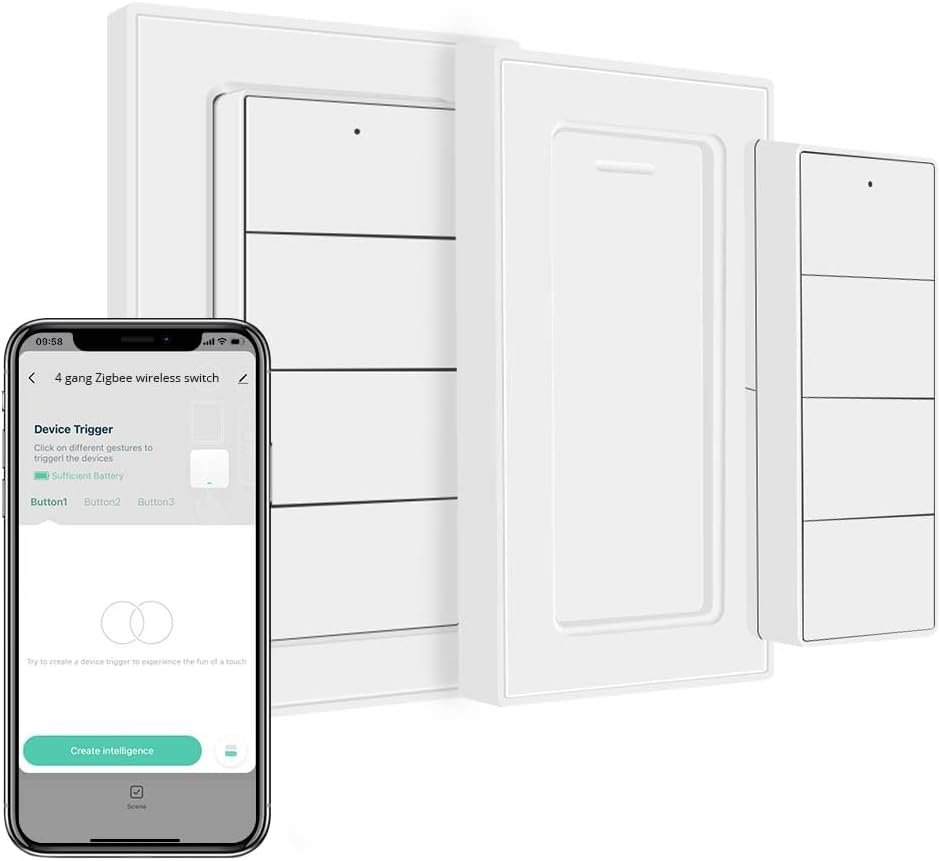
Wireless Zigbee Smart Button, 4-Way Remote Control Button Switch for Smart Home Devices, Scene Controller, Compatible with Tuya, Home Assistant, Homey, Hubitat, Requires Tuya Zigbee Hub
$21.24
Related Products


From the brand


Elevate Your Smart Curtain Experience with Blindsmart
Blindsmart, a trusted child brand of Zemismart, is your gateway to a truly intelligent and effortless curtain control solution.
With a deep understanding of your needs, Blindsmart offers a diverse range of cutting-edge smart curtain solutions that seamlessly integrate into your smart home ecosystem.
Welcome to Blindsmart, where your curtains become a reflection of your modern lifestyle.
Hot Sale
Smart Blinds/Curtain Solution
Seamless Wireless Control: Leverages Zigbee wireless technology for reliable remote control of compatible smart home devices and scenes. Effortless pairing with platforms like Hubitat, Zigbee2MQTT, Homey and Home Assistant-If you have problems of connection, feel free to contact us.
Customizable and Versatile: Features 4 buttons supporting single press, double press, and long press actions, allowing users to trigger device actions, adjust blinds, or activate pre-programmed scenes with ease.
Smart Automation Made Easy: Program the buttons to activate specific scenes automatically based on schedules or sensor data, offering an intelligent and personalized smart home experience.
Energy-Efficient Design: Powered by a high-capacity lithium button battery (included), it delivers months of reliable performance. The sturdy build balances a compact design with the benefit of a long-lasting battery.
Broad Compatibility for Enhanced Control: Integrates seamlessly with Homekit and SmartThings via the Zemismart M1 or M6 Matter Zigbee Gateway, expanding device compatibility and providing powerful control options for your smart home.
7 reviews for Wireless Zigbee Smart Button, 4-Way Remote Control Button Switch for Smart Home Devices, Scene Controller, Compatible with Tuya, Home Assistant, Homey, Hubitat, Requires Tuya Zigbee Hub
Add a review
$21.24
Mark Forest –
Home Assistant Compatible, WAF High
I was looking for a device that would let me integrate multiple Home Assistant automations into a single format. This device fills that requirement 12 times. I use Zigbee2MQTT for my Zigbee management; this device easily joins the network. Home Assistant recognized the device and gave me options to program the buttons with automations for items like turning the lights on using a scene as a reference. You have the options for Single Press, Double Press, and Hold Press, giving you 12 ways to handle the device; each is a trigger event. The wife likes that the mobile device does not need to be used to perform actions.While integrating with Home Assistant is quite easy, there are some points to discuss.The device comes with a magnetic mount, works great, and I have it mounted to a freezer. Wish the magnets were stronger; when using the device, the mounting plate moves around on the appliance.Replacing the battery may be challenging; getting into the battery slide proved difficult to manipulate. I also wish the manufacturer had used AAA batteries, rather than the button cells.I wish the buttons came as clear key caps so I could place my descriptions on the keys. I used a Brother P-Touch printer tape to make descriptions, but I also wanted to use different colors for different keys to facilitate at-a-glance actions, rather than having to read the text.Would I get another one? YES.
Pat C –
Works well among limited options
Review for Wireless Zigbee Smart Button, 4-Way Remote ControlThere are way too few scene remote controls out there and this is a pretty good one. I needed to integrate into my Apple HomeKit environment. I use Homebridge and had to add a Zigbee antenna. If not for Claude AI I would have completely messed up my setup as it required a good amount of programming, but Claude was able to walk me through everything.Now the remote works perfectly and I can configure the buttons in the iOS Home app so no additional apps are required. Responsiveness is very good. I used Onvis before and this is a slightly cheaper option with horizontal buttons that look a bit more like a light switch (and better to apply labels to), so I am switching to these for the rest of my setup.
Joe B –
Works well enough
Easy setup, and it works fine with my Hubitat hub. It is somewhat plain and clunky, but it’s good for the price point.
Austin R. –
Good value and easy to use
These were paired up with a Hubitat and immediately just work. No special installation, no driver installs, just pair and go.The buttons have a nice satisfying click. The remote is lighter than expected, but not flimsy. The wall plate can be installed with screws or adhesive (I used the adhesive and it’s fairly strong). The magnet used to hold the remote to the wall plate is weaker than I would like, but it gets the job done.Complaints aside, I would happily buy these again when I need more.
Dan D –
Works with SmartThings no problem! Here’s how to set it up
The device works with SmartThings it’s just a pain to do. The solution that got mine working was the following drivers by searching Google for “Smartthings Channel obmaz” -> the first thing that shows up should be his GitHub -> From within Github you will see a URL halfway down the page that states “You can enroll the channel and install edge drivers by using invitation URL” -> From here you click the Available Drivers button -> wait a minute or so for the page to load -> Click Install the driver titled “zigbee-tuya-button” -> This is where the pairing starts. I believe the issue is first you need to wait a few minutes for the driver to load to your SmartThings. From the SmartThings app click the Plus button, Click Add Device, Click Searching for Devices -> From here, hold down the first two buttons to pair until the device shows up. If the searching for devices times out, go back to the room where you started to add the device and make sure that the device didn’t just show up. I hope this helps!
Logan R –
An essential part of any non permanent smart home
These switches are so simple but I’ve not found anything quite like them, they pair instantly to home assistant and they just work. I can’t speak to the usability of the official app, but with HA they give you plenty of control options for automations or accessories. The buttons are quiet and not very tactile but they do make a pleasant click sound and it doesn’t feel cheap, my only complaint would be the magnets that hold the switch into the wall plate are a bit weak, and while it won’t fall out, it does slide around a bit within the fixture. I bought one of these a while ago and when I had use for another wireless switch I came right back because I’ve been entirely satisfied.
Nick –
The (almost) perfect Zigbee remote!
This has been a great addition to my Zigbee mesh I’ve been building in our new home. This works pretty well with Home Assistant and haven’t had any issues getting the Single/Double button functions set up. The “Hold” trigger seems to be a bit finnicky, Home Assistant doesn’t seem to pick up the hold trigger until after you let go of the button. May take some more poking around to get working, but definitely love the product outside of that so far! Also looks very sleek and minimalistic on my wall, very sturdy and doesn’t feel cheap.