
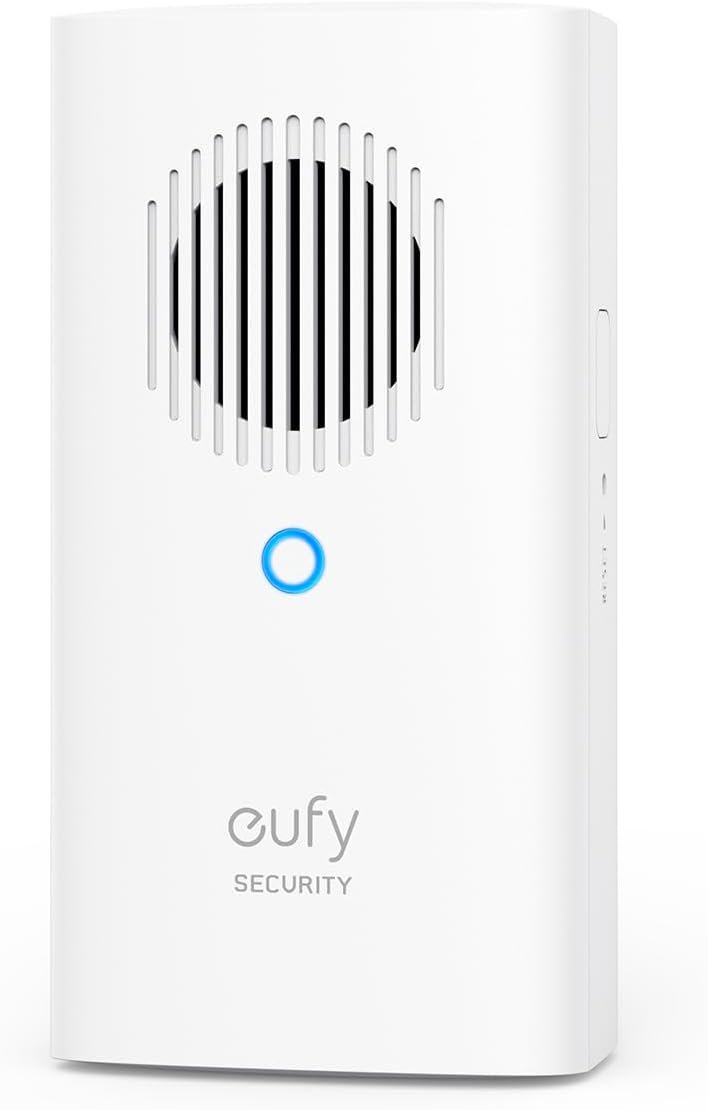
eufy Security Video Doorbell Add-On Chime, Indoor Chime, Requires eufy Security Video Doorbell E340/C30/C31, No-Delay Ring, Adjustable Volume, 8 Fun Ringtones, only works with 2.4GHz Wi-Fi
$39.99
Related Products


Product description
How does the eufy doorbell E340 pair with the chime?
Bind chime first, and then eufy doorbell E340. Alternatively, after binding eufy doorbell E340 and chime separately, connect chime at t
With which doorbell is the chime compatible?
The chime is compatible with the eufy Video Doorbell E340/C30/C31
Does the chime support 5G WiFi?
No, the chime only supports 2.4GHz WiFi.
Note:
This product only works with 2.4GHz Wi-Fi.Only works with eufy Video Doorbell E340 or eufy Smart Lock E330.
Official Accessory: Works with the Video Doorbell E340/C30/C31.
Easy to Set Up: Simply plug in, connect to your 2.4 GHz Wi-Fi network, then with just a few taps in the app you’re up and running in no time.
Never Miss a Visitor: Hear the chime throughout your home. Receive real-time notifications when someone rings the doorbell.
Custom Tones: Select from 8 chime options and set the ideal volume for your home.
Store Doorbell Footage with a microSD card: Add up to 128 GB for storing footage from your doorbell camera by adding a microSD card (not included). Video is protected even if your video doorbell is damaged or lost.
13 reviews for eufy Security Video Doorbell Add-On Chime, Indoor Chime, Requires eufy Security Video Doorbell E340/C30/C31, No-Delay Ring, Adjustable Volume, 8 Fun Ringtones, only works with 2.4GHz Wi-Fi
Add a review
$39.99
Max –
Everything works perfectly!
This chime is simply amazing! It works perfectly with the doorbell system, offers 8 ringtones to choose from, and has volume control. Setting it up is a breeze, all you need to do is connect it to Wi-Fi, and that’s it. No SD card required. A great choice, I recommend it.
Jesusfreakjan –
Privacy and good function
This is an update to an older Eufy, which was also great. We chose this brand because our videos and info aren’t stored on someone’s server. Privacy is our biggest concern. Easy to set up, both versions-wired at our house and without available wires at our daughter’s. The new wireless one has a much better battery life too! Sound and video quality is great. The bell inside is loud enough. Great value and options!
Graydon Owens –
Couldn’t use.
The product seems to be a good product but l had to return it unused. I purchased this extra speaker to use with the Eufy doorbell camera that could not connect with my Wi-Fi network. I had to return it.
vdawg –
Works well with our Eufy doorbell
This was a worthwhile add-on to our Eufy doorbell camera. I like that it can store much more video history and gives us an indoor doorbell chime. Previously we had the doorbell connected through Alexa which would chime when the doorbell was rung, but Alexa could sometimes have a slight delay, and the regular Alexa volume that we use wasn’t really loud enough for a doorbell (but it did work ok). This enhanced the chime by working more immediately and being a bit louder so it can be heard more readily throughout the living area of the house. The only nit I have is that it should offer more chime sound choices or allow uploading your own custom sound files, but it doesn’t. Fortunately, there is one “standard” ding-dong type doorbell sound we could use.
Damphir –
Worst device ever bought!
I’ve tried to connect it and everything was helpless, I have a google nest wifi system and I know about the incompatibility of the 5GHz with this devices but I’ve tried everything and I mean EVERYTHING!!!! I walked away from the router in order to get the connection of the 2.4GHz on my phone (iPhone), then I get another android phone and set a hotspot with the same SSID and password of my network, and again I couldn’t make the connection always replying that “Couldn’t connect to the network” either from the app or manually on wifi settings, I’ve tried also to connect the chime separately without a positive answer. So I’m thinking this item doesn’t work all the effort you have to do in order to complete a good sync. I’m returning it the same day I get it with the feeling of time loss and stressful negativity. I didn’t try to contact the customer service team, as I see in other clients reviews that is useless as well.My recommendation: if you have the newer mesh system like Nest WiFi or Nest Pro where you can’t switch manually from 5GHz to 2.4GHz this device it’s not for you… I’ve learned that in the hard way
ann –
My chime
Works very well. No problem easy set up
S. McCartin –
mini homebase/chime works with e340 eufy doorbell
I got the 340 last week expecting it could use my google home network as the doorbell but the feature is either not available yet (app update due by end of january) or I just couldn’t figure out how to turn it on. While I may go to a home base at some point I really didn’t want to spend the hundred fifty yet for a home base so I got this unit. It’s important to note the chimes don’t work with all the models of the doorbell so read carefully if you have other than the 340. I read one review who said she had an awful time getting it to connect, thankfully that was not my experience. I’ve installed quite a lot of this stuff in the last few years, it’s sometimes useful to set your cellphone/tablet to the same network that you want to connect your device to (old installer’s trick), I did that with my doorbell did it here too that might be why it was easy, can’t say for sure. This is a 2.4ghz device, if you’ve got a newer router that incorporates 2.4 and 5 ghz under one network name you may have problems connecting, most mesh routers have the capability to create multiple networks in the settings and you can setup a 2.4ghz network only and give it a different name, I did this long ago because I have several temperamental devices that just will not deal with a mesh setup.Assembly: The USA plug is separated from the unit, you just match up the indentations and turn right to lock it on. If you plan to use at least a class 10 micro sd card up to 128 capacity that installs in a slot on the side of the chime. As with the other eufy device I have, most of the instructions are in the app not the paper in the box. Start the eufy security app, go to the doorbell main selection and pick the mini chime you’ll be asked to scan the code box that’s on the bottom–not the back, of the chime device. Plug it into the wall press the sync button on top for a couple seconds the light on the front will go red for a few minutes. You’ll hear an audible confirmation that the chime has connected, some folks have problems with this step apparently.The chime will want to format your storage card. Right after install it sat at zero for a few minutes until I canceled it and then I got another notification of a new sd card and that time it formatted the card in a minute or two no problems. Somewhere during this step the video that might already be on your 340 doorbell is being moved to the sd card in the chime. Before I installed the chime I didn’t seem to have any access to the video on the doorbell, after the chime was installed (and it also needed a firmware update but I had to check manually to find that out I didn’t get a notification of a firmware update for the chime) I suddenly had about a dozen activations listed that let me watch the associated video which is how I know it brought it over from the doorbell because they were from earlier in the day.Chime selection: There’s a few choices, would be nice if you could record your own and use that but I’d still prefer if the google home could announce like Alexa does. It’s not clear if you can use multiple chimes per doorbell or only one, if you’ve got a larger home you might need a couple of chimes to be sure you can hear it if someone comes to the door. The doorbell can be set to send a notification to your phone if there’s motion or someone presses the doorbell button but I don’t always carry my phone around the house with me all the time. Now that the chime is installed it shouldn’t matter where in the house it’s plugged in so you could just put it in a plug near where you will be hanging out and deal with it that way. Satisfied, thirty bucks is a lot better than 150 when you aren’t certain how much you want to dedicate yourself to a new system. I don’t know if it matters or not but I use a cheap 2.4ghz only tp link router for many of my devices that I know don’t get along with my main mesh router. This way if something happens to the router provided by my IP I can swap that out without the need to reinstall every little camera and door open switch all over my house and yard. I’m very anxious to see what improvements come with the new version of the eufy app, so far satisfied with the 340 doorbell and now this chime I may get a camera or two at some point don’t really need anything at the moment.update: Apparently eufy monitors the “community” section in the app and they responded about the google home as chime issue. It’s apparently still under development for the 340 doorbell and is not currently available.NOTE: I added a home base three to my setup but didn’t immediately reinstall the doorbell and doing so apparently affected this unit acting as my chime. The doorbell still worked manually but if anyone pushed the button or activated by motion there was no chime and I wasn’t getting notifications either. It seems Eufy has some bug squashing to do with this product and their app. I had hoped that I could use the home base three as a chime in the room I spend most of my time in and still use this as an extra chime on the other side of the house but apparently the unit I need to do that is a different product that has a dongle that plugs into the back of the home base (another thirty five dollars) Oh well this just gives me a spare chime in case something should happen to my home base I suppose. So just keep in mind if you add a home base to your system it “might” knock out any setup you’ve already got going over wifi using this product.
Eugene M –
Add-on doorbell camera chime setup
Good solid product. The setup is slighltly tricky because the barcode is on the bottom of the chime. If your intended electric outlet is closer to the floor and you plugged the device into the outlet and already completed previous setup steps, now you have to unplug the chime to scan the barcode with your phone and start the setup again. They should print the barcode on the top of the device for easy scanning. Not a huge deal, just slight inconvenience. Later, after I finished the setup i realized that the barcode is also printed on the packaging box 🙂 so i actually could scan from there without unplugging. Other than that it is a nice reasonably priced addition to your doorbell camera. So far love it. Recommend!
Bisser B –
Good product – I have purchased separately w whole hours video monitoing systenm freom EUFY and the only uncomfortable i found is that … we can not hear the ring bell from basement or from bedrooms.So, this doorbell was connected to the maindevice and speaker works well.
Salvador Escandon –
El complemento ideal para el videoportero
Amazon Customer –
works well, sounds good. Needed this so that I didn’t have to always rely on my phone to know when someone was at the door. Easy to set up, nice, wide variety of options for chime sounds.
Amazon Customer –
The chime help to get us knowing the doorbell was ringing from outside. Also, allow us to put MicroSd card for storage.
terry –
Great storage and chime combovarious chime tones to choose and storage should be good for several month with SD card