
Slate Switch – Zigbee 3.0 Smart Wall Button Remote, Works with SmartThings, 8 Programmable Touch Buttons, Battery Powered, Includes Temperature Sensor
$39.00
Related Products


Product description
Snap-On Smart Control. No Wiring.

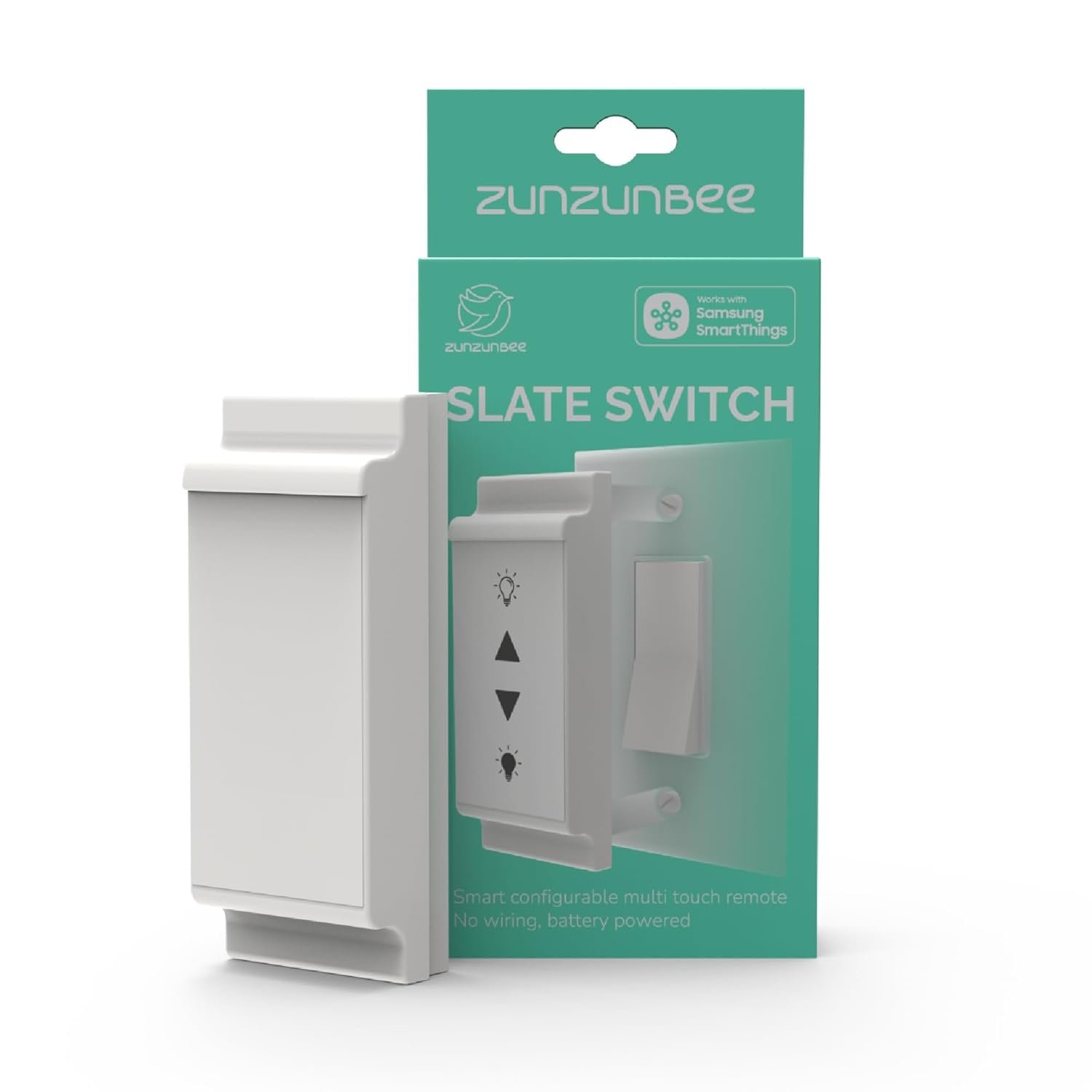
Smart Button Control Without Rewiring
Slate Switch brings the flexibility of a smart button to the wall—without rewiring, tools, or wall damage.
Simply snap it over your existing paddle or toggle switch to keep smart bulbs powered and automations working.
With up to eight programmable touch buttons, Slate Switch lets you control lights, scenes, and routines through your Zigbee smart home hub. A built-in temperature sensor adds even more automation possibilities, all powered by a long-lasting battery.

Designed to Work With Smart Homes
The Problem with Traditional Switches
Traditional wall switches cut power to smart bulbs, breaking automations and scenes every time they’re turned off.
A Simple Retrofit Solution
Slate Switch snaps over your existing wall switch, keeping smart bulbs powered while restoring physical control.
No Tools. No Rewiring. No Hassle.
Installation takes seconds and requires no electrician, no wall damage, and no changes to your existing wiring.
Keep Smart Bulbs Smart Traditional switches cut power to smart bulbs Slate Switch keeps bulbs powered and automations intact No electrician, no wall damage, installs in seconds
Key Features

Snap-On Installation
Fits paddle and toggle switches—no tools or wiring

1–8 Programmable Touch Buttons
Flexible layouts using included icon stickersProgrammable single and long press touch buttons

Zigbee 3.0 + SmartThings Certified
Reliable control through compatible Zigbee hubs (SmartThings, Homey Pro, Home Assistant)

Built-In Temperature Sensor + Local control
Enable comfort and energy-saving automationsLocal Zigbee control for enhanced security
Set Up in Four Simple Steps

Apply Icon Stickers
Choose and apply the included icon stickers to match your routines and devices.

Assign Button Actions
Press the mode button on the rear side to enter assign button mode.While holding the mode button, press the touch surface to map each button to scenes or routines.

Pair with Your Hub
Connect Slate Switch to your Zigbee hub. Follow instructions of your respective hub eco system (SmartThings, Homey or Home Assistant) to enroll Slate Switch.Tap the touch surface of the Slate Switch to trigger enrollment mode.

Snap It On
Attach Slate Switch over your existing paddle or toggle switch—no tools or wiring required.
Smart Button for Scenes & Automations – Use Slate Switch as a Zigbee smart button to trigger lights, locks, scenes, and routines through your smart home hub. Ideal for replacing app and voice control with simple button presses.
Works With SmartThings (WWST Certified) – Officially certified to work with SmartThings hubs for reliable, secure Zigbee automation. REQUIRES ZIGBEE HUB – Compatible with Homey Pro, and Home Assistant (ZHA via Zigbee hubs such as Home Assistant ZBT-2). Slate Switch DOES NOT control devices directly.
Snap-On Wall Button — No Wiring – Magnetically snaps over existing paddle or toggle wall plate screws. No tools, no electrician, no wall damage. Keeps smart bulbs powered and automations working.
Up to 8 Programmable Touch Buttons – Assign single-tap, double-tap, or long-press actions for multiple devices, scenes, or routines — all from one compact wall-mounted smart button.
Built-In Temperature Sensor & Battery Powered – Includes ambient temperature sensing for comfort automations and runs on a pre-installed CR2450 battery (no wiring required).
6 reviews for Slate Switch – Zigbee 3.0 Smart Wall Button Remote, Works with SmartThings, 8 Programmable Touch Buttons, Battery Powered, Includes Temperature Sensor
Add a review
$39.00
Tim –
Works great in HA via Zigbee2MQTT
I use this with Home Assistant via Zigbee2MQTT. At first, it showed up but wasn’t fully recognized. I found out my Z2M was out of date, so I updated that and now it works perfectly. It’s fully recognized and can have up to 8 buttons. You can configure WHERE on the surface the buttons are, so if you don’t need 8, you can put them wherever you want.It does report both short and long presses on each button, but it can only report one button at a time.One possible downside – it makes a soft beep every time you push a button. It’s not loud, and it does confirm you hit the right spot, but it can be annoying after a while as well.The mounting is a mixed bag. It’ll magnetically stick over a normal or paddle type light switch. You can also stick it anywhere else magnetically (fridge, metal door, etc). However, on a light switch it does stick out and isn’t the most attractive thing. Especially on a toggle type switch, where you have to add a spacer to it (which is included), but that makes it stick out further and the spacer is not flush around the edges with the switch, which seems odd.But if you want 8 buttons in one location, this is a super convenient device to do that.
Riya –
Reliable and flexible remote
Love the flexibility this remote offers. I have Hue bulbs along with an outdated smartthings station hub. The hub is synced to my Echo so most often I use Alexa to call out routines. Since Echo supports Zigbee, I initially enrolled to Alexa. But it shows up only as a temperature sensor. So I had to re-enroll to the smartthings hub.Setting the buttons was fairly simple. The flexibility to program buttons anywhere on the switch is amazing. I am using it as a remote to control kitchen downlights. So far not missed a button press, so seems very reliable in terms of connectivity.
Josh358 –
Capable Zigbee switch
OK, let me get this off my chest right away. I see some people giving this poor reviews because it didn’t work with their hubs. The web page states quite clearly what it works with. If you owned a Toyota and bought a part for a Citroen and it didn’t work, would you give the part a one star review? That’s just plain unfair to the seller and manufacturer.That said, one of the things that’s missing from a lot of smart home setups is the good, old-fashioned lightswitch. There are times when it’s just more convenient to hit a switch when entering the room than to issue a command. For that reason, I’ve always installed switches and it can be hard to find suitable ones. This fits the bill, and is quite versatile because you can program eight buttons to control multiple devices or scenes.It has a nice, easy to install arrangement. The switch itself has magnets on the back, and it can optionally fit into an adapter that also has magnets and can fit over an existing switch, either bat handle or Decora style. That has three advantages — ease of installation, the ability to get to the old switch if you need to cut off power (which you may have to do repeatedly to sync a Zigbee bulb), and the ability to remove the switch and use it as a remote.It comes with a plethora of stick-on labels that you can use to label the switches depending on how you assign them in software and each switch can be short or long pressed, giving you even more options. Power is supplied by a lithium cell, which is an advantage since you don’t have to wire it in/don’t need a neutral as you do for some built-ins.A note on Zigbee — it requires a hub, but it prevents WiFi congestion and is really a better way to control small devices like lightbulbs than WiFi.OK, so the downsides and suggestions. First of all, I don’t really like the look. It isn’t as wide as the switch plate, and it sticks out–see the photos. If you want to remove the old switch, you can just put a blank metal switch plate there and stick the switch on without the adapter for a somewhat cleaner look. But it should really match the profile of a standard switch plate.There are, as I said, a bunch of handy press-on labels, but it would be more versatile if you could print your own. I imagine you could do so with some adhesive film designed for an inkjet or laser printer.There’s no provision for mounting in a location that doesn’t have a switch, which is puzzling since that’s one of the big advantages of a Zigbee switch, being able to mount a switch where you want it. This is easy enough to get around in practice — attach a piece of ferromagnetic metal to the wall and the switch will stick magnetically to that. But it should have a provision for wall mounting.Bottom line, I don’t think this checks all the boxes, but its advantages — notably, the ability to program as many as eight switches — mean that it will be the go-to choice in the appropriate situation. If they improved the cosmetics, it would be an easy 5 stars.
customer –
Nice multi-button device
A clever use of magnets to snap over wall plate screws. I randomly tested over different rocker switches and they snap fairly well. Just had this over 2 days and enrolled in my ZBT-2 Home Assistant. I can see it has a temperature sensor and identify feature as well. Hitting the identify button on HA dashboard I can hear short “beeps”, but I doubt anyone can hear it more than 10ft away. I like this device for its multi button support more than anything else. Pretty cool feature that you can change icons and even locations on the touchscreen.
Mustang_Nismo –
Good in theory
Conceptually this is a nice product. The slate surface can be in theory. Partitioned to operate as a multi-switch. But coming down to practicality I was not able to get all the partitions to work and while set up not all sections were detected. It also does not help that there is no haptic feedback when you press the slate. It’s hard to tell whether you did not end up touching it, or whether you touched it and there was a delay in actioning or whether that command was not registered. All in all it can be frustrating to use
Amazon Customer –
Not supported by Home Assistant
Lovely concept. Not supported by Home Assistant. Also, the auto-discovery of exposed parameters doesn’t seem to be complete, so even more work to create an external definition. There are other buttons, so I’m returning this rather than fighting it.