
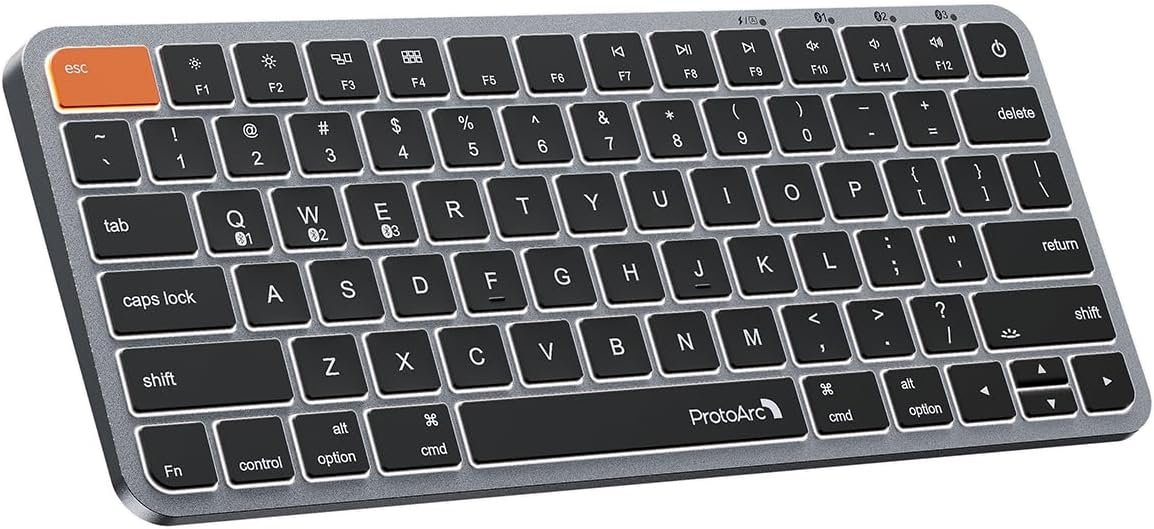
ProtoArc Bluetooth Keyboard for iPad, K90-A Backlit Compact Wireless Keyboard for Mac, Multi-Device, Low Profile, Rechargeable, Compatible with MacBook Pro/Air/Neo, iMac, Not for Windows – Space Gray
$44.99
Related Products



Product description
Bluetooth Wireless Keyboard for Mac Professionals
The video showcases the product in use.The video guides you through product setup.The video compares multiple products.The video shows the product being unpacked. ProtoArc K90-A Backlit Bluetooth Mac Keyboard Merchant Video
Are you searching for the perfect keyboard to pair with your iPad? Meet the K90-A wireless keyboard for iPad designed to supercharge your productivity. Compatible with iPad, iPad Air, and iPad Pro, the K90-A effortlessly transforms your tablet into a powerful alternative to a traditional MacBook Neo
The Ultimate Alternative to Magic Keyboard without Touch ID


 Compact 78-key Layout (no number pad)
Ideal for small desks, travel, or minimalist setup. Not a full-size keyboard
If you’ve ever had trouble typing in low light or want to add a stylish touch to your desk, ProtoArc K90-A backlit keyboard for Mac is the perfect solution. By eliminating the numpad, this space-saving design lets you position your mouse closer to your body and making your workspace more efficient
Seamlessly Switch between 3 Devices for Ultimate Productivity


A compact bluetooth keyboard helps reduce desk clutter, allowing you to type faster and more comfortably. Note: ProtoArc K90-A Keyboard is designed primarily for macOS and may not be fully compatible with Windows. The media keys and function keys don’t work on Windows
Discover the ProtoArc Compact Keyboard without Numeric Keypad
 No Touch ID
Due to original proprietary hardware restrictions, it does not include a Touch ID sensorAfter Mac shutdown, Enable “Unlock with A-pple Watch” in macOS settings → skip passwords entirely

 Certified Sustainability, Trusted Excellence
Designed for Wellness, Built for Mac, Certified for Earth
ProtoArc K90-A bluetooth keyboard for iPad is perfect for work, general tasks, and everyday use. However, gaming is not recommended
ProtoArc Backlit Mac Models
Add to Cart
Add to Cart
Add to Cart
Add to Cart
Customer Reviews
4.5 out of 5 stars 345
4.5 out of 5 stars 201
4.6 out of 5 stars 107
4.2 out of 5 stars 107
4.4 out of 5 stars 1,713
4.5 out of 5 stars 134
Price
$44.99$44.99
$69.99$69.99
—
$69.99$69.99
$59.99$59.99
$59.99$59.99
Version
Entry Level
Flagship Model
Mid-Range Model
Flagship Model
Mid-Range Model
Entry Level
Material
Metallic
Aluminum
Plastic
Aluminum
Plastic
Metallic
Connection Type
3 * Bluetooth 5.1
3 * Bluetooth 5.1
3 * Bluetooth 5.1
3 * Bluetooth 5.1
3 * Bluetooth 5.1
3 * Bluetooth 5.1
Operating System
Mac OS X 10.12 and above
Mac OS X 10.12 and above
Mac OS X 10.12 and above
Mac OS X 10.12 and above
Mac OS X 10.12 and above
Mac OS X 10.12 and above
Compatible Devices
MacBook Pro/Air, iMac, iPad
MacBook Pro/Air, iMac, iPad
MacBook Pro/Air, iMac, iPad
MacBook Pro/Air, iMac, iPad
MacBook Pro/Air, iMac, iPad
MacBook Pro/Air, iMac, iPad
Layout
Compact layout, no numpad
Full Size layout, with numpad
Full Size layout, with numpad
Full Size layout, with numpad
Full Size layout, with numpad
Compact layout, no numpad
Keyboard Dimensions L x W
11.2″L x 4.7″W
16.7″L x 4.4″W
16.7″L x 4.8″W
16.7″L x 4.4″W
16.7″L x 4.7″W
11.2″L x 4.7″W
Number of Keys
78
110
109
110
109
78
Backlight
✔
✔
✔
✔
✔
✔
Ergonomic Titing Feet
✘
✔
✘
✘
✘
✘
Numeric Keypad
✘
✔
✔
✔
✔
✘
Windows Compatible
✘
✘
✘
✘
✘
✘
The keyboard cannot connect to your device
1.Ensure that the keyboard is fully charged.
2.Confirm that the keyboard is in the correct mode.
3.Delete the keyboard’s Bluetooth pairing from your device’s Bluetooth listing.
4.Repair the keyboard with your device.
Some keyboard keys do not work / Keyboard keys have typing delay / Keyboard keys repeat typing:
1. Ensure that the keyboard is fully charged.
2. Delete the keyboard’s Bluetooth connection from your computer’s Bluetooth connection history. After deleting the Bluetooth connection, restart your computer.
3. Re-pair the keyboard with your computer
Is K90-A Bluetooth Keyboard compatible with Windows PCs?
No. This K90-A keyboard is designed exclusively for macOS 10.12 and above, iPadOS 13.0, and iOS 13.0 and above. Device manufactured before 2013 or running macOS versions below 10.12 are not supported. It does not support Windows, Android, or Linux
On macOS, why do the keyboard keys 7, 8, 9, U, I, O, J, K, or the number keys (0-9) on the keypad, stop responding?
Because the “Mouse Keys” feature is enabled, to disable this feature on MacBook, iMac, and Mac Mini, follow these steps:
○ Go to Settings > Accessibility > Pointer Control > Mouse Keys.
○ Toggle the Mouse Keys switch to the off position.
After the device restart that required login, the keyboard wouldn’t reconnect?
The reason is FileVault On Mac. To disable FileVault:
1. Go to System Settings/System Preferences 2. Click Privacy & Security 3. Click FileVault 4. Click the lock icon in the bottom left and enter your password. 5. Click Turn Off Encryption
How to Use Multimedia or F1-F12 function?
The Bluetooth keyboard comes preconfigured with multimedia functions. The F1-F12 functions need to be activated by pressing Fn + F1-F12 keys. Or you can set the keyboard to the F1-F12 functions by default on your Mac
How long does it take for the keyboard backlight to automatically turn off if not in use?
If the keyboard is not in use for 2 minutes, the backlight will automatically turn off and can be awakened by pressing any key.
Does the keyboard come with a USB receiver or bluetooth adapter?
No. The keyboard connects only via Bluetooth — no dongle, no port clogging. lt’s designed for the clean wireless experience mac users expect
Can i connect and switch between multiple devices with the keyboard?
Yes. The keyboard offers 3 bluetooth channels and supports bluetooth 5.1 version or above. Using our keyboard for multiple devices helps declutter your workspace by eliminating the need for separate peripherals for each device.
How to know if the keyboard is at low battery?
When the battery is low, the low battery indicator light will start flashing in red until the keyboard is turned off. Low battery power can cause performance issues such as response delay and keys sticking
Mac Only, Not for Windows/PC: Small keyboard without numeric keypad features a compact layout designed for precise functionality without compromising on portability. Compatible with Mac OS 10.12 or later, iOS & iPadOS(13.0 or above), for MacBook Pro, MacBook Air, MacBook Neo, iPad, or iPhone. Note: Device manufactured before 2013 or running macOS versions below 10.12 are not supported. Not compatible with Linux, Windows, or the Windows installed on Mac hardware
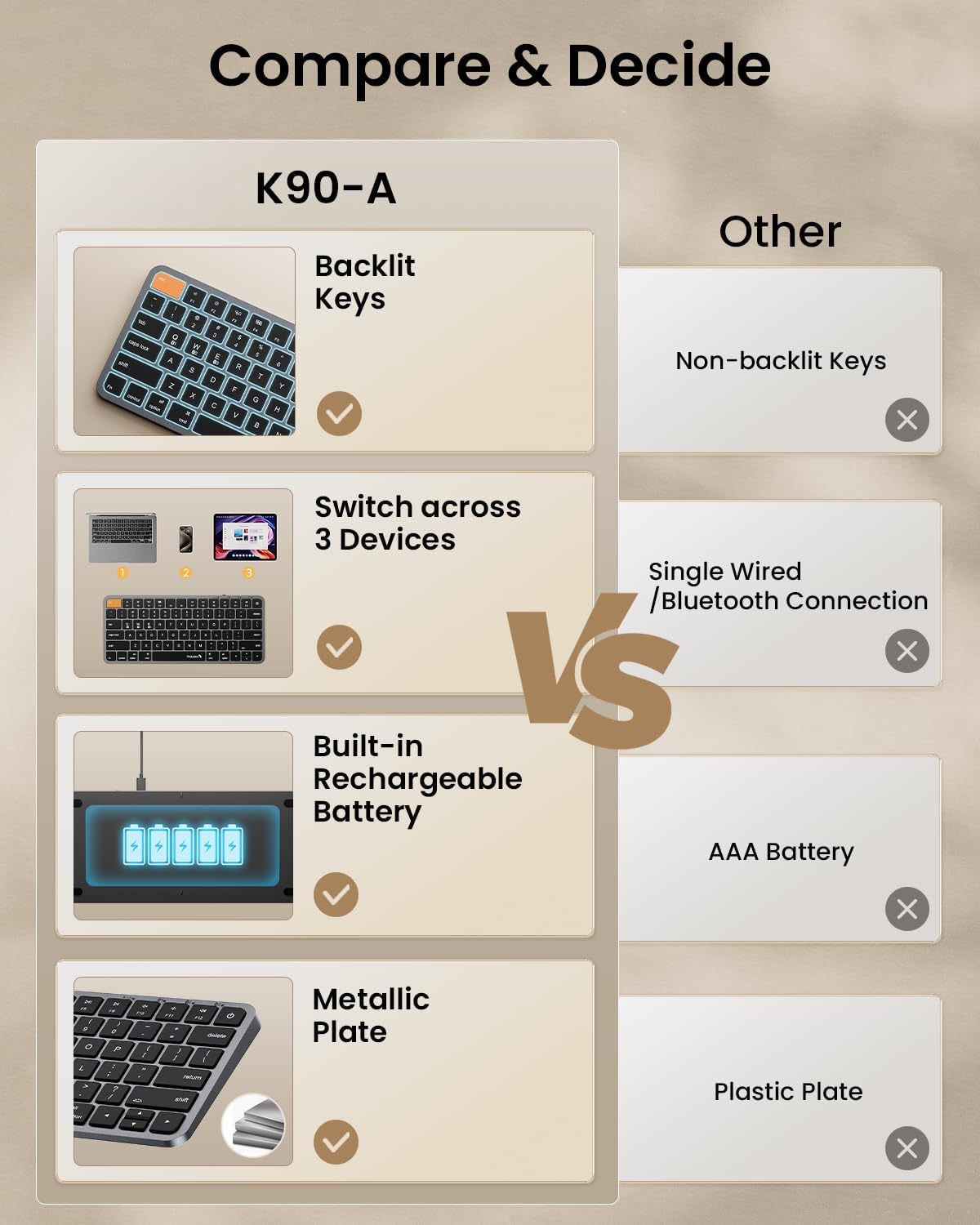
Designed Specifically for Mac: Featuring backlit Mac keys and a sleek metallic plate, the K90-A bluetooth keyboard offers seamless multi-device connectivity and convenient USB-C charging – making it the perfect match for your Mac setup
Customizable Backlighting: Customize your typing experience with ProtoArc backlit wireless keyboard for Mac, offering three soft white LED brightness levels for reduced eye strain in any environment
Seamless Multi-Device Connectivity: Bluetooth only, connect up to 3 devices effortlessly with our wireless bluetooth keyboard’s 3 bluetooth channels. Conveniently switch between devices using the mode switch button, with connection established via Bluetooth (no USB dongle required). Note: This device is not a wired keyboard. The accompanying cable is intended solely for charging purposes
Bigger Command Key: No more mis-hits. Unlike most other keyboards, We made both Command keys noticeably wider – perfect for copy, paste, and app switching. The Cmd key sits right where your thumb naturally rests, and the larger size makes it easy to hold down while pressing another key
Sleek Design, Responsive Typing: Featuring a sleek design that seamlessly complements your mac setup, wireless keyboard for iPad provides a remarkable typing experience, thanks to its low-profile scissor mechanism keys offering tactile feedback for fast and accurate input
Rechargeable and Eco-Friendly: Features a built-in 1200mAh rechargeable battery, entering sleep mode after 60 minutes of inactivity to conserve energy. Easily awaken the keyboard with any key press, with manual reactivation needed for backlighting. Note: The charging cable is in the upper right corner of the compartment inside the box
Small Size, No Numpad: If you travel, need a lightweight keyboard for bag/café/dorm, choose this K90-A small compact keyboard for Mac (78 keys). As a bluetooth keyboard for iPad, it delivers a space-saving solution without sacrificing performance – perfect for those who value efficiency in a smaller form
Need a full-size keyboard? Search K110-A for our 110-key desktop keyboard with numpad (not for travel)
13 reviews for ProtoArc Bluetooth Keyboard for iPad, K90-A Backlit Compact Wireless Keyboard for Mac, Multi-Device, Low Profile, Rechargeable, Compatible with MacBook Pro/Air/Neo, iMac, Not for Windows – Space Gray
Add a review
$44.99
tt –
Ashley –
Jason A. Adams –
Devin –
Stuart –
Marcus Grode –
Waseem S –
Alayna Smith –
FcoGZam –
Marni BAHons –
Jaglale Jerome –
Umer –
aakin –