
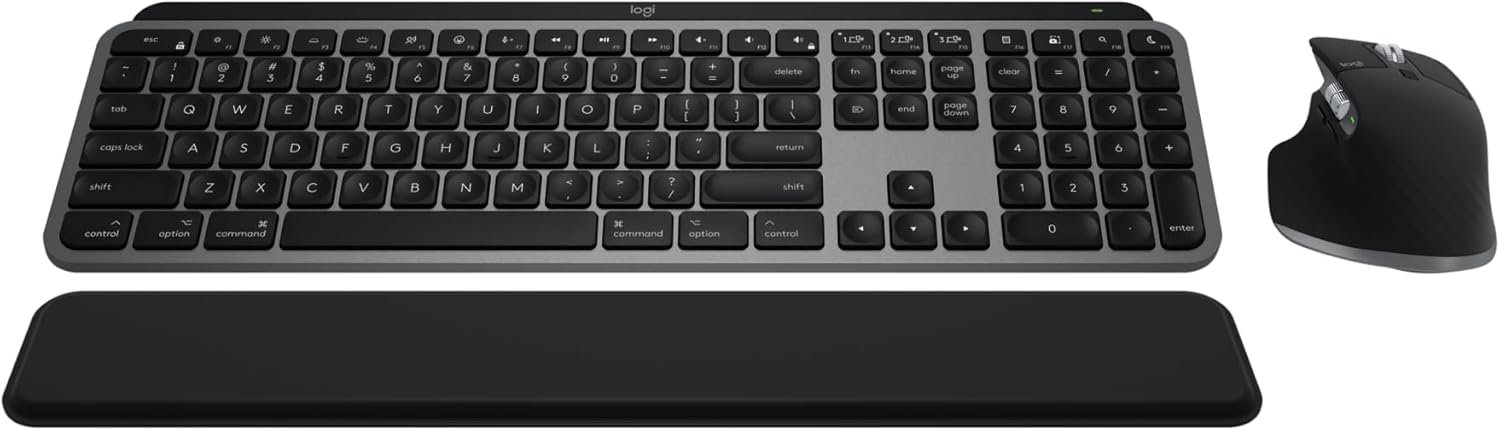
Logitech MX Keys S Combo for Mac, Wireless Keyboard and Mouse with Palm Rest, Backlit Keyboard, Fast Scroll Wireless Mouse, Bluetooth USB C for MacBook Pro, MacBook Air, iMac, iPad – Space Grey
$199.99
Related Products


Master your flow with the Logitech MX Keys S Combo for Mac, the ultimate keyboard and mouse combo optimized for macOS and iPadOS (6) with a dedicated Mac key layout, programmable functions for macOS via Logi Options+ (1), and matching Space Gray finishes that blend perfectly with your Apple setup. Wireless keyboard and mouse combines the power of the fluid, fast precision typing of MX Keys S for Mac with the precise, fast scrolling experience of MX Master 3S for Mac mouse. Product Details MX Keys S for Mac: Weight: 810 g Dimensions : 20.5 x 430.2 x 131.63 mm Rechargeable Li-Po (1500 mAh) battery Optional Customization app(1): Logi Options+ Important: FileVault might be enabled on your macOS computer, which could prevent you from entering your password at start or reboot when connected to Bluetooth. In this case, use the Logi Bolt USB Receiver (not included). MX Master 3S for Mac: Weight: 141 g Dimensions: 51 x 84.3 x 124.9 mm Rechargeable Li-Po (500 mAh) battery Sensor technology: Darkfield high precision Buttons: 7 buttons (Left/Right-click, Back/Forward, App-Switch, Wheel mode-shift, Middle click), Scroll Wheel, Thumbwheel, Gesture button Optional Customization app(1): Logi Options+ Both devices are compatible with macOS, iPadOS operating systems (6) Wireless Connectivity: Bluetooth low energy Additional wireless compatibility of these devices only with Logi Bolt receivers (not included).
Mastered For Mac: With a Mac key layout, a Space Gray finish, programmable functions for macOS via Logi Options+ (1), USB C charging, the MX Keys S Combo for Mac is a perfect fit with your Apple setup
Designed For Mac: This Bluetooth keyboard and mouse combo is fully compatible with Apple MacBook Pro, MacBook Air, iMac, and iPad models
Fluid Typing Experience: Laptop-like profile with spherically dished keys shaped for your fingertips; experience fast, fluid, and precise typing on this wireless Bluetooth keyboard for Mac
Scroll 1,000 Lines Per Second: Logitech MX Master 3S wireless mouse with MagSpeed, Logitech’s fastest and most precise scroll wheel (3) with an 8K DPI sensor that tracks anywhere, even on glass (4)
Smarter Illumination: Backlit keyboard keys light up the moment your hands approach this wireless keyboard for Mac; have more control of backlighting duration and brightness on Logi Options+ (1)
More Comfort, Deeper Focus: Both wireless keyboard and mouse are engineered for hours of work; stable keyboard with an optimum angle and mouse sculpted for your hand for better wrist posture
Connect To Multiple Apple Devices: Pair Logitech MX Keys S Combo for Mac with up to 3 Mac computers and iPads (6) via Bluetooth Low Energy and switch between them seamlessly at the push of a button
Made With Recycled Plastic: Plastic parts in MX Keys S Combo for Mac include certified post-consumer recycled plastic; 27% for MX Master 3S for Mac and 26% for MX Keys S for Mac (8)
10 reviews for Logitech MX Keys S Combo for Mac, Wireless Keyboard and Mouse with Palm Rest, Backlit Keyboard, Fast Scroll Wireless Mouse, Bluetooth USB C for MacBook Pro, MacBook Air, iMac, iPad – Space Grey
Add a review
$199.99
FlyCoolChick –
The Ultimate Mac Companion…Smooth & Sleek
I recently upgraded to the Logitech MX Keys S Combo for Mac and I can confidently say it’s one of the best purchases I’ve made for my Apple setup.First off, the design is sleek and professional & blends well with my other gear. The keyboard has a solid, premium feel with just the right amount of key travel. Typing is smooth, quiet, and incredibly satisfying. The smart backlighting is a nice touch and adjusts automatically based on the lighting in the room, which feels high-end and intuitive.The mouse is equally impressive, ergonomic, fast-scrolling and very precise. I love that it can switch between scroll modes with a single click and glides effortlessly across my desk. The palm rest included in the combo is surprisingly comfortable and adds a touch of luxury to the setup.Setup was seamless with my Mac Mini. It paired via Bluetooth in seconds, and I appreciate the USB-C charging; no more dongles or random cables. Battery life has been excellent so far, and I haven’t had to recharge either device yet despite daily use.If you’re looking for a professional-grade keyboard and mouse combo that feels made for the Mac environment, this is it. It’s well worth the investment for comfort, performance, and aesthetics.
Ravi –
Great Build Quality, Smooth Feel, Extensive Features, and Amazing Price
Magic Keyboard and Then SomeWhat impressed me the most was how feature rich the keyboard and mouse are. It was designed to work with Mac so the keys, layout, and functions are very similar to the Apple magic keyboard so you can use the same keyboard shortcuts that you use on an Apple keyboard with MacOS. But in addition to this there are several other features. You can modify the keys using the Logi app to do automations or remap the keys to perform custom shortcuts. Also if you want the keys to behave differently for different applications, you can set a custom profile for each application so that the keys and shortcuts are unique to your use case in an application. Similarly with the mouse you can use preset profiles or create custom profiles based on what application you are using. The mouse and keyboard will seamlessly switch the settings based on what application is active. The Logi app is very neat and walks you through all the features and configurations for your devices. This is pretty much a magic keyboard with way more features, has backlighting, and is cheaper. Just the Magic Keyboard is $200 but you can get this Logitech combo that has keyboard, mouse, and palm rest for less than that which is pretty incredible. Really the only thing that the Magic Keyboard has over this is the touch ID.Overall:This keyboard is pretty amazing. First of all, the build quality is very nice. The finish on the keyboard feels very premium and it also has a good weight to it. It pretty much feels like it is a genuine Apple product. The typing is comparable to the magic keyboard as well as the quiet noise. The mouse also feels very ergonomic and precise. The scrolling and clicking is also very smooth and quiet. The keyboard and mouse connect via bluetooth which I was skeptical of at first since I always used a wireless dongle receiver but the bluetooth works amazing. There is no latency and it pairs very fast to my Mac.
Craig –
pretty darn great (and a hidden mouse button, too)
This is a major upgrade to the standard iMac chiclet-style keyboard (and the mouse is outstanding as well – why doesn’t everything come with two scroll wheels?). The keys are quiet and responsive, and the concave shape makes for increased accuracy versus the Apple offering. The palm rest isn’t worth much of anything, but I suppose it’s better than nothing. The mouse has a hidden tactile button down in the thumb “tray” which you can bind to whatever you want with the legitimately outstanding Logi Options+ software you can get straight from Logitech’s website. I couldn’t be happier with this… good value, great built quality, super functional, and aesthetically pleasing.
Vision Skyworks –
Best Keyboard and Mouse Combo for Mac Users
I’ve been using the Logitech MX Keys S Combo for Mac for a few weeks now, and I’m honestly impressed. The keyboard feels premium—typing is super smooth, quiet, and just satisfying overall. The backlighting is smart too—it only lights up when my hands are near, which helps conserve battery.The MX Master 3S mouse is a beast. It glides effortlessly, works on any surface (even glass), and the scroll wheel is insanely fast and accurate. Plus, being able to switch between my Mac Studio and iPad with a single button is a huge bonus for my workflow.Battery life has been excellent so far, and the whole setup just feels like it was made to complement Apple devices. It’s not cheap, but if you spend a lot of time at your desk, it’s absolutely worth it.
Markos A. Berndt –
A surprising shift in my creative workflow
To be honest, this combo wasn’t quite what I was expecting when I first opened the box. The keyboard itself is fantastic while the build quality is remarkably solid and typing out stories and doing deep-dive research feels significantly better than on the built-in laptop keyboard.The mouse did take some getting used to. I’ve lived on the Apple Trackpad for years, so it felt a bit less fluid at first, but after a short adjustment period, it’s become second nature.Actually, these two things combined were the nudge I needed to move my MacBook Pro into clamshell mode. Whether I’m editing in Lightroom and Photoshop or just grinding through writing my next story, I’ve found myself noticeably more productive since making the switch. It’s a setup that really grows on you once you settle into the rhythm.
Treeline Visuals | Jesse Holland –
Picked this up for my office and it’s been great so far. The keyboard has a good weight to it and just feels well made. The keys press super smooth and there’s no lag at all. Bluetooth connection was quick and easy.The mouse fits perfectly in my hand and feels really natural to use. Super comfy for long days. Honestly just a solid setup all around. Happy with it!
MHOman –
Great set up. High quality. Tried many different mice and keyboards and these are the best yet.
Nicolle08 –
Best keyboard and mouse. Works perfectly on my Mac Mini.
Vivek Korat –
this helps a lot with my wrist ligament issue. must try
Random Defence –
Once of the best keyboards, mice, and wrist rest combos. As someone who has it duel synced to a pc and Mac, having both sets of keys represented is great. The Bluetooth is quick and responsive. The one gripe, and it’s a big one, is that for some stupid reason Logitech moved the mouse pairing selector to the bottom of the mouse so you have to flip it over to switch it. Other than that, very comfortable, USB-C chargeable, and lasts a long time on a charge.