
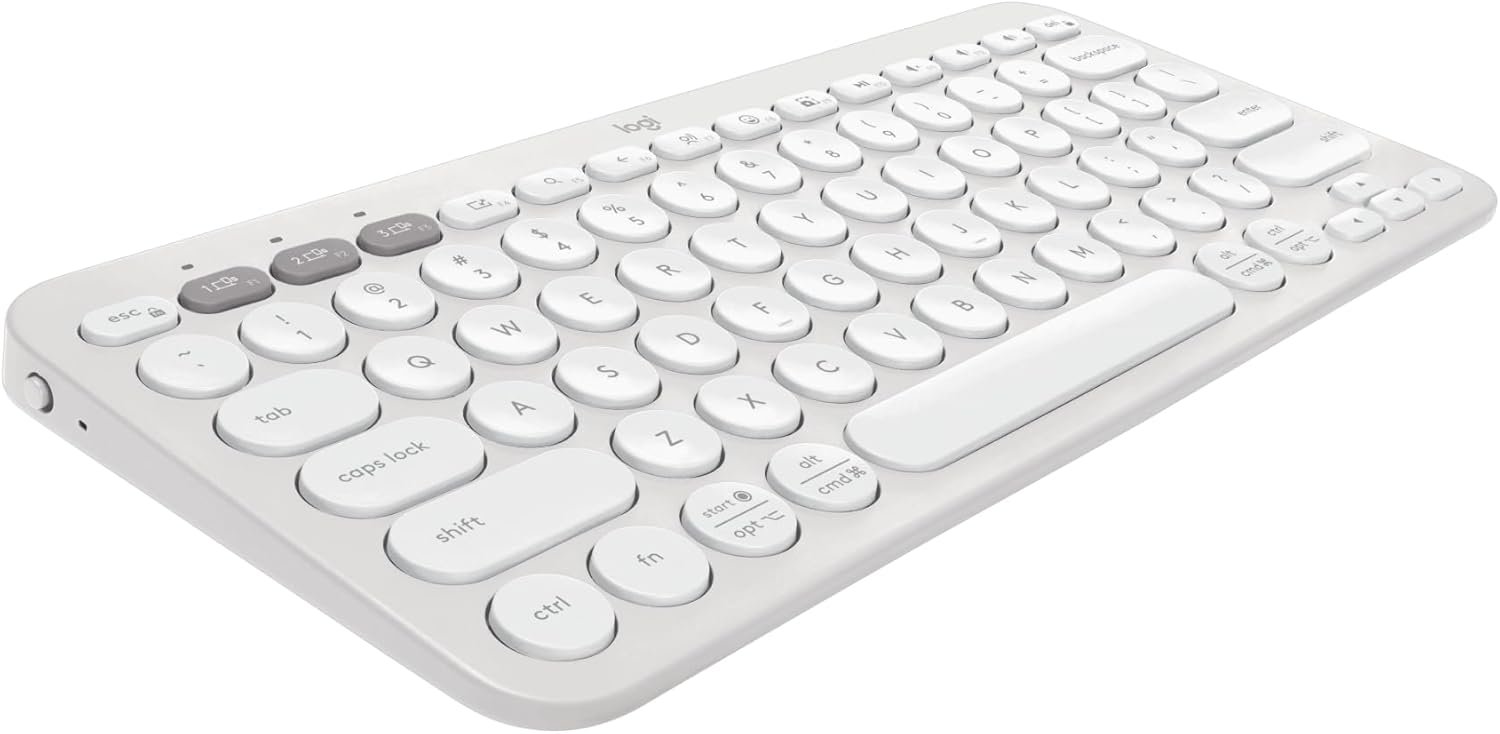
Logitech Pebble Keys 2 K380s, Multi-Device Bluetooth Wireless Keyboard with Customizable Shortcuts, Slim and Portable, Easy-Switch for Windows, macOS, iPadOS, Android, Chrome OS – Tonal White
$39.99
Related Products
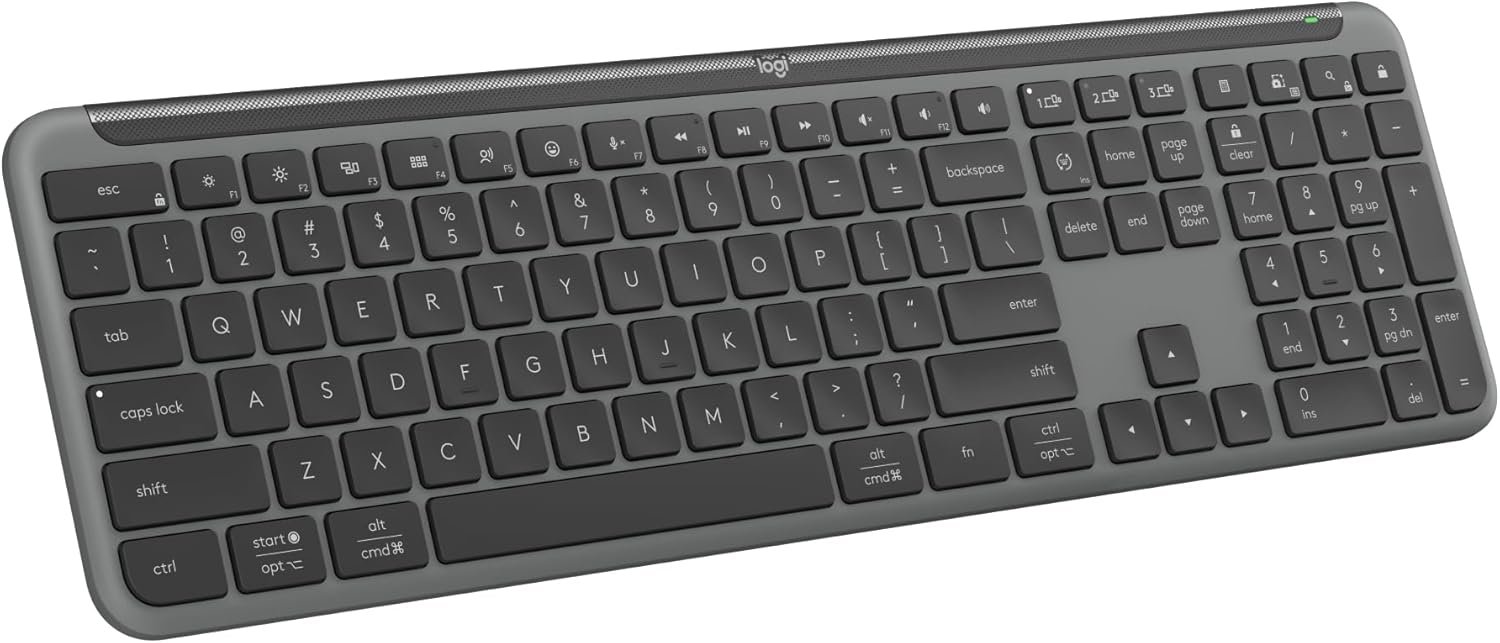


Defy Boring with the iconic Pebble Keys 2 K380s Bluetooth keyboard. The Pebble 2 collection of wireless keyboards comes in a choice of fresh colors – made with recycled plastic (1). Pick the one that suits your vibe. Its minimalist, lightweight, streamlined shape and sleek curves make it as iconic as you and super portable to take it wherever you go. Easily switch between up to 3 wireless devices across OSs (Windows, macOS, iPadOS, iOS, ChromeOS, Android) with a press of the Easy-Switch buttons. The wireless keyboard also features Fn shortcut keys such as screen capture, search, voice dictation and the emoji menu to free up your time. You can customize these 10 Fn shortcut keys to do everyday actions like opening your favorite applications instantly, assigning keyboard shortcuts (copy/paste) and much more with Logi Options+ app (2). Welcome to the comfort zone. The Pebble Keys 2 K380s Keyboard offers comfy and precise typing with scooped, low-profile keys for a familiar and quiet, laptop-like typing experience. This wireless Bluetooth keyboard gives you hours of use with a 3-year battery (3), auto-sleep power-saving mode and 50% more battery life (4) to keep you going for longer. Batteries included.
Defy Boring: With a slim design, multiple colors and smarter tech, this Bluetooth keyboard from the Pebble 2 Collection lets you express your vibe and make your statement
Never Made Ordinary, Made to go places: the Pebble Keys 2 K380s keyboard is slim, compact, portable and made with recycled plastic (1)
Easily Hop Across 3 Devices: Use Bluetooth to connect up to 3 wireless devices across OSs (Windows, macOS, iPadOS, ChromeOS), and switch between them with one click of the Easy-Switch buttons
Save Time: Get instant access to search, screen capture, the emoji menu and more with Fn shortcut keys; personalize the 10 Fn keys with Logi Options plus app (2) so you can do things your way
Feel-Good Typing at Your Fingertips: The Pebble Keys 2 K380s Quiet Keyboard comes with scooped round keys and a familiar, laptop-like typing experience for effortless, comfy typing
Go for Longer: This wireless keyboard gives you hours of use with a 3-year battery (3), auto-sleep power-saving mode, and 50% more battery life (4), for worry-free usage; batteries included
A Design Choice You’ll Feel Good About: Plastic parts in the Pebble Keys 2 K380s Slim Keyboard include minimum 49% certified post-consumer recycled plastic (1)
Responsibly-sourced packaging: The packaging of Pebble Keys 2 K380s (including product wrap) comes from FSC-certified forests and other controlled sources
13 reviews for Logitech Pebble Keys 2 K380s, Multi-Device Bluetooth Wireless Keyboard with Customizable Shortcuts, Slim and Portable, Easy-Switch for Windows, macOS, iPadOS, Android, Chrome OS – Tonal White
Add a review
$39.99
Yana –
Quiet, easy to use, little but the perfect size! I love It!!!
I love this keyboard. I was a bit apprehensive at first because I thought I needed my 10-key numbers but I could not be happier. It is very soft and quiet. There is no clicking and the round buttons make it easier to type and not make typing mistakes. The Bluetooth connection has never been problematic at all. The buttons do not stick. It’s worth the investment. Great quality!
Amazon Customer –
Confusion about Unifying…cleared up by Bolt.
First off, this is a nicely made keyboard and works really well with Bluetooth on Windows machines. It will work really well right after setup on Linux but after a reboot will not automatically switch in. I had a similar issue with a M720 mouse and resorted to using the Unifying Receiver that came with it. I figure I would get the same behavior with the K380s so I tried to connect it to the same Unifying Receiver. (I dual boot with Windows 11 and used the Logitech software for the attempt.) It was a NO GO. No manner of Unifying software or disabling the Bluetooth would get it to connect. I have seen conflicting info online about whether it works and I can tell you I tried to connect mine to 3 different Unifying Receivers on two different Windows 11 systems and the K380s will not connect. I have seen word that the Bolt Receivers are the way to go….I’m not convinced. Logitech Support info is sketchy on the subject and I don’t believe half the people on Reddit that insist you can connect it to a UR. The Logi Options+ software will show the mouse and keyboard but only the mouse is using the UR, the keyboard has the Bluetooth icon. The check on that is when you turn off Bluetooth in Settings the mouse keeps working and the keyboard stops. Now I have to solve the debate in my head as to whether this thing gets returned…..sigh. Amended 9/22: I solved the receiver problem. I bought an M550L from Amazon that came today. It was equipped with the Bolt Receiver. When I ran the Logi Options+ on Windows 11 looking for the K380s and it took all of 2 seconds to find it. The two work like champs in Ubuntu 24.04.01. The small size and the utility now that the receiver issue is solved makes this K380s a great addition to my complicated office environment and takes two other keyboards out of the crowded picture.
jack t. –
Great produce.
Fantastic keyboard. Had my keyboard fail on my laptop and rather than trying to fix it, I opted for this. Small, quick action on the keys and fits over my laptop keyboard easy and paired instantly. Also so light and the Pebble keys feel good when typing which I do a lot of since I am a writer.
WanJae –
It’s Not Rechargeable and That’s Fantastic
It’s small. It’s a good keyboard. It thankfully uses regular AA batteries as I am SO SICK of rechargeable devices for SO MANY reasons. I got a little optional case for it, and I’m as happy as a clam. The response time from the keyboard is nearly as fast as a wired keyboard. I will say that there’s no documention in the box explaning how the keys map to various operating system’s special functions, and finding the document on their website is a massive chore, which is disappointing for Logitech. I wish it had a little momentary LED backlight you could fire up when you need to find a rare key, but I can live without it.
Amazon Customer –
Good product but repackaged/used.
I saw this in other reviews as well, but my keyboard that was sold to me as new (when there are used options available) but was clearly repackaged after having been used to some extent. At least I saved on having to install batteries! That said, the keyboard works as advertised. Pairing was simple and typing feels good. I do wish the keys were rounded squares rather than circles but it mostly feels fine and I’m sure I’ll be completely used to it within 30 minutes of use.
Marlon Aquino Monton –
Perfect for my SNF treatment cart—quiet, compact, and connects instantly!
I’m a first-time buyer of a Bluetooth keyboard, and I needed something that could hold up on my treatment cart as I move between patient rooms in a busy SNF (Skilled Nursing Facility). I was tired of using the laptop touchpad while standing, and this keyboard has been a total game changer.The best part is how quiet the keys are. When I’re documenting in a semi-private room or during a treatment, I don’t have to worry about loud clicking disturbing anyone. It just works.I also love that I can switch between my work laptop and my personal phone instantly with the Easy-Switch dial—great for checking schedules or sending a quick message without pulling out my phone. The compact size fits perfectly on my cluttered cart, and the build feels solid enough to survive being bumped around in the hallways.If you are a therapist or nurse looking for a portable typing solution for your cart, this is it. Highly recommend
Tim Schmidt –
Perfect for travel and support for PC laptop and iPad
I wanted a keyboard that was small for traveling, had the feel of an Apple Magic keyboard, and would work with my iPad and PC. This keyboard does not disappoint. If has a nice feel, is super accurate, and is small enough to slip easily into my backpack but big enough to be a replacement of a regular size keyboard. It required no setup and easily switches between my iPad and PC very easily. So far, it has been very durable and a great value. I love it. On a side note, I’ve paired it with a Logi MX Anywhere mouse which also easily pairs with my iPad and PC laptop.
Jack Spencer –
Great quality, just 1 caveat
For its size, it works very well. Obviously because it’s so small, it will never type as well as a traditional keyboard, especially if you’re a fast touch typer. However, it’s durable and solid quality for the price. Instantly pairs with my tablet, no connection issues. Only annoying issue I had is that if you have two languages on your keyboard, pressing Shift + Space changes the language. I couldn’t figure out how to get rid of that. Every time I pressed space to start a new sentence and then the Shift key to capitalize my sentence, it would change the language unless I did it very slowly, breaking my speed of typing. Removing 1 star for that annoyance. Other than that, it’s great. I love it. Perfect to take notes on my tablet at work without lugging around my laptop.
J –
Super long battery life and easy connectivity. No delay when typing, I use it with my iPad Air and it’s the perfect size. A bit smaller than a regular keyboard so good for on the go. Amazing product
Uncle Wolfe –
Great compact design, soft key feel, customizable, blue tooth connectivity. These are the best features of the Pebble Keys. I thought I’d miss my numerical keypad, but I got used to using the top numbers quickly. It took me a few days of using it to find out that there is a power switch on the top left hand side of the keyboard, so turn it off when you’re finished using it so the batteries won’t drain. I’m not sure if it has a built in feature that automatically turns it off if it’s not used for a while. I’ve had this keyboard for a year and a half and I just recently swapped the batteries for fresh ones, and i use the keyboard every day for at least five hours. Great product.
John Talisker –
Good quality and works great. Connects easily and quickly. Only nit is that there’s no indication of caps lock which is annoying.
JonB1759 –
Easy to connect, quiet keys and very comfortable to use. A slight delay happens when typing fast on a phone or tablet, however the delay is far less problematic than mistypes without the keyboard.
Marsjey Hymn Casipit –
After looking for a wireless/Bluetooth keyboard, I stumbled across this item, and let me tell you, it didn’t disappoint. When using this keyboard, it connects almost instantly to my devices, and switching between them is seamless thanks to its multi-device pairing. The keys are quiet yet responsive, making typing comfortable.I also appreciate its compact and lightweight design–it fits in my backpack without adding a bulk, which is great for students or anyone on the go. The battery life is impressive, lasting weeks without needing to charge, and its minimalistic aesthetic blends with any setup.If you’re looking for a fast Bluetooth connectivity, portable, and long lasting keyboard, this is a great choice!