
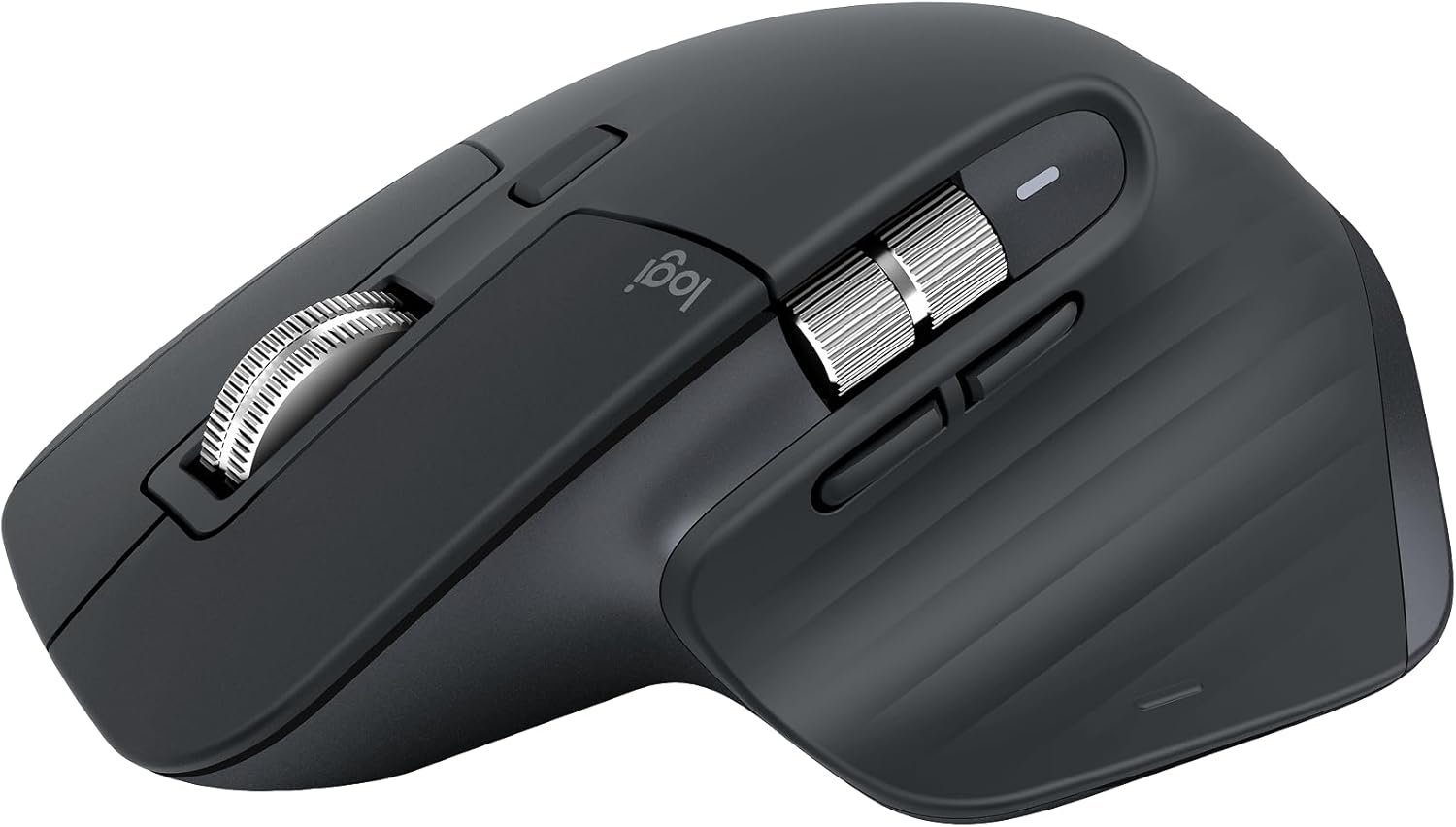
Logitech MX Master 3S Bluetooth Edition Wireless Mouse, No USB Receiver – Ultra-Fast Scrolling, Ergo, 8K DPI, Track on Glass, Quiet Clicks, Works with Apple Mac, Windows PC, Linux, Chrome – Graphite
$99.99
Related Products


Logitech MX Master 3S Performance Wireless Mouse Logitech MX Master 3S Bluetooth Edition – productivity and precision mouse. With Quiet Clicks(2) and 8K DPI any-surface tracking for more feel and performance. Product details: Weight: 4.97 oz (141 g) Dimensions: 2 x 3.3 x 4.9 in (51 x 84.3 x 124.9 mm) Compatible with Windows, macOS, Linux, Chrome OS, iPadOS, Android operating systems (8) Rechargeable Li-Po (500 mAh) battery Sensor technology: Darkfield high precision Buttons: 7 buttons (Left/Right-click, Back/Forward, App-Switch, Wheel mode-shift, Middle click), Scroll Wheel, Thumbwheel, Gesture button Wireless operating distance: 33 ft (10 m) (9) Footnotes: (1) 4 mm minimum glass thickness (2) Compared to MX Master 3, MX Master 3S has 90% less Sound Power Level left and right click, measured at 1m (3) Compared to regular Logitech mouse without an electromagnetic scroll wheel (4) Compared to Logitech Master 2S mouse with Logitech Options installed and Smooth scrolling enabled (5) Requires Logi Options+ software, available for Windows and macOS (6) Logi Bolt USB receiver not included. Not compatible with other Logi USB receivers. (7) Battery life may vary based on user and computing conditions. (8) Device basic functions will be supported without software for operating systems other than Windows and macOS (9) Wireless range may vary depending on operating environment and computer setup (10) Excludes plastic in printed wiring assembly (PWA), receiver, wire, FFC cable, and packaging.
Logitech MX Master 3S Bluetooth Edition is a Bluetooth only mouse, and does not come with any USB receiver / adapter or charging cable
8K DPI Any-surface tracking: Use MX Master 3S cordless computer mouse to work on any surface – even glass (1) – with an 8000 DPI sensor with customizable sensitivity
Quiet Clicks: MX Master 3S Bluetooth mouse with Quiet Clicks – offering the same satisfying feel but with 90% less click noise (2)
Magspeed scrolling: A computer mouse with remarkable speed, precision, and near silence – MagSpeed scrolling is 90% faster (3), 87% more precise (4), and ultra quiet.
Ergonomic design: Work comfortably with a precision mouse featuring a silhouette crafted for a more natural wrist posture and optimally placed thumb controls
Countless Customizations: Customize buttons and optimize your workflow with App specific profiles in the Logi Options+ app (5)
FLOW cross-computer control: Work seamlessly on multiple computers or laptops, and transfer text, images, and files – between Windows & macOS (5)
Multi-device and multi-OS: Connect the comfort mouse with up to 3 devices via Bluetooth (6) on Windows, macOS, Chrome OS or Linux. Logi Bolt USB receiver not included.
Plastic parts in MX Master 3S include certified post consumer recycled plastic (Graphite and Black: 27%(10).
13 reviews for Logitech MX Master 3S Bluetooth Edition Wireless Mouse, No USB Receiver – Ultra-Fast Scrolling, Ergo, 8K DPI, Track on Glass, Quiet Clicks, Works with Apple Mac, Windows PC, Linux, Chrome – Graphite
Add a review
$99.99
Ryan –
Tracks on Anything, Smooth as Butter, Great for Switching Between PCs
The MX Master 3S has been an awesome mouse. It’ll track on almost anything, it’s super smooth, and the multiple channels make it perfect for bouncing between workstations. I use it to switch from my home PC to my shop laptop, and that alone makes it worth it.The scroll wheel is top-tier—fast when you want it, controlled when you don’t. Ergonomics are great too. It fits my hand well and stays comfortable even when I’m using it for long stretches.I did have one issue where Bluetooth wouldn’t connect on my laptop, but a software/driver update fixed it, and it’s been solid since. Battery life has also been really good—more “oh yeah, I forgot it even needs charged” than “where’s that cable again?”Color looks good in person, size feels right (not tiny, not a brick), and overall it’s been a big upgrade. If you’re juggling multiple computers, this mouse makes it feel way less annoying.
Aduse –
Smooth gliding
I have used Logitech MX mouse decades now and haven’t gone back because there is just a lot to love and appreciate about these mice. The ergonomic, the smoothness, the size fitment in the hand/palm, battery life has always been great. Setup is usually seamless especially when it is a unifying capable and one has a unifying receiver. The quality has always been there even though flaws can occur in one or two out of many. Price may be a little higher as compared but it may be worth it when using the MX for heavy AutoCAD drawing and graphics. It seems to pay for the value.
rivaldealer –
Excellent mouse with great customizations via Logi Options+. But consider the newer Master 4.
It’s a great mouse but at this poingt you might as well get the MX Master 4. I own both and they are both excellent, with great battery life, quiet clicks, smooth scrolling, and tons of customization options via the Options+ software. The MX Master 4 has the thumb button which is great for activating the Actions Ring. The mouse is fine without the Options+ software, but with the software you can customize it to be exactly how you want it. I programmed mine to activate the actions ring with the middle button, and from there I can automatically switch to different computers that also have Logi Bolt USB receivers installed. Super useful and high quality mouse, it really doesn’t get much better, I’ve tried lots of mice and always go back to the Logitech devices.
Erik Hansen –
Perfect for office work
I never realized how nice a horizontal scroll wheel would be. This mouse is worth it for that reason alone if you work in excel. Plus the vertical wheel is buttery smooth and glides endlessly if you spin it fast enough. Mouse clicks are perfectly quiet while still satisfying.From an ergonomics standpoint, the mouse is well designed. It fits the shape of my hand well, and I have rather large hands. Well worth the money if you spend a meaningful amount of time on the computer for work
Baz –
Good Mouse, But Not a Game-Changer
I upgraded from the MX Master 2S expecting noticeable improvements, but honestly, I’m a bit let down. The 2S was fantastic, and this 3S doesn’t feel like much of an upgrade.My biggest frustration is the software setup. Some customization options work perfectly in Chrome but completely fail in Photoshop. It’s inconsistent and annoying when you’re trying to optimize your workflow across different programs.The mouse itself performs fine – the scrolling is smooth, it’s comfortable to hold, and the build quality is solid. But there’s nothing here that makes me think “wow, this is so much better than my old one.”If you’re coming from an older Logitech mouse, you’ll probably be happy. But if you already have a 2S, save your money. The improvements are minimal and the setup hassles aren’t worth it.Bottom line: It’s a decent mouse, just not the revolutionary upgrade I was hoping for.
DamselinDisDress –
Excellent ergonomic mouse!
This mouse took me a little bit of time to get used to as I’m more used to a lower profile mouse. However, once you get used to it, the ergonomic feel in your hand is excellent! I still haven’t gotten used to using the thumb scroll but that’s just going to come with time. It connected right away to my Mac and seems to be working absolutely fine! I really like it!
Peter C. –
be aware, no charging cable included
Overall is a good mouse, good quality!I want to give a 5 stars but for a $100 mouse doesn’t come with charging cable is crazy. even the cheaper one from Logi comes with it, literally should be part of the product.After a months of use: battery life is terrible, 2 weeks need to recharge the mouse, it randomly lost connection, I originally give 3 stars and after use i will only give 1. Luckily still made it under the return window. Return it and not recommended.
Joseph Luke –
Exceptional Mouse – Works with Bluetooth & Bolt Receiver
This is my favorite mouse ever, I’ve even bought one as a backup for when Logitech eventually decides to “improve” it and come out with an inferior device. Before I got the MX Master 3S, I’d tried multiple different mice from different vendors. The quality and consistency of those mice was always lacking. My old mouse finally died 18 years after I first started to use it and I was forced to get a new one. Luckily it was the MX Master 3S, the first new mouse I’d tried that had consistent scrolling, buttons, wasn’t too loud (clicking can get annoying), and was very responsive.The ergonomics and grip on this mouse are stellar. I like the dark matte color that this has. The management software (on Windows) allows ample configuration – I use the scroll on the side for sound. I wouldn’t say it’s the most portable mouse in the world (it’s a full-sized mouse) but if you had to you could.One final point: I’m reviewing the Bluetooth edition but can confirm that this works perfectly with the Logitech USB Bolt receiver. This is just the normal Logitech MX Master 3S, it just doesn’t include the Bolt receiver. I prefer using the Bolt since it’s ever so slightly more responsive.If you’re hesitating about a new mouse, try this.
DC –
The 3S has a softer feel and better thumb button layout than the 2S, and USB C charging is a nice upgrade from the micro USB of the older models. Like the older models this mouse is very good for longer use – possibly not for carpal tunnel issues, but your hand can rest in a relaxed, comfortable position while using this.Note that the Bluetooth model will not pair with a unifying receiver, so the connection is Bluetooth only. If you need a faster wireless connection, the standard 3S is a better choice. Otherwise, if this fits your hand, I highly recommend it.It may not be ideal for twitch gaming, but it’s a fantastic everyday/productivity mouse.
Brent Dar –
The new 4S is too easy to trigger the thumb button and I just couldn’t adapt to it. I bought this mouse which can do almost everything as far as action menu launch from thumb button etc. as the 4 can but with way less accidental activations of the action menu. Plus the 4S is so quiet if I bump something and trigger a click I didn’t even know it and left a mess sometimes. I prefer to hear the click and this mouse allows me to hear the click.
Vincent M. –
awesome
G –
I don’t know if the material could easily take damage when I travel, because the mouse is quite light compared to my previous one (much older, but same brand I believe), but my hand quickly adapted to its shape, it connects properly to bluetooth or such, and is pretty much plug and enjoy using. Sole negative comment, maybe : with the previous one (a relative’s), it seemed like it always had energy in store, so didn’t need to change batteries or almost. Here, I found I had to plug it relatively early to recharge it, but even leaving it plugged for an hour or so will have it function for a while if for some reason you need it quickly. It’s not extremely cheap, but I’m rather satisfied of this purchase. Some other products could cost a lot more and the field of electronics, and leave people much less satisfied. Logitech MX Master 3S is a positive and safe bet to me. Also, read on the properties or details of the mouse you’ll buy. There is at least another Logitech MX Master that is more “Gucci”, in theory, but the one I chose fulfills my needs more, so the price can indicate the another product has more options and is more recent, but knowing what you buy is the best way to be satisfied with your choice. My experience with Logitech so far is positive enough to want to purchase from them again in the future. 🙂
Joletta –
Arrived on time, so far so good