
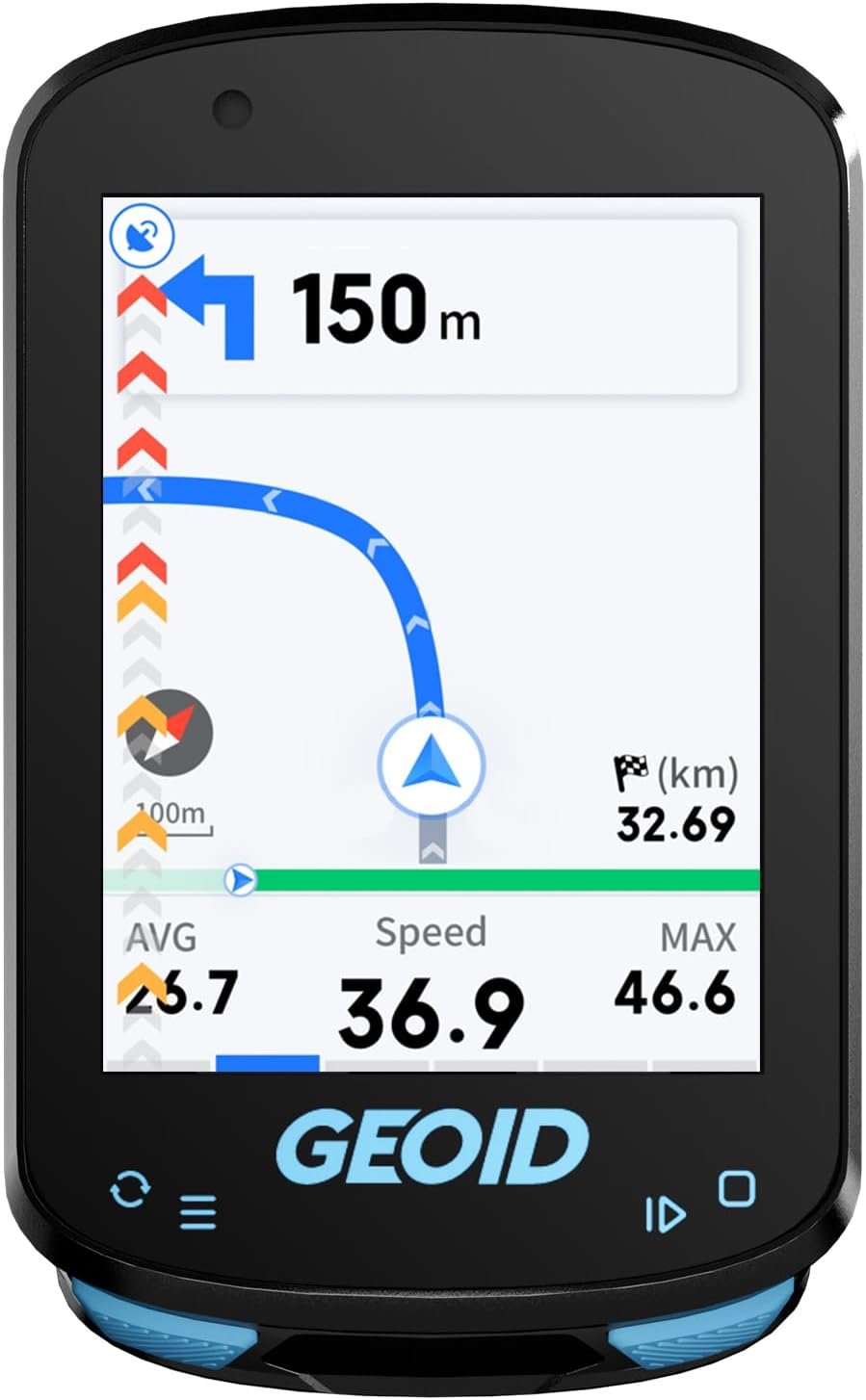
GEOID CC600 Color Screen Bike/Cycling Computer Wireless – Route Navigation with Reroute Planing, WiFi & Bluetooth, Fast 5s GPS Positioning, Free Indoor Training
$49.99
Related Products




Product description
The video showcases the product in use.The video guides you through product setup.The video compares multiple products.The video shows the product being unpacked. CC600 Color Screen Bike/Cycling Computer Wireless Merchant Video


1 Wide Compatibility
2 Portable Data Export
3 Faster Transfer Speed
4 Global Interface Design
5 Training Mode


1 Extensive Data Options
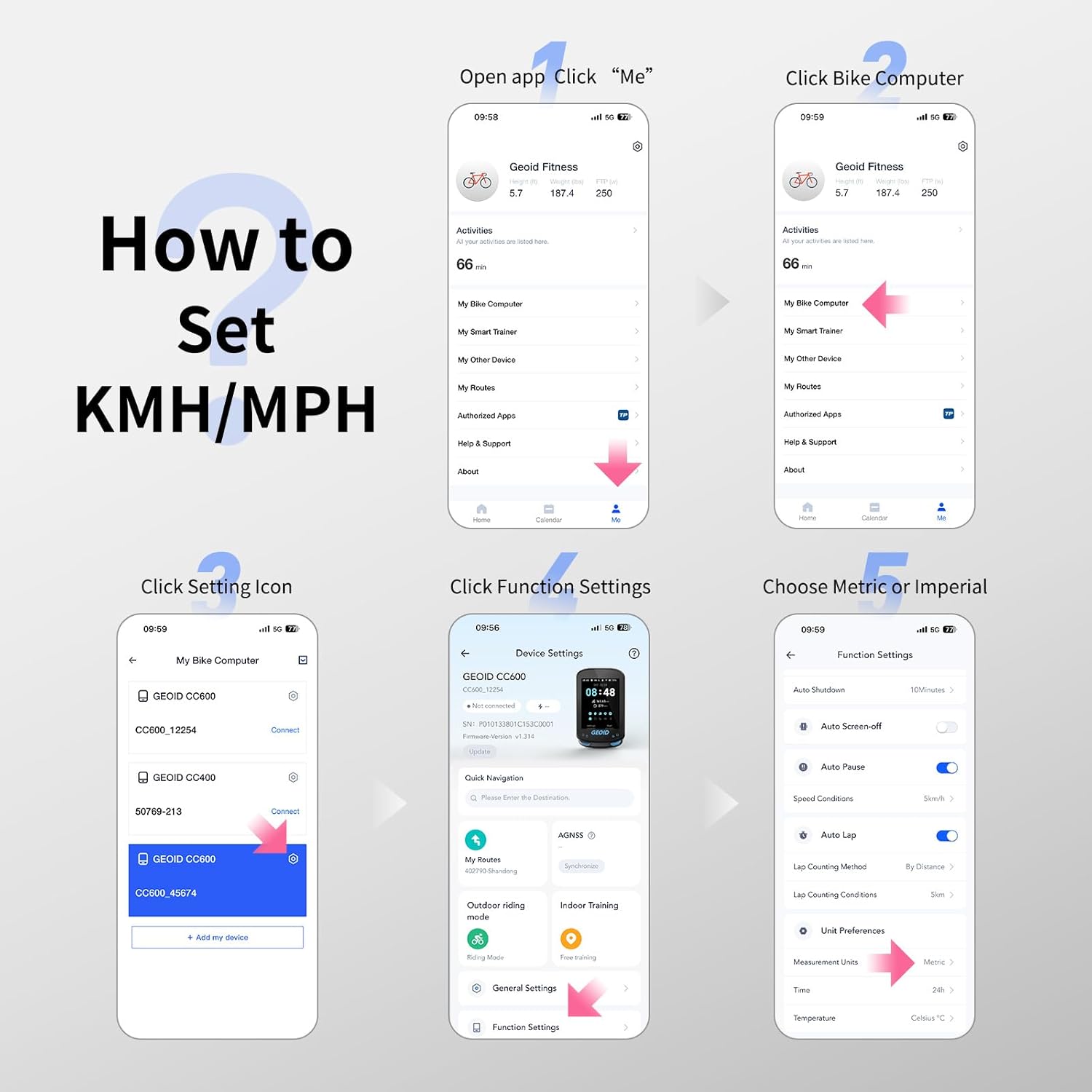
2 How to Set Units
3 IPX7 Waterproof
4 Package Contents
How to Set Units (Metric/Imperial, Temperature, Time, etc.)
Open the OnelapFit app, go to the Device Settings page, tap Function Settings, then tap Measurement Units to switch between Metric and Imperial. You can also change the time or temperature units here.
ls it compatible with Komoot?
Not officially. Plan route on Komoot, export GPX, import to bike computer, ride. After, download FIT file, upload to Komoot.
Why can’t road fork information be displayed?
Due to map resource maintenance issues, some roads are missing, causing certain intersections to lack fork information during navigation.
Why does my bike computer show inaccurate data after installing a speed sensor?
The bike computer prioritizes speed sensor data (wheel circumference x rotations) over GPS. For accurate data, manually set the correct wheel circumference in the app. The CC600 does not auto-calculate wheeldiameter.
Does the bike computer support map navigation, and how many routes can be loaded?
lt does not support map features or display nearby streets; navigation is based on GPX files. Routes up to 300 km in length can be loaded, and up to 4 routes can be stored simultaneously.
GEOID Bike Computer Sensor
Add to Cart
Add to Cart
Add to Cart
Add to Cart
Customer Reviews
4.3 out of 5 stars 52
4.3 out of 5 stars 944
4.1 out of 5 stars 154
4.4 out of 5 stars 131
4.2 out of 5 stars 1,201
4.3 out of 5 stars 537
Price
$179.99$179.99
$49.99$49.99
$79.98$79.98
$49.99$49.99
$19.99$19.99
$16.99$16.99
Power Accuracy
±1.5%
—
—
—
—
—
Screen(Inch)
—
2.4″ Color Screen
2.8″ Touchscreen
2.8″ Color Screen
—
—
Battery Life(hr)
300H
24H
25H
24H
—
—
Track Navigation
X
Route Navigation
Map Navigation
Route Navigation
—
—
Link Technology
ANT+, Bluetooth
WiFi ANT+ Bluetooth
WiFi ANT+ Bluetooth
WiFi ANT+ Bluetooth
—
—
Free Training
—
YES
YES
YES
—
—
Auto Backlight
—
YES
YES
YES
—
—
Auto Time Calibration
—
YES
YES
YES
—
—
Fresh Screen Design: Enjoy a fresh cycling experience with the CC600’s 2.4” colorful screen, durable Asahi glass, and intuitive three-button design. The vibrant display makes navigation and data viewing effortless. With a memory storage capacity of up to 100 hours, the device can record more ride data without frequent syncing.
Stay on Track with Colorful Route Navigation: The CC600 offers colorful navigation with turn reminders, zooming in and popping up notifications at turns. Upload external GPX files via the phone app and enjoy automatic re-routing if you go off track, ensuring you stay on course at all times
WiFi & Bluetooth Transmission: Automatically sync AGNSS and riding records, update firmware directly on the bike computer, and enjoy seamless, rapid transfers that let you focus on your ride. WiFi offers significantly improved speeds over Bluetooth
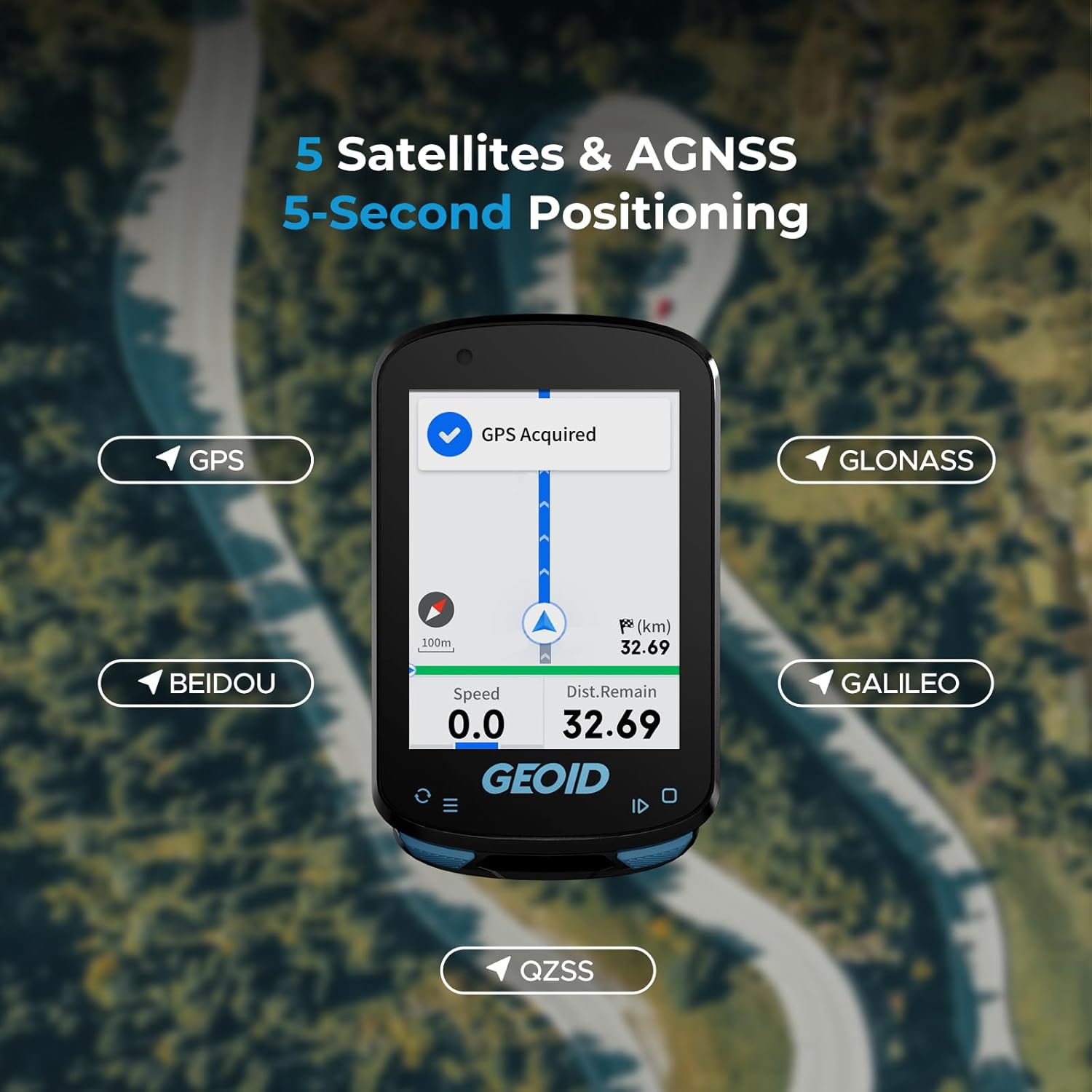
5 Satellites & AGNSS, 5-Second Positioning: Supports GPS, BEIDOU, GLONASS, QZSS, and GALILEO. Connect to WiFi and sync AGNSS for 5-second location acquisition. AGNSS data valid for 14 days. Ensure latest AGNSS data is synced, CC600 is powered on/off near the same location, and the area is open
Graphic Data Fields & Extensive Data Options: Define your cycling styles with customized data pages. The CC600 supports various display formats including numerical charts, circular dials, line graphs, and bar charts. It offers up to 10 pages, 10 displayed data items per page, 29 display layouts, and 108 supported data items
Free Indoor Training to Enhance Your Power Performance: The CC600 supports indoor training with a smart trainer, allowing you to customize power targets, resistance levels, and gradients. Focus entirely on improving your performance without external factors like weather or road conditions affecting your training pace
Support Bluetooth, ANT+ Protocol: The GEOID CC600 GPS Bike Computer supports both Bluetooth and ANT+ protocols, allowing seamless connection with up to 9 types of devices for enhanced cycling data and performance tracking
Support for 11 Languages: Choose from a selection of languages including English, Italian, Japanese, Spanish, Korean, Portuguese, German, French, Polish, Traditional Chinese, and Russian
Portable Data Export: Easily export and share FIT files via the specified App. Compatible with STRAVA and TrainingPeaks for auto-sync of cycling data after account binding
8 reviews for GEOID CC600 Color Screen Bike/Cycling Computer Wireless – Route Navigation with Reroute Planing, WiFi & Bluetooth, Fast 5s GPS Positioning, Free Indoor Training
Add a review
$49.99
MacAttack –
Great bang for the buck Strava compatible bike computer
Almost 5-stars but the fact one in the US has to set up the unit using metric settings before flipping to US/imperial was a bit annoying BUT this is an awesome device! Great screen clarity and easy to use and fast boot-up compared to my old Garmin Edge 520 Plus. It doesn’t have nifty features found in the Garmin devices (weather add in, live track, contact notification if an accident, no text messages, etc.) but can capture all ride info for uploading to Strava and elsewhere. I added the GEOID heart rate monitor and speed and cadence and all with ease! Again, highly impressed for the price! Also, GEOID is a Magene sister product company so amazingly the same quality.Update on July 3, 2025: I’ve done a few rides and added the Garmin RTL515 light/radar and found it was so fast to add to the CC600 and the radar worked great. I utilized the import of a GPX file for a Strava ride and found the navigation system to be accurate. Above all, the unit is very fluid with screen layout switching while riding. After using the device more, I’m moving it to 5 out of 5 because you get such great performance from a device less than $100 US. Again, blown away at the ease of use of the device and hardware performance….I encourage anyone to buy it and try it for yourself….you won’t be disappointed with the “bang for your buck” pricing. Great unit!
1world4us2share –
Nice piece of tech.
Beautiful instrumentation tool.The first thing I’m gonna tell you about is something that most tech isn’t able to do. It has very little to do with what it actually does for you, but it makes it much more valuable than any other similarhave equipment.Each of the screens , what you can add or subtract from whenever you want through the app has customizable data points.I can choose a template for a screen right now.I have five screens on the uni. Each template supports a number of data points like speed distance heart rate. I can pick what those data points are out of a pool of available ones.For example , the first screen has one large data Points and Is four small ones. I used a large one for a speedometer. I used to force smaller one.nFor distance and time , speed and direction. Now I can change any one of those to something else if I want or had a whole another page to the display.My first page on the screen is for default driving. It has A large speedomer. time for total, moving time, Distance traveled and temperature.And I have four other custom pages one just for elevation and grade.There is about fifty different data points to pick from and any field on any page can have any single one of them in it. There are charts for different things, like .Elevation, grade, speed.I believe that altitude is calculated by absolute not relative air pressure.So just remember that. It does have a recalibrate , so I just calibrated it to the physical elevation.In about 15 years I’ve only seen one other brand of device that has customizable fields like Garmin used to do. I quit using garmin, because I eraced all my warranties out of their system. This is the best replacement i’ve found since I quit using their stuff.This company makes really good little units. If i’m not riding , I actually carry this in my pocket to track my walking. If you know anybody that rides a bike or a scooter or hikes this is a good gift. It actually has g p s in it for distance and speed. I’m not sure if the altitude is part of the unitor from the phone. This thing is a beautiful little toy.I love it
Everett Hall –
Great value – usable device with some limitations and rough edges.
After several rides I am happy with the device for the price I paid (under $50 with a clickable coupon). This is my first bike computer so I cant compare it to the models that cost triple or more.It is far from perfect: the software and user interface has a learning curve, the route files don’t retain their name and are assigned a random number when uploaded to computer, and if you get off the route then this thing is useless at navigating you back. Also, the .gpx files I am getting dont have cues for turns and such, and the device doesn’t really carry full maps … so sometimes the computer will show a turning arrow or the road will bend and it doesn’t seem to correlate exactly … but if you pay attention to the distance to the next turn it’s easy to figure out.Once I am rolling on a pre-planned route file, this bike computer is fine. I am also tracking my ride on a smartphone in case i need real directions… i don’t think i would trust this device alone in the middle of the desert if my life depended on it … but for some dirt roads just a few miles from civilization it’s ok.
Ángel perez –
Por 50 euros , lo tienes prácticamente todo, tengo el garmin edge 830 y la batería empezaba a darme problemas, compre este como segundo ciclo computador y el garmin está en el cajón guardado.No tiene mapas preinstalados pero puedes descargar rutas en gpx y desde la app instalarlas en el ciclocomputador en un momento y seguirlas, también puedes acceder desde la app a mapas y crear tu propia ruta.Conectividad ant+ poco mas que añadir y conecta con los mismos satélites que garmin , incluso mas rápido.Configuración de pantallas con los datos típicos de cualquier GPS de gama alta a precio los cost.La batería dura una barbaridad, 6 salidas de 4 horas con GPS y en la última aún llegue con un 10%.Botones super intuitivos y sencillos.Por 50 euros no se puede pedir nada mas, totalmente recomendable tenerlo tanto como segundo GPS como primero, buena compra.
bmcq –
I’ve been using this for almost a month now and it’s really impressive for the price. There are, of course, limitations but it’s hard to hold that against it when it costs as little as it does (purchased for £50.99).Good points:- Excellent value- Good battery life- Solid built quality- Customisable displays- Excellent support for sensors (ANT+ and BLE)- Fairly big colour display with adequate brightnessNot so good points:- Navigation is very basic and has to be prepared beforehand via an app- The OneLap app requires registration and is needed to upload routes and customise displays (if OneLap disappears, this device loses a bunch of its functionality)~The hardware~The CC600 perhaps a bit on the chunky side at 18mm deep. The colour screen is readable outdoors in sunlight but could do with being brighter. It does have a light sensor so it can set the screen brightness automatically which is nice. It feels fairly solid and probably would survive some drops with cosmetic damage. It isn’t particularly light but you’re probably not looking to save grams at this price point. Battery life is quite good and better than I expected for this price. A full day of riding is not going to be an issue. It comes with a couple of different sized brackets and rubber attachment bands to easily mount it on your bike. The CC600 twists 90 degress to remove/refit on this so easily swapped between bikes or removed for charging via the USB-C port.~Using the device~The CC600 has 3 buttons to navigate the screens and menus on the device. All navigation is done by these (no touchscreen). The left button will open settings from the home screen and allow scrolling of options or switch the view when a ride is started. The right button selects options or starts/pauses a ride. A long press will end the ride (with confirmation). The power button on the top left can be used as a back button or long presses to power on/off.From the CC600 itself, some settings such as connecting to ANT or BLE sensors (these will be remembered after adding), checking ride history, triggering navigation (more on that in a sec), training, brightness, phone pairing and sounds. More advanced settings such as uploading routes and customising the layout of displays are controlled via bluetooth using the OneLap app on a smartphone. The layouts/screens can be switched between (and also route navigation if started) and can be organised to display data as you desire. You’ll probably be interested in the basic speed, distance and elapsed time but you can also configure data from any ANT or BLE sensors you’ve paired like cadence, heart rate or speed from a wheel sensor rather than GPS (wheel circumference is set in the app via the bike profiles you add!).~The App and Navigation~The OneLap app is basically a exercise tracking platform like Garmin Connect, Strava or MapMyRide but it does allow configuration of the CC600, planning and upload of routes. It does require registration even though I use Garmin Connect and Strava already and don’t care. One of the attractions of the CC600 for me was the navigation but it’s unfortunately a little on the basic side. The device doesn’t have a map as such and is reliant on GPS and a pre-planned route. This means you’ll see your route and any turnings (it will beep to alert you and display which way to turn or if you’re straying too far) but if you stray off it, it will only be able to show you a straight line back onto the nearest point of your route with no awareness of surounding roads or road names. This is good enough in most cases but isn’t much help if you get seriously lost (e.g. you find a road on your route is closed or take a wrong turn and don’t want to turn around). The OneLap app allows planning of routes which is probably the easiest option for most. You can search for an address and drop waypoints to plan your route away from busy roads! GPX is a fairly widespread format so you can also just download these around the web or export a previous ride to “My Routes” on OneLap. There’s also a website that allow you to share Google map routes to them and export them to GPX files (mapstogpx). Lots of options!~Conclusion~I think for the price, this is amazing. It’s probably not going to put Garmin out of business but for £35 more than a very basic Cateye bicycle computer, you’ve got something that can display a bunch more data, connect to various sensors and help you navigate. It’s also been reliable so far with no sofware issues noticed.
MajorGriffon –
UPDATE 2:Nach intensiven Kontakt mit dem Hersteller, verschiedener Testschritte ect. hat sich ergeben, das die von mir festgestellte Abweichung von 8% eine banale Ursache hatte:Anders, als wie man es von anderen Geräten kennt kalibriert der Tacho bei Verwendung eines Speed-Sensors den Radumfang NICHT automatisch.Ihr habt also einmal Last, den korrekten Wert selbst zu ermitteln oder die Abweichung zu berechnen und einzutragen, wenn ihr einen Speedsensor nutzen wollt.Ohne den Sensor hatte ich keine signifikante Abweichung gegenüber Ride with GPS, zwei zusätzliche Screenshots habe ich angehängt.Softwaremäßig ist die Sache mit dem Speedsensor nicht wirklich schön gelöst, aber vielleicht schneit über ein Update ja noch was rein.Darüber hinaus, wie schon in meiner ursprünglichen Rezension erwähnt ist das ein guter GPS-Tacho mit erstaunlichem Funktionsumfang gemessen am Preis!Sogar ANT+ Geräte wie das Garmin Radar-Rücklicht werden unterstützt! Leistungsmessung habe ich nicht, wäre aber auch drin.Die Navigation einer vorbereiteten Tour ist tauglich und auf dem Niveau deutlich höherpreisiger Mitbewerber.Eine kleine Schwäche ist das Display. Also das geht schon, man kann es ohne besondere Mühe auch im Sonnenlicht ablesen. Aber wer Garmin oder Wahoo kennt wird hier vielleicht etwas enttäuscht sein – allerdings sind die Geräte auch 5-10 mal so teuer, da relativiert sich das schnell.Und – der Support ist erstklassig, sie waren tatsächlich an einer technischen Lösung meines Problems interessiert.Den Vergleich mit den bekannten Premiummarken braucht dieses Gerät nicht zu scheuen und zu dem Preis braucht man da wohl nicht mehr viel zu sagen.UPDATE:Ich wurde vom Hersteller kontaktiert, der sehr bemüht ist, das Problem zu identifizieren und eine technische Lösung zu finden. Läuft aktuell noch.Ursprüngliche Rezension:Ich hab in den letzten 15 Jahren mehrere GPS-Tachos, bzw. deren Akkus verschlissen. Garmin, Wahoo und 2 NoName-Produkte. Um die Genauigkeit habe ich mir nie Gedanken gemacht, das ist ja grade der Witz bei einem GPS-Tacho, das man nicht stundenlang mit genau bekannten Strecken die exakte Kalibrierung im Fahrbetrieb ermitteln muß.Bei diesem war ich ein paar mal überrascht, das es so wenig war, aber ich hatte ihn am “Arbeits”fahrrad, wo ich als Aussendienstler keine exakten Streckenlängen kennen kann, bzw. nur kurze Teilabschnitte fahre. Es kam mir teilweise etwas zu kurz und zu langsam vor, aber ich bin ein alter Sack und so schnell komme ich nicht mehr aus dem Winter, also was solls.Jetzt hatte ich ihn im Urlaub am Start und direkt auf der ersten längeren Tour fiel es mir auf:Die teilweise bekannte Tour sollte deutlich über 50km bringen. Der Tacho vermeldete Abends 49,irgendwas…Ich war misstrauisch, die Tour bestand aus bekannten Teilabschnitten…Ich habe mir mal vom Tacho die .fit-Datei gezogen und in Komoot eingespeist – siehe da, auf einmal waren es 53,9 km!!!!Dann habe ich mehrere Touren ebenfalls derart behandelt und der Tacho zeichnet in seinen Routen immer ca. 8% zu wenig auf.Den letzten Test habe ich gemacht, mein alter Garmin an der Powerbank (der Akku ist hin) Komoot auf dem Handy und diesen Tacho – Garmin und Komoot Gleichstand, dieser Tacho… 8% weniger. Bei den Geschwindigkeiten fehlen die 8% ebenfalls.Es gibt viele positive Punkte an dem Gerät, der Bildschirm, die Navigation, der Funktionsumfang, der Preis – das nützt alles nix, wenn er die Basics nicht auf die Kette bekommt. Ist m.M. ein Softwarefehler auf dem Gerät, aber einer, der es in meinen Augen unbrauchbar macht.Das ist natürlich so nicht hinzunehmen, der Tacho geht als defekt zurück.
Aasif Malik –
Screen is a bit smaller than expected but the device works as per the specs
Jeroen –
Hele leuke budget fietscomputer. In combinatie met de app houd hij boven verwachting veel data bij, welke mooi in grafieken wordt weergegeven, let wel op dat je er zelf sensoren voor snelheid, hartslag en cadans bij moet bestellen, snelheid pakt ie uiteraard wel via de GPS maar persoonlijk heb ik ervaren dat dit in bosrijk gebied soms afwijkende waarden oplevert.