
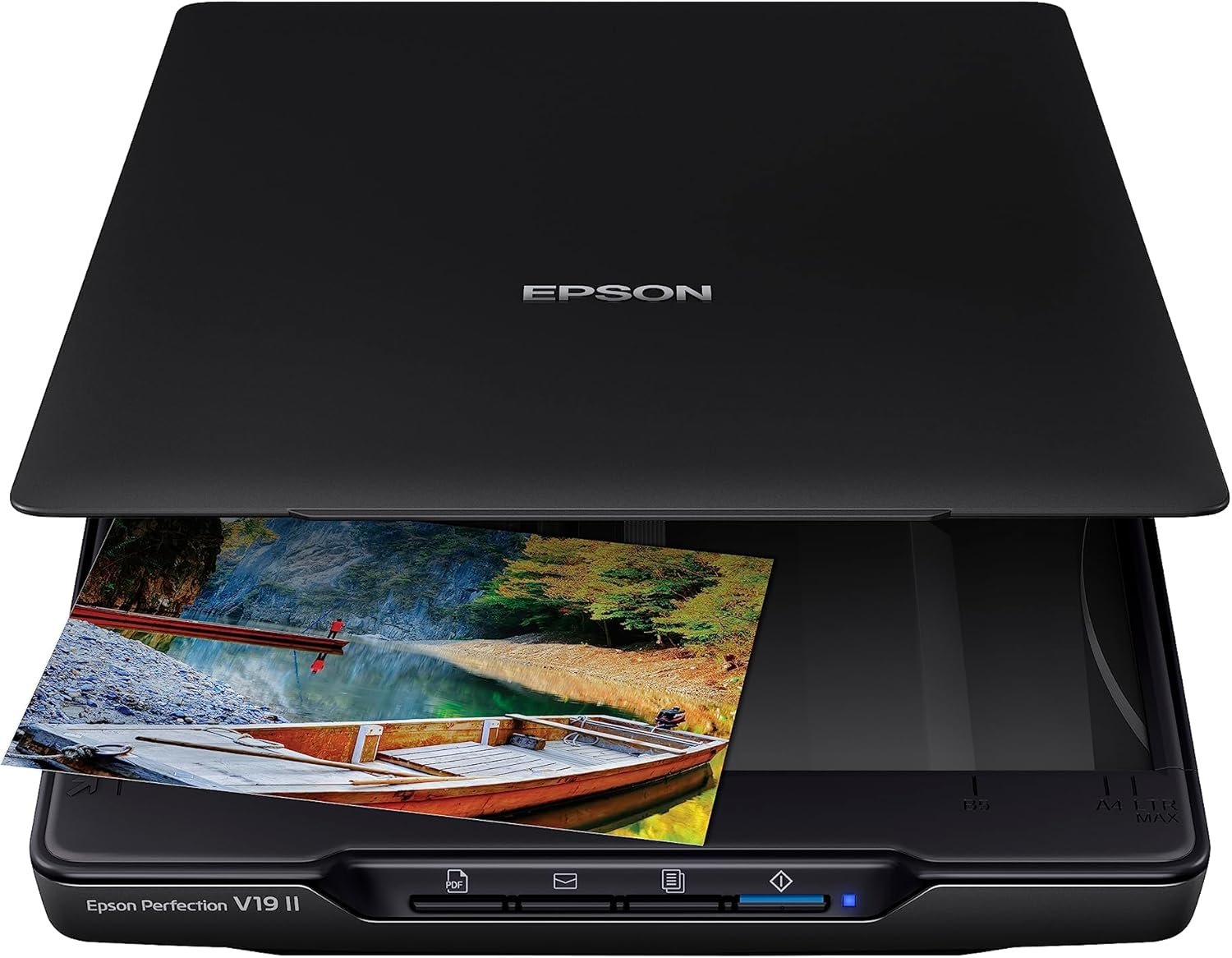
Epson Perfection V19 II Color Photo and Document Flatbed Scanner with 4800 dpi Optical Resolution USB Power, High-Rise, Removable Lid
$99.99
Related Products


Make scanning simple with the affordable, compact and lightweight Epson Perfection V19 II. With an optical resolution of 4800 dpi (1), this easy-to-use photo scanner delivers amazing clarity and detail at a great value. The V19 II includes convenient one-touch scanning with easy-to-use buttons (2), so you can scan directly to PDF or email with just the touch of a button (2). Get high-quality letter-sized scans in as fast as 10 seconds (3). Moreover, scan photos, artwork, illustrations, books, documents and more with the included Epson ScanSmart software (4). If your photos have faded, you can bring back the color in one click with Easy Photo Fix technology. You can also create editable Microsoft Word, Excel and PowerPoint files (2), or generate searchable PDF files using optical character recognition (OCR) software (2). The V19 II is USB powered for portability, includes a built-in kickstand for space-saving vertical placement and storage, and features a high-rise, removable lid to accommodate bulky items such as books and photo albums.
1. Optical resolution is the maximum scan resolution of the image sensor, using the definition of ISO 14473. | 2. With Epson ScanSmart software installed on the connected Windows PC or Mac. Internet connection required. | 3. Based on letter-sized scans at 300 dpi in Black-and-White, Grayscale or Color Mode. | 4. Internet connection required for software download.
Amazing image clarity and detail — 4800 dpi optical resolution (1), ideal for photo enlargements
Epson ScanSmart software included (4) — easily scan photos, artwork, illustrations, books, documents and more
One-touch scanning (2) — scan in fewer steps with easy-to-use buttons (2)
Restore color to faded photos — with one click, Easy Photo Fix technology makes it simple
Scan books and photo albums — high-rise, removable lid
Generate searchable PDFs (2) — convert scanned documents to searchable PDF files
Create editable Microsoft Office documents (2) — scan to Word, Excel and PowerPoint files with optical character recognition (OCR) (2)
Compact and lightweight — USB powered for portability; 3.1 lb
Convenient — scan letter-sized documents in as fast as 10 seconds (3)
Save space — built-in kickstand for vertical placement and storage
12 reviews for Epson Perfection V19 II Color Photo and Document Flatbed Scanner with 4800 dpi Optical Resolution USB Power, High-Rise, Removable Lid
Add a review
$99.99
Amazon Customer –
LOL It works great!!
Checked out the other reviews when purchasing this. Don’t know WHAT they are doing or talking about. Very easy to install. ALL DRIVERS DOWN LOAD FROM EPSON. I can put my iMac, desk top, to sleep and scanner stays on. Went off once and when I woke iMak up it turned back on. No unplugging , reloading or what ever, just turned back on! Doesn’t make any more noise then my older scanner, No problem. Scans quickly, not MINUTES like reviews stated? Photo quality is fine as well as printed statements. Just got it up n running so will give an update in the future. Don’t know what the other reviewers where talking about. Great little unit, not as bulky as my other Epson scanner was. As a former professional photographer, I have always found Epson to be my choice. Oh yes, price was right!
lonestarkate81 –
Good performance for the price
Read all the reviews for this and the newer model and decided to go with this one. No issues installing, works relatively fast, and the quality of the scans is great. My only complaint is sometimes when scanning certain scrap book pages, it wants to turn each photo into a separate scan file. I’ve gotten around that by using the magazine setting when that happens and adjusting the color after to lighten it as magazine is kind of dark. Really impressed with the performance for the price.
David K. H. –
Died after 1.5 years; visual artifacts and other flaws
This scanner died after a little more than 1 year of sporadic use (perhaps after scanning about 400-500 photos). At some point, the scanner stopped turning on consistently (requiring the USB to be unplugged and re-plugged repeatedly in order to get it working) and the preview scan would often turn out to be a full black page. A few weeks afterwards, the scanner stopped turning on at all.Prior to the scanner dying, it’s scans also had streak lines through the middle of the page. Fortunately, I was able to work around by positioning the photos outside of the streak lines. Besides that, scan quality was decent, but not outstanding compared to higher-end scanners. Another flaw that’s worth mentioning is that the actual scan area does not extend to the edge of the glass (a shortcoming that’s even documented in the manual), meaning that it’s necessary to place photos within the edge; however, doing so can result in a skewed scan that requires adjustment afterwards.In any case, the fact that this scanner died just after a year of use underscores its cheap construction and build quality and validates the saying “buy cheap, buy twice.” This scanner may still be ok if you’re just looking for a one-and-done light scan project.
ksuwildkat –
Excellent quality, OK software
I had a dual need for a scanner – a few documents and a lot of photos. Turns out there aren’t really any solutions for less than about $700 that do both well and even then there are compromises. I decided that my priority was photos and landed on the Epson.Once you go with flatbed, you are locked into needing a relatively large surface to put it on. The Epson has very little “extra” beyond the size of the bed so its almost optimally sized. Its also very thin and light so you can put it on just about any flat surface. I named it next to my keyboard with about 25% of it hanging off the desk with no issue.Software installation was simple and easy. On my Mac plugging in the scanner launches the software. On my windows system I have to launch it separately. No big deal. The software itself is just ok. I creates a unique file name each time which is great so you dont accidentally overwrite a file but it would be nice if it took your last rename and added to it. So as an example if you renamed it to “Disney Vacation” then making the next one “Disney Vacation 002” automacily would be nice. The software also seems to randomly flip the images upside down. Like I put them on the bed the same way but for some reason the software flipped it. Changing it back was easy but its still time.One of the things I had forgotten about scanners like this – the use your computers processor! I had originally set this up with an old (i7 970) Windows machine because it had a better location for setting up the scanner. It was slooooooow. So slow I considered returning it. Then I hooked it up to my modern Mac. 10x faster. Not exaggerating at all. Thats generally a very good thing because faster computer – faster scan – but not great if you were trying to use an older system as your scan station.The scanner itself is powered by the USB connection. This is a HUGE DEAL. One of the reasons I bought this is because I had an older scanner that was worthless because of a proprietary power brick that was dead.Overall I really like this scanner and the images it produces are great. The software is disappointing but Epson can fix that.Recommended.
Patience Montoya –
I love it, works as intended
I wanted to scan in all of my mothers photos she had in a paper file & then put them into a photo album so I bought this. It’s really nice to have & I’ve used it a few more times after the initial intended use.It works great, easy & straightforward to use. You can do 4 photos at once which is good for saving time, but any more than that it doesn’t detect. Make sure you space them out a little bit so it will detect them all as seperate pictures.The software is easy to download & use, you can crop the photos & tilt them if they scan in slightly off.The photos were all scanned in accurately & good quality. It is a bit slower at scanning but it didn’t bother me at all.
GBC –
started out great
stopped working after 6 months of use
L. Layton –
Wonderful scanner for a great price.
This was a great price for a scanner. My ‘new’ printer did not come with a scanning option, to my surprise. This was exactly what I was looking for. I will take the longer 14″ paper. Easy to set up and worked the first time I tried. Very pleased. I am scanning older family pictures, and it’s doing a great job.
Amazon Customer –
Works like a charm and easy to use. Took a little while to setup with software download but got it done
Yac Cruz –
Funciona a la perfección , el mismo cable USB alimenta al escaner, asi que es de bajo consumo electrico. Rapido, alta calidad de escaneo y myligero.Recomiendo descargar software de escaneo extra, el incluido es demasiado sencillo y automatizado, no se puede cambiar nada. Pero si descargan el epson scan 2, funciona mejor
David –
Very happy with my Epson Perfection V19 II it is fantastic for bringing old photos back to life, highly recommend.
Mr. B. G. Murphy –
I was surprised it had to be imported from USA and took a little longer than expected to get deliveredHaving said that, the unit is very easy to set up, download software, install, plug in usb and it worked no problem.Very pleased with results and happy with purchase.One thing though, I went to register g/tee, will not let me choose country only USA?
Mert Ozunal –
Both my PCs, Windows 10 and 11, could not detect the scanner at first. I uninstalled and downloaded the drivers again. Finally, it is working now.Epson software is not the best, but it is working at the moment, so I am changing the one-star review.