
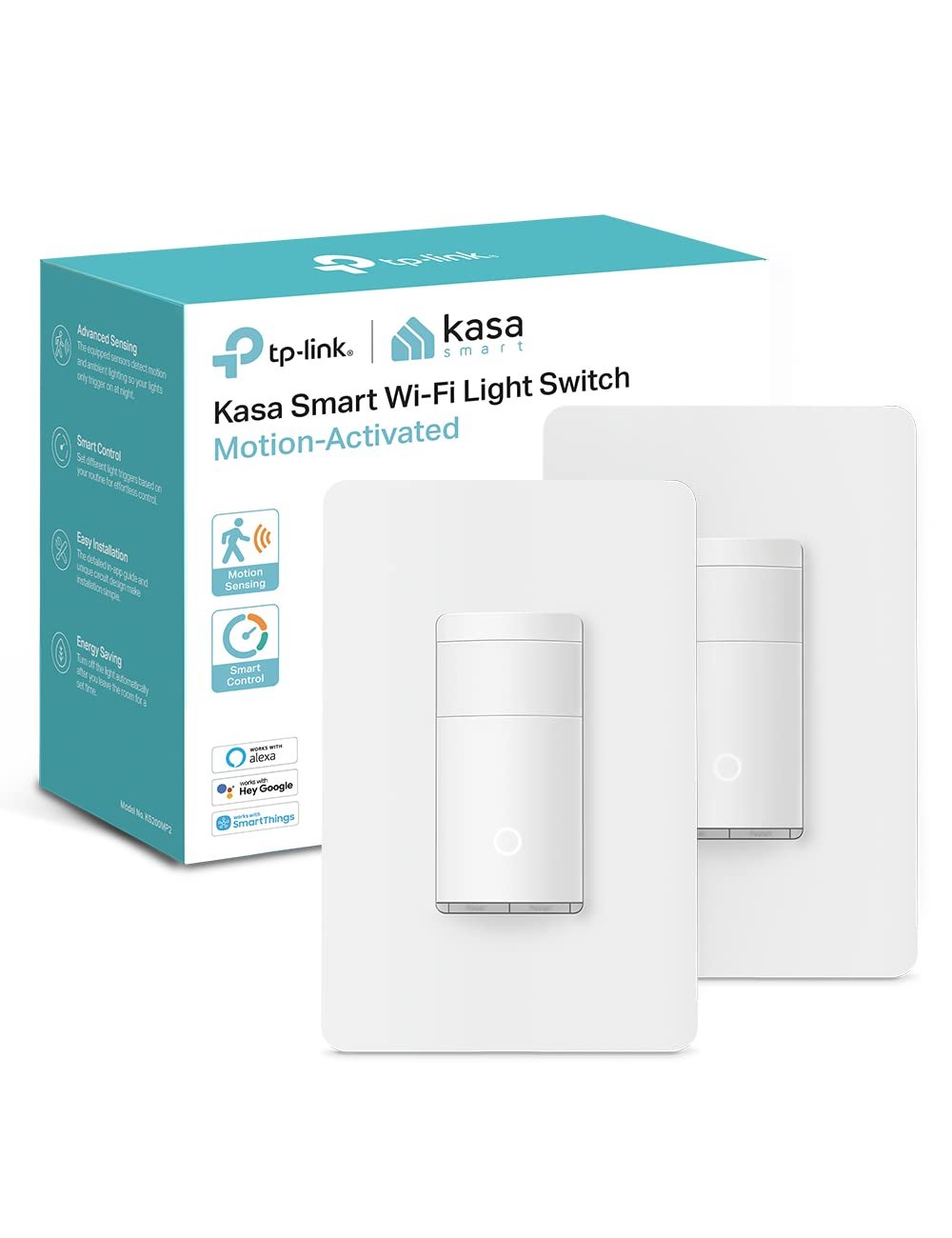
Kasa Smart Motion Sensor Switch, Single Pole, Needs Neutral Wire, 2.4GHz Wi-Fi Light Switch, Works with Alexa & Google Assistant, UL Certified, No Hub Required(KS200MP2),White,2-Pack
$39.99
Related Products


The KS200M is smart switch with an advanced motion and ambient light sensor built in. Ideal for areas where hand-free operation is ideal, the KS200M is perfect for those who want more automation in their home, including those with limited mobility or those with children in the home. Walk into a room and have your lights automatically turn on. Lights can be programmed to turn off after a set time without motion detection to save on electricity. The smart switch also includes an ambient light sensor that will detect daylight conditions and prevent the lights from turning on during the daytime if desired. Fully customize your experience with settings based on your routine. Best of all, the KS200M is hands-free, voice controllable, and app accessed. From Amazon Alexa, Google Assistant, to Samsung SmartThings, the Kasa Smart KS200M gives you convenient voice controls.You can expect Kasa Smart quality with the KS200M which has undergone rigorous safety testing and has been UL certified by 3rd party Underwriter Laboratories. In addition, the device is backed by an industry leading 2-year limited warranty. If you are one of the 7 million plus Kasa Smart users, you will also appreciate that the KS200M is compatible with other Kasa devices meaning, you can set groups, and smart actions to work in conjunction with other Kasa Smart devices.Take control of your smart lighting, and have total automated freedom with the Kasa Smart KS200M Smart Switch with motion sensor.This which can achieve more automation, intelligence, and personalized settings. Standard: IEEE802.11 b/g/n Wi-Fi Standard: 2.4 GHz Wi-Fi only Max load: 600W INC, 300 W CFL. Power Supply: AC 100~125 V, 50/60 Hz Neutral Wire Required. 2-year warranty.
【Advanced Motion Detection】Completely hands-free and smart operation of your connected lights. The switch automatically turns lights on when motion is detected and turns off after a preset time. Ideal for areas such as bedrooms, hallways and restrooms where hands-free operation is ideal.
【Daylight Detection】Smart ambient light detection will sense daylight and prevent lights from turning on during the day.
【Smart Mode & Away Mode】Set different light triggers based on your routine for effortless control. Automatically turns devices on and off at different times to give the appearance that someone is home.
【Works w/ All Bulb Types】600W Incandescent/Halogen, 300W CFL/MLV/ELV
【Voice & App Control】Manage your device with voice commands via Amazon Alexa, Google Assistant, or Samsung SmartThings. Hands-free operation of your lights from anywhere through the free Kasa app.
【Trusted & Reliable】The KS200M is UL certified, meaning rigorous testing is done for safety and certified by a 3rd party laboratory. Includes our industry leading 2-year warranty. Kasa is trusted by over 7 million users worldwide.
【Kasa Smart Action】A part of the Kasa Smart Ecosystem, the switch works with other Kasa devices, so you can set smart actions, and groupings with your other Kasa devices.
【App-Guided Setup】Neutral wire is required, standard wall plate size. No need to understand complex switch wiring or master vs auxiliary switch configurations; The Kasa app guides you through easy step by step installation. Need 2.4GHz Wi-Fi connection.
8 reviews for Kasa Smart Motion Sensor Switch, Single Pole, Needs Neutral Wire, 2.4GHz Wi-Fi Light Switch, Works with Alexa & Google Assistant, UL Certified, No Hub Required(KS200MP2),White,2-Pack
Add a review
$39.99
Aaron C Reskew –
Makes life easy, but has a few issues
Update, Oct 2024:The motion sensor is still very sensitive but it turned out the problem with the timer was my error. I’d set up a rule to turn the light off after 10 minutes but elsewhere in the app I’d set it to turn off if it didn’t detect motion for 1 minute. So after 1 minute of me being out of sight of the motion detector it turned itself off, as I’d instructed it to. So a good slap of my own forehead here, a very loud “D’oh!” in my best Homer Simpson voice, and I’m restoring the fifth star to the product.Update, Aug 2024:The motion sensor is very sensitive. I’ve got mine set to the lowest setting and it activates when I’m 10 feet away in an adjacent room. It would be nice to be able to set it to be much less sensitive, so it activates if I walk past it but not if I walk somewhere in the general vicinity. It’s as if the angle of view is fairly narrow, so that if I’m walking along the wall where it’s located it doesn’t respond until I walk right in front of it, but if I’m in the next room it will activate with me a clear 10 feet or more away. That’s tedious, because it means if I stand at my bench to mend something the pantry light keeps turning on.There’s also an issue that might be with the switch and might be with the Kasa app (I suspect the app, but the two go together). Because I’m prone to forget to turn off the pantry light (and sometimes it’s hard to turn it off if I’ve got both hands full) I set up a rule in the software that activates when the light is turned on, and turns it off 10 minutes later. 10 minutes is plenty of time to find what I need in the pantry and leave, except that it actually turns off after more like 2-3 minutes.These aren’t major issues but are irritating enough to knock off a star. There’s not much point having time-based options if what happens bears so little resemblance to what I programmed, and it’s been known for years that motion sensors that activate whenever anything happens remotely near them are of limited use.I still plan to install the other one in the attic, I’ll just leave it to a standard rule to turn it off.Original review:I fitted a motion sensor switch to the room in my basement where I keep the chest freezer. When I take stuff down to the chest freezer I need to figure how to turn the light on, which can be tricky when I’ve got both hands full with stuff to go in the chest freezer. I can flick a switch with an elbow but it’s a bit of a drag. And sometimes when I leave the room I forget to turn the light off, and find it still turned on a couple of days later when I’m next down there.A switch like this solves all these problems at once. The motion sensor means all I have to do is walk past it and the lights come on. And being a smart switch it means I can set up a rule that turns the light off again after 15 minutes. As a fallback I have a “scene” set up in the Kasa app that turns all the automated lights off at midnight regardless, so if the rule doesn’t work as expected it will still shut off at midnight.Be aware these switches are quite deep. I had to replace the back box to fit it, because the previous switch I had was the smallest switch available. The metal back box that was in place was deep enough to hold the Kasa switch but didn’t have enough free space to handle the cables in and out and the wire nuts behind the switch. But now I have a deeper back box and a switch that works very nicely.Installing the switch is about as easy as it gets. It has four wire tails – a white one to connect to neutral, a green one to connect to earth, and two black ones to connect to line/load. All you have to do is figure which wire is which, use the supplied wire nuts to join the wires together, and configure the switch. If you can’t figure out electrics as simple as this, pay an electrician to do it for you.The default level of sensitivity had the light triggering if I went anywhere near it, so I turned it to the lowest sensitivity (this is done in the Kasa app) and now I have to walk right up to it before it activates. That’s perfect for my needs, I don’t want it turning on unless I actually go into the room where it is installed.As a smart switch it can be configured to activate only when ambient light is low, it has different levels of sensitivity for the motion sensor, and it can be controlled remotely and programmed to turn on and off at particular times. That sort of thing has obvious uses if you’re going to be away for a few days, you can set up timers so it’s not so obvious you’re not home. You can also do all sorts of weird and wonderful things if you’re so inclined, so if it takes your fancy you can set it up so that if you walk into the room where the switch is installed it will some totally unrelated device on or off. Why you’d want to turn the attic power strip off when you walk into a room in the basement is another matter, but you can if you want to.I have two of these, and I’m thinking a motion switch to turn the attic light on might be a handy thing to have, for similar reasons.
Ol’ Hesty –
KASA switches are the best you can buy
I would like to first point out that I’ve been using smart switches since their inception. I have tried just about all major brands and there is just absolutely no comparison to these switches. Set up couldn’t be easier. Integration with Amazon Echo devices (Alexa) is automatic after you set up the switch. The switches are a bright white color. One would think that is a given, but not so. Other switches can have a slight yellow hue to them that stand out when using a bright white cover plate. The user has the option to turn off the small LED light incorporated in the switch rocker. I have 24 of their switches (3-way combo sets, single pole switches, and several of their motion sensing switches). All have performed flawlessly over the years. Not one glitch to date. Now Lutrøn on the other hand. They inevitably go bad, all of them, and their switches only provide manual on/off and vacancy sensing. Their options for how long the light stays on is very limited (only 5 settings), not to mention their recessed logo and multiple seams collect dirt over time. I have one of their vacancy sensor switches left, but I anticipate it is going to go bad here in a short while (they all do). Their app for the devices is tops! Easy to navigate, and program the switches. The one feature that I truly love about these switches is their vacation setting. I have certain switches go on and off throughout the night to create the illusion that someone is awake and turning on lights throughout the night and early morning hours. All their switches have a sunrise/ sunset option which is great for porch lights and external illumination. They are a set it and forget it kind of switch, unlike their competitors in which you have to manually set daylight savings hours, and adjust their on/off hours according to the time of year. The sensitivity of these KASA vacancy sensors switches are on par with anyone’s expectations.I have included a few photos and a video illustrating above mentioned and their functionality through Alexa. 1st photo is that of a Lutrøn vacancy sensor switch (not sleek at all), the switch to the left of it is a standard switch (note its color discrepancy compared to the wall plate and smart switch). 2nd photo is the KASA switch, it stands out a bit proud, but I don’t mind, and the switch to its left is a standard switch (again take note of the difference in white hue). 3rd photo is two KASA smart switches (left and middle), and the 3rd is GÉ fan smart switch. Take note of the LED circle on the middle switch. That can be disabled in the app if you choose.
CmfmotorSports –
Perfect motion switch for laundry rooms and pantries
Kasa Smart Motion Sensor Switch – Single Pole, Neutral Wire Required, 2.4GHz Wi-FiWhile most of my home runs on TP-Link Tapo switches and outlets, Tapo didn’t have the perfect solution for a couple spots in the house. That’s where this Kasa motion sensor switch came in and it worked perfectly.I installed these in the laundry room and pantry, which are two places where motion control just makes sense. Being able to walk into the laundry room with your hands full and have the lights automatically turn on is extremely convenient. The same goes for the pantry when coming home with groceries.The motion detection works reliably and the lights automatically turn off after the preset time with no motion, so there’s no need to worry about lights being left on.Integration was seamless as well. Since Kasa and Tapo are both part of the TP-Link ecosystem, they work well together and can be managed easily through the apps and voice assistants.Overall, this has been a simple but very practical upgrade that just works exactly as intended.
Emil Jukovski –
I recently installed the Kasa Smart Motion Sensor Switch KS200M in a few spots around my home, and it’s quickly become one of those upgrades I didn’t realize I needed until I had it. What caught my attention first was the built‑in motion and ambient‑light sensor. It picks up movement reliably and only turns the lights on when the room is dark enough, which makes it feel genuinely smart rather than just reactive.One of the best places I installed it was in the mudroom—an area where my hands are often full when I come in with groceries or gear. The lights now switch on automatically the moment I walk in, and after I leave, they turn themselves off after the set time. That alone has saved me from fumbling for the switch or leaving the lights running all day. Another spot where it shines is the basement stairwell, where hands‑free activation makes a big difference in safety, especially when carrying bins or laundry.What I also appreciated is how easy the setup was. The in‑app guide walked me through each step, and once wired up (it does need a neutral wire), it connected right away to my Wi‑Fi. After that, pairing it with Alexa was seamless. Now, if I ever want to override the motion sensor—like dimming lights for a movie night—I can just tell Alexa to switch things up.The automation options are surprisingly flexible. I created a simple schedule so the lights in my hallway only use motion activation in the evenings, while staying manual during the day. The switch has been consistent with its triggers, and the motion sensor is sensitive without being overly jumpy. I also like that it’s UL certified, which adds a layer of confidence when installing something that ties directly into home wiring.Because I work in a busy environment and come home pretty drained some days, having lighting that “just works” without needing to think about it has honestly made the house feel more welcoming and efficient. And in rooms where the lights used to get left on all the time, I’ve already noticed fewer wasted hours.Overall Opinion:This switch has improved both convenience and energy savings in my home. It responds quickly, installs cleanly, integrates smoothly with voice assistants, and genuinely adds useful automation instead of novelty features. If you’re looking to upgrade high‑traffic areas or rooms where hands‑free lighting just makes sense, the KS200M is an excellent choice.
KC –
The Kasa line of switches are an excellent choice for upgrading your home to a smart home. They install easily like any switch should. The quality is robust and they look sharp once installed. Each switch comes with everything you need including basic install instructions, connectors, and finish plate. The switches have a night light feature built in to them making them easy to locate and turn on in low light situations. The motion sensor functions perfect and the sensitivity is easily adjustable with the app.Their app is easy to use and has numerous features to automatically control your home. The Kasa line integrates nicely with Tapo products and you can easily control all your cameras and switches from the Tapo app as well.
Nancy –
Have this setup in the garage and it does a pretty good job at detecting motion. You can change the settings to make it more or less sensitive which is also nice. Setup was pretty simple, don’t forget to make sure your breaker is tuned off :)It would get a 5 if it could detect the door as motion but I think it’s based off heat and only detects me once I’ve gone down one of the stairs (180 degrees in relation to the switch)Also, app is pretty good too, simple enough to use and the connectivity was easy. I like that Kasa has widgets available on iOS so you can toggle the light from your home screen (See screenshot). You can also set a timer for how long the light stays on after it stops detecting motion.
Warren –
I have a house filled with a lot of Kasa, Tapo, and Omada devices throughout, and after a few firmware updates over the years they all work very well via Alexa.There are some things to consider when installing iOT devices.1. Don’t use standard grommets that use up valuable space in you 1/2/3 gang boxes. Look at using flatter connectors.2. Follow the installation instructions, and really read them. These are easy to install, but the Kasa devices all need a neutral wire.3. Do the initial firmware updates and use your App to check every so often. The bug fixes are important to.4. Some smart switches can be a pain, like the 3 way, especially when wiring in an older house. If you don’t have a red wire (14/3) it won’t work. I do have one that one side works and the other does not. Possible a problem with the traveller wire.5. For everyone who has a home network with 2.4ghz and 5ghz signals. Let all your iOT devices run on the 2.4ghz. Do not use tablets, smart phones, firestick or other media devices on this, use the 5ghz, trust me, you’ll see amazing improvements and a lot less dropped signals. Remember 2.4ghz usually can have only 32-64 devices depending on the router, and is prone to interference. Don’t waste your bandwidth, big devices…use the big signal.6. If you have 1 router in a big house, expect problems. Install a few EAP225s if you can (Cat 5e or better wiring and either a POE switch or POE injectors) will improve performance. Cable company routers and extenders usually are basic for a high price, and if they aren’t wored, they can be temperamental.Over the past 8years I have been installing TP link devices and their customer service is usually pretty good if you understand electrical and networking, if not you may struggle.In my opinion, TP Link has an excellent spread of devices for the home.I am installing their fan controllers next, and really hoping they make a solid smart thermostat that does not need a C Wire, or comes pre packaged with a solution.Since installing these devices and programming schedules, I have also seen a drop in my power bill…which is always welcomed.One more item to note: Only purchase from “Prime” which ships from an Amazon warehouse to ensure you get a factory fresh device.I hope this helps many who gave these less than 4 stars, I trust this brands performance after many years of use and their evolutions.
Darrenpc –
Works great, I also have other Kasa switches which I love.