
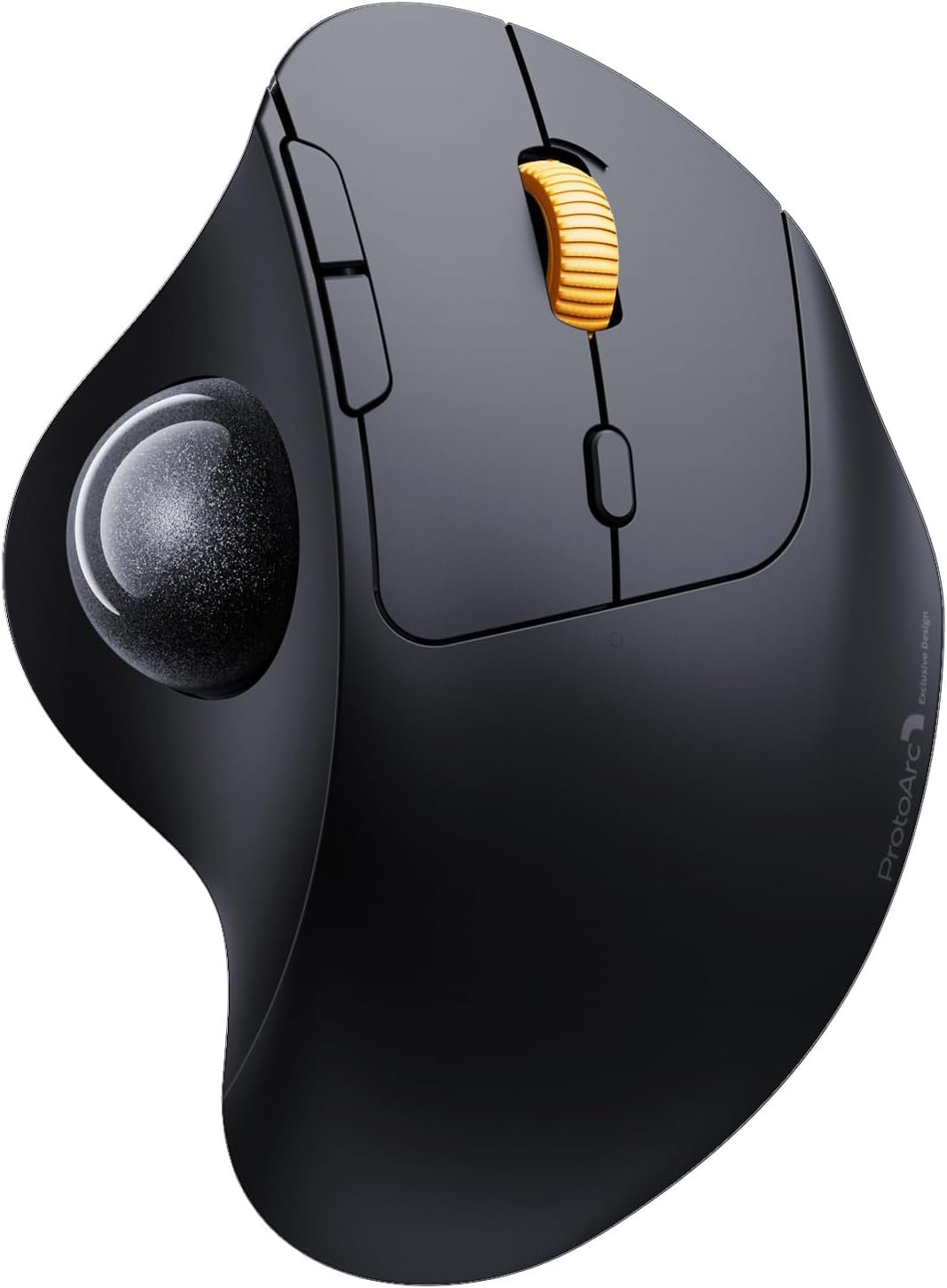
ProtoArc Wireless Trackball Mouse, EM04 Ergonomic Bluetooth Rollerball Rechargeable Computer Laptop Thumb Control Mouse, Compatible with PC, iPad, Mac, Windows-Gray Ball
$33.99
Related Products


Product description
The video showcases the product in use.The video guides you through product setup.The video compares multiple products.The video shows the product being unpacked. Wireless Trackball Mouse Merchant Video

 WIRELESS TRACKBALL MOUSE
With the smooth and precise rollerball mouse, you no longer need to move your arm and wrist
 BLUETOOTH & 2.4G WIRELESS
Switch freely between Android, tablet and Mac with just one button
 USE ON BED OR SOFA
You can use this trackball mouse on any surface without moving the mouse

1 THUMB MOUSE
2 MULTI-DEVICE CONNECTION
3 TRACK ANYWHERE
4 MEASURE YOUR HANDS FIRST
A THUMB-CONTROL TRACKBALL
Wireless Trackball Mouse (2.4G USB+Bluetooth+Bluetooth)
With the thumb-operated trackball, you don’t need to move your hand to move cursor, so there will be less fatigue with your hand
1x Wireless Trackball Mouse
1x USB Receiver
1x Type C Charging Cable
1x User Manual

 Adjustable DPI
With 5 DPI modes, you can adjust cursor movement speed for superior and accuracy control by pressing the DPI button
 Rechargeable Mouse
With built-in rechargeable battery, no need to replace the battery, you can charge the mouse easily with the Type-c cable included in package
 Universal Compatibility
Compatible with USB-enabled and Bluetooth-enabled devices. Support Windows XP/7/8/10/11, Mac OS x 10.12, Android 4.3 or higher version
 Low battery indicator
The ergonomic mouse is equipped with low battery indicator. Note: When the battery level is low, the charging indicator light will flash
ProtoArc Wireless Trackball Mouse
Add to Cart
Add to Cart
Add to Cart
Add to Cart
Add to Cart
Add to Cart
Add to Cart
Customer Reviews
4.4 out of 5 stars 1,915
4.3 out of 5 stars 3,168
4.4 out of 5 stars 202
4.3 out of 5 stars 399
4.4 out of 5 stars 148
4.3 out of 5 stars 3,168
4.3 out of 5 stars 3,168
Price
$33.99$33.99
$34.96$34.96
$32.99$32.99
$47.99$47.99
$38.78$38.78
$38.18$38.18
$38.18$38.18
Connection Type
2.4G + Dual Bluetooth
2.4G + Dual Bluetooth
2.4G + Dual Bluetooth
2.4G + Dual Bluetooth
2.4G + Dual Bluetooth
2.4G + Dual Bluetooth
2.4G + Dual Bluetooth
Compatibility
MacOS,iOS, iPadOS, Win,Android
MacOS,iOS, iPadOS, Win,Android
MacOS,iOS, iPadOS, Win,Android
MacOS,iOS, iPadOS, Win,Android
MacOS,iOS, iPadOS, Win,Android
MacOS,iOS, iPadOS, Win,Android
MacOS,iOS, iPadOS, Win,Android
Color
Black-Gray Ball
Black-Gray Ball
Black-Gray Ball
Black-Gray Ball
Black-Gray Ball
Black-Purple Ball
Black-Red Ball
USB-C Charging
✔
✔
✔
✔
✔
✔
✔
Trackball Type
Thumb Type
Thumb Type
Thumb Type
Thumb Type
Index Finger Type
Thumb Type
Thumb Type
Hand Size
Great for Small Hand
Great for Medium Hand
Great for Medium Hand
Great for Medium Hand
Great for Medium to Large Hand
Great for Medium Hand
Great for Medium Hand
Ergonomic Thumb Trackball: Equipped with a smooth and precise trackball, move your cursor with your thumb movement instead of moving your wrist and arm. It will effectively reduce fatigue and strain for your wrist and arm. Not only work on flat surfaces, but also on your leg, sofa and other surfaces as well, especially in the narrow space, such as the messy desktop
Bluetooth & 2.4G Wireless Connection:PLUG and PLAY. This trackball mouse has triple connection modes. You can control three devices at the same time, switch freely between Android, tablet and Mac with just one button. Compatible with Windows, Android, Mac OS PC Laptop Desktop etc
Rechargeable & Adjustable DPI: The Bluetooth Trackball Mouse built-in 450mAh battery. No need to change batteries. Each full charge can stand by for 1 month. Please remember to turn it off if you do not use it for a long time. 5 DPI levels (200/400/800/1200/1600 DPI) allows you to change the cursor sensitivity easily for more precise tracking
Quiet Clicking: Smooth frosted surface and quiet clicks can bring a better user experience and free your worry about bothering others and keep you stay focused while working. Note: it will enter auto sleep mode if you don’t use it for a few minutes to save battery and click it, the mouse will enter working mode again
6 Button High Performance: ProtoArc bluetooth trackball mouse is designed with ergonomic and elegant curved shape. With the backward and forward button, you can browse your website easily, make your work more efficient. Note: all the buttons are non-programmable and the back forward buttons are not compatible with Mac OS system
9 reviews for ProtoArc Wireless Trackball Mouse, EM04 Ergonomic Bluetooth Rollerball Rechargeable Computer Laptop Thumb Control Mouse, Compatible with PC, iPad, Mac, Windows-Gray Ball
Add a review
$33.99
Snow Rosso –
Update few months later
I believe I bought this mouse around the same time I bought my laptop because I started summer classes the last week of June, I believe, or the first week of July. So I’ve had the mouse some time, as it’s now 8/30/2024.I’m currently having connectivity issues with the mouse. I’ve never used the USB plug before until a few minutes ago because, for some reason, the mouse keeps disconnecting from my laptop. I’m not sure if it’s my laptop specifically disconnecting the mouse, or if it’s losing signal. I started doing this about two days ago, and it is seemingly progressing.I did not want to use the USB adaptor because, in the past, I would leave them in my laptops, and I did not want to risk harming the ports since the laptop is usually in my car and could at any moment land or hit against something.I am also using a gaming PC that was created for 2022/2023 but was purchased brand new, so I don’t think it’s my laptop. If so, it must have something to do with multiple Bluetooth devices being connected at the same time… Such as..my phone. Neither my phone nor my car’s audio was interrupted whenever the mouse would disconnect.I will have to use the USB adaptor for now because I’m scared of investing in a more expensive mouse if it has these same issues.My story: I basically live in my car. I’m also a college student so I don’t have much space for my mouse to move around on. I was either running it over my laptop, which made these awful screeching noises like nails on a chalk board, or I’d be fighting with my armrest and trying to adjust my seat constantly.I just could never get into a comfortable position.At first my objective was to buy an ergonomic mouse, out of fear of my hand hurting with the constant micro wrist movements, then I saw these types of mouses.I’m not gonna lie, I was not happy that none of these mouses came in a soft pastel pink color. I really wanted that touch of pink, but I decided to give it a shot.nd the mouse.Okay.. so then.. which one?Well, I was actually going to buy a more expensive one. I knew I wanted to get the device next day, so it limited my selection a bit. At first I thought I needed a trackpad at the center of the mouse, for the best comfort. These were at the 40$ and above price range, and I was considered it.But.. i noticed that a lot of the mouses with the trackpad at the center are too large for smaller hands.I’m so grateful I listened to the reviewer in that devices review section. She complained that it was too big for her, and my hands were measuring 5.6 inches. 3-4inches under the recommended size.I whined a little bit, because it had cool lights that glowed and stuff, but I knew that I could return this mouse if it didn’t work out. Besides, it’s half the cost.The Experience:Well, I’m here to say, I’m very glad I chose this device. My thumb after a day of use while scrolling through documents and course readings hasn’t ached.I also discovered that I can also use my index finger to move the mouse as well, and scroll using my ring finger , and left click with my middle finger comfortably.—-The default would to use your thumb to scroll, index and middle finger to left click, middle finger to scroll, and of course the ring and pinky finger to right click.I’m surprised by how light the mouse is, the only weight in it is the trackball itself. Otherwise, it’s just as light as any other regular mouse.It wa easy for ME to get use to. I’m not a master at it, but I broke into it much faster than I’ve seen others commenting have. Some saying 3-7 days. I believe the quality is nice and fair for its price point.I mean, you have to also realize that it’s more than plastic and a ball. It has Bluetooth connections, a usb port, AND ITS RECHARGEABLE! It’s everything I wanted in one!It’s my first time having a rechargeable mouse, and the first to having one that doesn’t require a usb plug in.Pairing was easy! All I had to do was click the 2 or 3rd connectivity option, and hold it for a few seconds until it started to blink happily. My laptop recognized it immediately, but you may have to go directly to your Bluetooth devices setting.There’s a tiny button below the scroll button, and it allows you to change your cursor speed. The first one was way too slow for me, the second was decent, but I prefer the fast past cursor.The only thing I’m sad about..I guess along the way of looking at different options, I thought this mouse had the 20 degree angle function, and I really would like to experience that to see if I like it. When using this mouse, my hand kinda slides to the right, and I think that 20 degree angle would help keep my hand in position.I don’t want to return it, but I really want to see if I like having this option.
William Osborn –
Surprisingly Feature Rich Mouse at an Unbeatable Price
I originally bought this mouse simply because of the price. I needed something inexpensive for work,something I wouldn’t worry about if it got lost or taken. That was the only expectation going in.After using it, I was genuinely surprised by how much I ended up liking it. It performs far better than I expected at this price point, and it’s quickly become more than just a “throwaway” work mouse. In fact, I’m now considering buying another one for home use.What really stood out to me is a feature I didn’t even know it had until I set it up: the ability to switch between a PC and a mobile device. I already own a more expensive mouse at home, and it doesn’t even offer that functionality. That alone completely changed my impression of this product.For something I initially bought just to get by at work, it has proven itself to be surprisingly capable, practical, and versatile.
Dakota Fox –
Worked Great for 2 years of daily use.
I highly recommend this mouse. It’s an amazing rollerball for the price range and lasts a long time. I bought it to replace my Logitech Ergo M575 in 2023. I used this mouse everyday and even bought my mom one! (Which now I’m using hers!) After 2 years (well, 22 months) of almost daily use, the censor for the rollerball gave out. This did not upset me, as I’m heavy handed and usually my mouses give out pretty quickly. All around, I’ve had a great run with this mouse. Connectivity has been awesome. The mouse only stops, lags, or disconnects when it needs charging, and I’ve only had to charge it about once every 2 to 4 weeks, despite how much I used it. It’s easy to use and a great mouse for someone getting their first rollerball. It is a perfect medium between the traditional mouse and the traditional rollerball….Can you tell I really like this mouse?I have chronic hand pain and a small desk, and wow! This mouse is a perfect fit for me. My only complaint is that it’s very easy to accidentally change the speed of the mouse, so if you’re buying this mouse, keep that middle button in mind as you’re learning to use it.I know I wrote this like some school assignment, but this deserves it 🫶Thank you ProtoArc for you’re great mice! I’ll definitely be a returning customer!
Jonathan Sandberg –
Good for the price, with a things I didn’t like overall
I needed this to be able to connect to multiple devices (PS/laptop and tablet). It was to replace my existing Logitech M570 wireless trackball mouse. I always loved my M570, but I found I now need multi-use capability. I bought this at the same time as a similarly featured Nulea mouse to compare which one I was going to go with.This worked well and connected easily with USB Dongle as well as BT, it wasn’t as smooth as the LT or Nulea, but was still nice. Unfortunately, this didn’t pair/connect via BT to one of my 3 devices (laptop). USB dongle worked fine though, but dissapointed the laptop wouldn’t see it via BT, where it had no issues finding and connecting to the other BT mouse and 2 different BT keyboards.Also, the ergonomics weren’t as nice as the M570/Nulea. The buttons were not at the same nautral position as the other 2. And, the scroll wheel was at a strange angle & canted off to the side strangely. I was able to get used to the new position, but it wasn’t optimal for me after 20 years with the logitech (although I didn’t see it as a deal breaker by any means – specially for the price!). but that, along with the quirk of not being able to connect via BT to the laptop caused the Nulea to win my deciding vote (which was also a bit smoother and a lot closer in ergonomics to the LT M570, while being a bit bigger in size).Overall, this was still a nice trackball mouse at a great price. My son loves it for gaming and said he actually likes it better than my old M570 I was going to hand down to him, so we are keeping the ProtoArc and he will be putting it to use!Can’t comment on the battery life as I have only had it a day.
Lambie –
This is brilliant for my arthritic wrist. It was packaged neatly and so easy to use. Very functional and easy to install.
alkalinos –
Perfecto lo tengo como segundo ratón con distancia al pc, va de maravilla
Drugo –
Già dal packaging si capisce che è un prodotto fatto con amore. Dispositivo solido e finora anche molto affidabile. Consigliatissimo
Alfredo R. –
Excelente calidad y muy cómodo para trabajar, súper versátil una muy buena compra. Saludos.
Phil –
Très bien et prix avantageux