
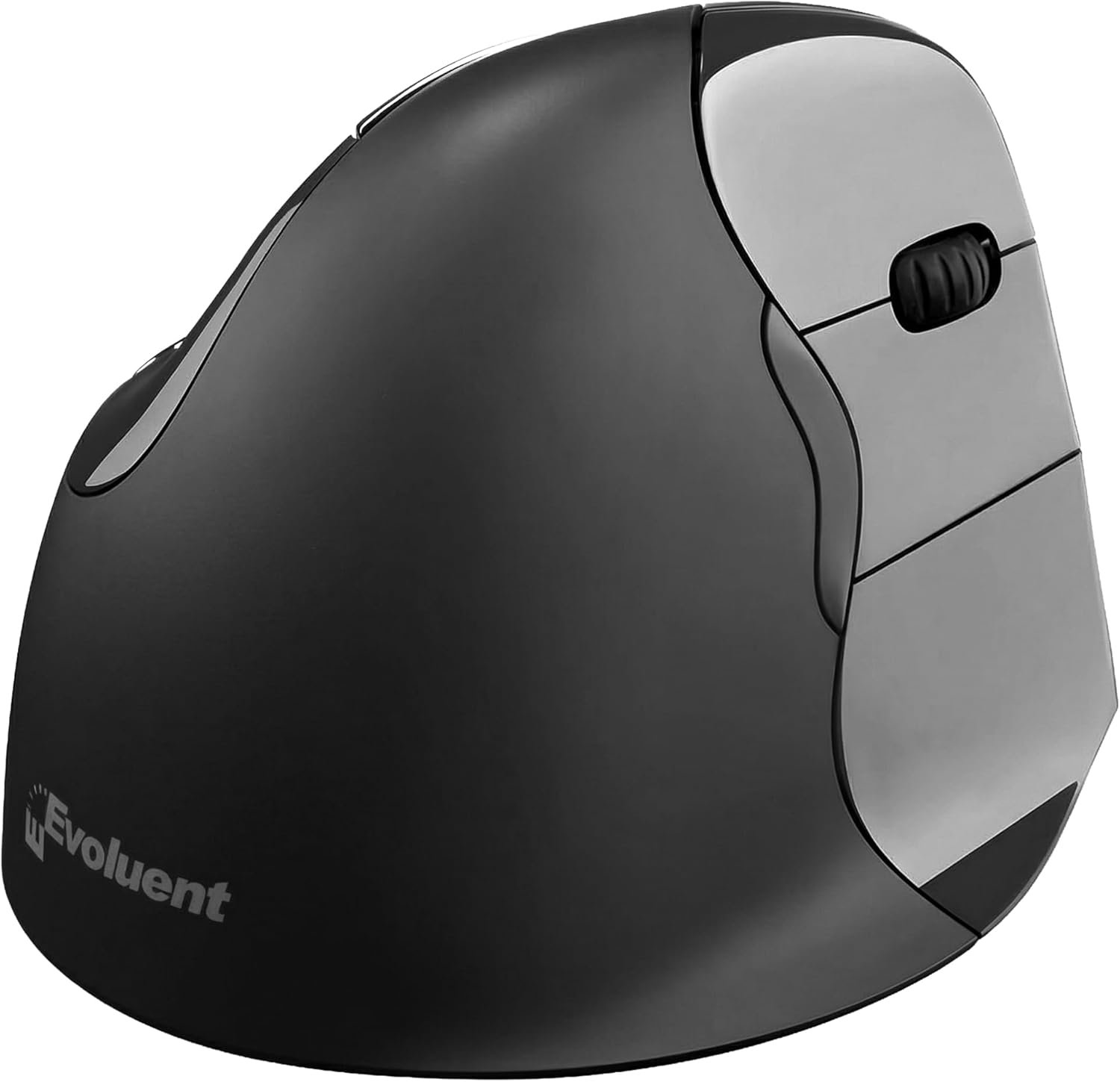
Evoluent – Inventor of The Vertical Mouse – VMC Vertical Ergonomic Mouse Wireless USB/Bluetooth Ergo Design for Right Hand M-L, Sculpted Comfort, 4 Speeds, Copy & Paste Buttons
$79.95
Related Products


Product description


Sculpted Ergonomic Mouse: Experience natural hand posture with this ergonomic wireless mouse engineered for comfort. This ergonomic vertical wireless mouse is designed to help reduce strain and supports daily use with a smooth, upright mouse grip.
Dual Mode Wireless USB/Bluetooth: Switch instantly between wireless vertical mouse and bluetooth ergonomic mouse using the power toggle. This wireless ergonomic mouse delivers reliable connections for home, office mouse use, or travel—no drivers required.
Precision Control With 4 Pointer Speeds: Adjust control easily on this vertical ergonomic mouse. This ergonomic mouse wireless also works as a vertical gaming mouse, with the speed button and light placed neatly on the bottom.
Built-In Copy & Paste Buttons: Two fixed buttons are preset for Copy and Paste to speed up workflow. This mouse ergonomic ergo mouse works as an ergonomic bluetooth mouse or ergonomic computer mouse for fast, simple productivity.
Designed for Comfort & Reliability: Made by Evoluent, creators of the Evoluent vertical mouse wireless line. This wireless mouse ergonomic design is an ergonomic vertical mouse wireless option and a reliable anti carpal tunnel mouse for daily use.
Natural Handshake Position: Ergonomically sculpted to align your hand in a natural handshake posture, this ergonomic mouse wireless reduces wrist strain and fatigue. Ideal as an anti-carpal tunnel mouse or vertical gaming mouse for all-day comfort.
8 reviews for Evoluent – Inventor of The Vertical Mouse – VMC Vertical Ergonomic Mouse Wireless USB/Bluetooth Ergo Design for Right Hand M-L, Sculpted Comfort, 4 Speeds, Copy & Paste Buttons
Add a review
$79.95
J. Rodo –
the next generation of a great mouse!
I’ve been using this mouse for at least a decade and am locked into this design. The click wheel failed on my old one so I needed an immediate replacement. Thanks to Amazon, it was there the next morning. This new one has both Bluetooth and USB dongle connections, so I can use it to drive both my work and home computers – excellent! The new magnet closure battery door is also a nice upgrade (the old one had a design involving a plastic bit that had to be bent and it eventually broke). It also now uses one battery, instead of two.I initially bought this mouse after having a decent amount of wrist pain over many years of using a computer. Using this mouse all but eliminated that and this will be the mouse I always use. I’m using this only for standard desktop work, not gaming, not any sort of art, and with all of the default settings. It takes a while to get used to, but eventually, a normal mouse feels weird, not the other way around. Give it a shot!
Anne Allen –
Best Ergonomic Mouse I have used.
Super product that I have been using for more than 10 years. This mouse has helped me avoid DQT surgery althogether.
loimprevisto –
Missing a few features, but overall a great ergonomic mouse
I’ve been using this mouse for a month now, and I really agonized over whether to give it 4 stars or 5 stars. For me, the mark down came from not being able to reprogram the functions and from the “back” button above your thumb not being a two-part rocker that could be used to go back or forwards. But there is a LOT to like about this mouse!When unpacking it and setting it up, the first thing I noticed was that the bottom of the mouse was as well engineered as the top. It’s very easy to configure it for BT or USB Wireless operation, and there was a USB “extension cable” in the box in case your work space had your mouse too far away from the receiver to get a good signal. There was a convenient selector for the pointer speed that was easy to adjust to my preference, the battery hatch has a snappy magnetic fastener, and the battery life has been outstanding. I have a mild preference for mice with a built-in battery that can recharge via USB, but I didn’t feel like it was lacking with this mouse.I’ve used some other ergonomic mice like trackballs and vertical models, and the main competition I had in mind as I was reviewing this was the Logitech MX Vertical Mouse. This model is slightly cheaper, but computer mice are a fairly durable product and paying a little bit less at the beginning for something that you’ll use daily for years isn’t a huge selling point. I definitely appreciate Evoluent’s long history of designing and refining this product, but making the deliberate choice to release a model that’s not compatible with their MouseManager software doesn’t feel great as an end user. The buttons “special” buttons on this mouse can’t be reprogrammed to match a workflow that is convenient for you, but they are well thought out to enable a lot of hands-free use cases. It took a little while to get accustomed to the special keys, but the built-in copy/paste shortcuts get to be second nature and I also get a fair bit of use out of holding down the “copy” button and scrolling the wheel to zoom in and out. As I mentioned in the beginning, the only thing I really don’t like about the “back” thumb button is the lack of a forward shortcut when it is pressed accidentally or if I just want to return to where I was after jumping back. If it had been a two-part button where pressing the front goes forward and the back goes backwards, it would feel much more convenient.Overall, this is a good vertical mouse and is a fine value for the current $79.95. The ergonomics are very comfortable and it felt good to use it for hours on end. The hard plastic is durable and easy to clean and feels good in my hand, and repositioning the mouse by slightly lifting one corner feels natural and convenient. From a quick glance at their website, Evoluent’s newer/higher-end models solve the lack of a forward button and the general lack of customization with the MouseManager software, so if those features are important to you then it might be best to look at a different model. But if you just need a well-engineered ergonomic mouse then it’s hard to go wrong with this model.
Joe –
Great mouse to relieve wrist pain
I’ve been using these for many years. I used to get a lot of wrist/forearm pain after long counter sessions. I tried track balls, track pads, other mice, you name it.Changing to these Evoluent mice fixed all the pain. I need to support my wrist with a little bean bag for longer sessions, but after adding that I can go all day/night. Didn’t take long to get used to it either.
amazoner –
Programming the buttons for this mouse does not work on Windows 11
Buyer beware – if you use Windows 11 and want to program the buttons it will not work. Evoluent hasn’t updated their mouse management software driver for a few years and now it’s broken for this mouse. If you don’t care about programming the function of your buttons (for example I want the middle large button to double-click instead of right click) then this mouse is fine. If you do care then you will have to purchase the wired version of this mouse which works just fine. I give this product one star because it doesn’t function as advertised.
VJKN –
Ergonomic ease
This mouse completely alleviated my wrist strain from moving a mouse. It also glides very easily!
MrGames –
Save your hand
This did wonders for me. Hand pain gone after years. Thank goodness for this mouse 🙂
Vile Lizard –
Comfortable, easy-to-use mouse for long PC sessions
I do quite a bit of programming/development work, and this mouse significantly reduces wrist tension during long sessions of coding, debugging, and app switching.The sculpted shape supports a natural upright hand position, cradling the entire hand rather than forcing a flat, twisted wrist on the desk. A well-designed thumb rest prevents sliding and provides secure support, while the soft, grippy texture remains comfortable without stickiness over extended use.Buttons are intuitively placed and easy to reach, and the dedicated copy/paste buttons are really handy for moving blocks of code around.The scroll wheel offers smooth, precise action with soft yet distinct clicks. Adjustable speed settings (four levels) allow quick switches between slow, detailed editing and faster navigation or window jumping, with an easily accessible button for instant changes.It performs reliably across surfaces with smooth tracking, supports both USB receiver and stable Bluetooth connections (seamless on laptop and desktop), and handles multitasking without lag.Suited for medium to large hands, the size and shape keep fingers relaxed instead of cramped or tightly curled. Battery lasts several days with auto-sleep for efficiency, and the build feels durable.Overall, it’s highly effective for programmers and heavy computer users seeking sustained comfort and reduced wrist/forearm fatigue over 6+ hour days.