
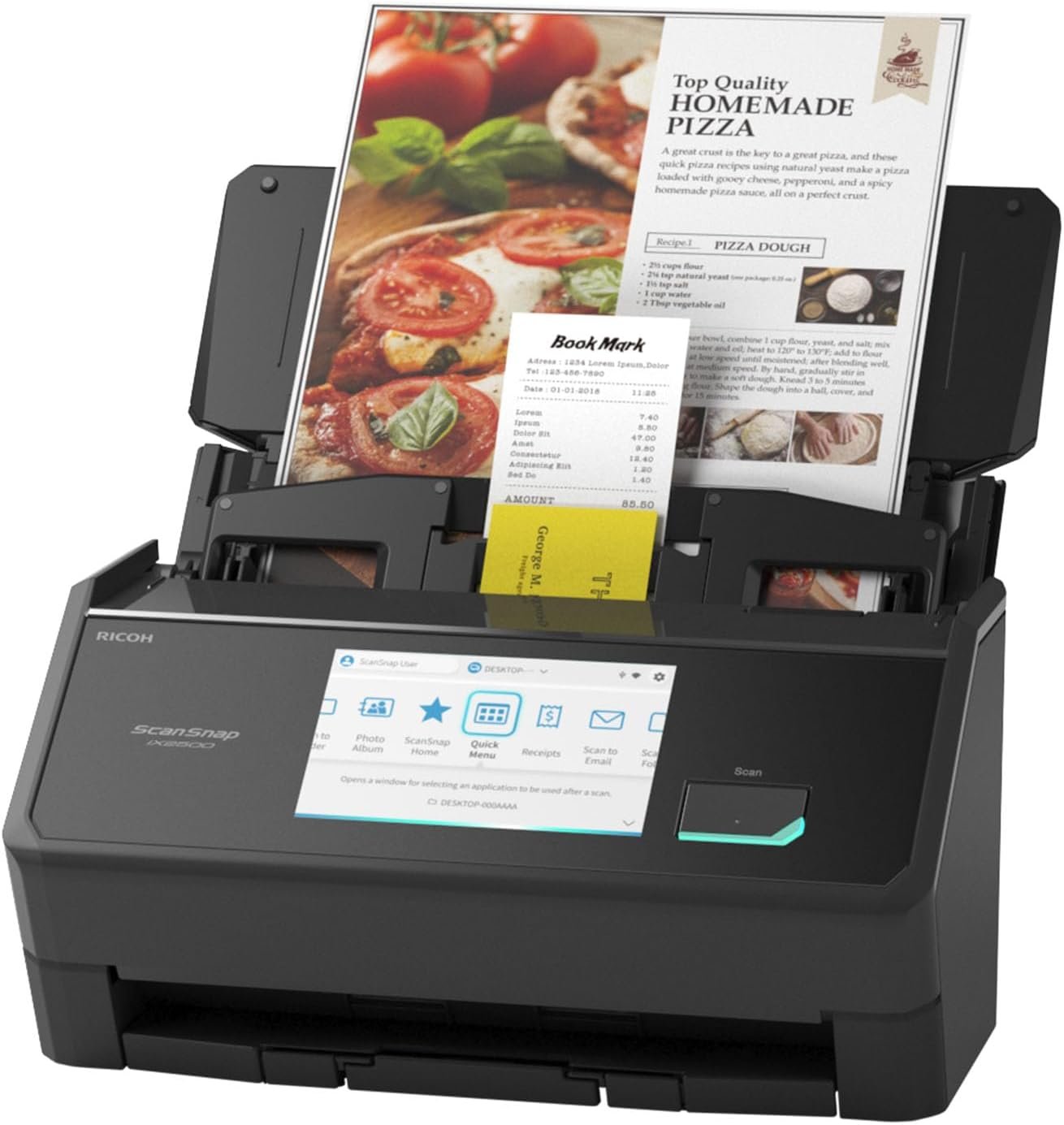
ScanSnap iX2500 Wireless or USB High-Speed Cloud Enabled Document, Photo & Receipt Scanner with Large 5″ Touchscreen and 100 Page Auto Document Feeder for Mac or PC, Black
$399.99
Related Products


The ScanSnap iX2500 stands out with its elegant faceted design, available in both black and white to complement any workspace. Built with premium materials and robust construction, it features a large seamless touchscreen that responds like a smartphone. The high-capacity document feeder can hold up to 100 sheets and it scans double-sided documents at an impressive 45 pages per minute. With USB-C and Wi-Fi connectivity, it offers the flexibility to put the scanner where it’s most convenient. As the upgraded replacement for the discontinued iX1600, the iX2500 builds on its legacy with enhanced speed, design, and usability. ScanSnap Cloud enables deviceless scanning: simply scan directly to your favorite service, no computer needed. Compatible with Mac, PC, iOS, Android, and popular cloud services, it can automatically make text searchable, plus optimize, name, and sort documents into folders and clouds. The exclusive Quick Menu allows for easy drag-and-drop to your favorite apps, helping you manage everything from tax documents to daily correspondence with the legendary ease and reliability of ScanSnap.
OUR MOST ADVANCED SCANSNAP. Large touchscreen, fast 45ppm double-sided scanning, 100-sheet document feeder, Wi-Fi and USB connectivity, automatic optimizations, and support for cloud services. Upgraded replacement for the discontinued iX1600
CUSTOMIZABLE. SHARABLE. Select personalized profiles from the touchscreen. Send to PC, Mac, mobile devices, and clouds. QUICK MENU lets you quickly scan-drag-drop to your favorite computer apps
STABLE WIRELESS OR USB CONNECTION. Built-in Wi-Fi 6 for the fastest and most secure scanning. Connect to smart devices or cloud services without a computer. USB-C connection also available
PHOTO AND DOCUMENT ORGANIZATION MADE EFFORTLESS. Easily manage, edit, and use scanned data from documents, receipts, photos, and business cards. Automatically optimize, name, and sort files
AVOIDS PAPER JAMS AND DAMAGE. Features a brake roller system to feed paper smoothly, a multi-feed sensor that detects pages stuck together, and skew detection to prevent paper damage and data loss
8 reviews for ScanSnap iX2500 Wireless or USB High-Speed Cloud Enabled Document, Photo & Receipt Scanner with Large 5″ Touchscreen and 100 Page Auto Document Feeder for Mac or PC, Black
Add a review
$399.99
Amazon Customer –
Worth every penny if you regularly scan multiple page documents.
Our organization is a non profit that utilizes 5 scanners in 5 locations throughout the year. In total, we scan 25,000 pages a year. These scanners work very well with almost no down time.We have purchased ScanSnap scanners beginning with the IX500. A decade later, I do not think there is a better choice for high speed scanning. The design of the ix2500 is nice, but this one seems a bit lighter and not as well made. The ADF input tray does not have the sliding extension for longer documents. The output tray is thinner and more fragile. The plastic casing of the scanner seems thinner. We transport these in cases that were designed for the IX500 but have worked for the later models as well. I suggest you do the same if you need to move the scanners between locations regularly. Close the ADF lid and output tray when not in use to avoid accidental damage. The scanner starts up and is ready to scan in a few seconds (your experience may vary due to processor speed).The software can be a bit picky. Typically, the best fix is to uninstall it and install the newest version from the internet. Wireless setup requires connecting to your network on the touch screen. If you do not have a static IP address, wireless can be picky. It is also about 10% slower than the direct connection if speed matters. Currently, the drivers work with OS X Sequoia (Intel and Apple processors), and Windows 10 / 11. This covers all of the computers in my organization. For Macbooks, you need to separately purchase a dongle converting USB C to USB A or purchase a USB C to USB 3.0 cable. I use a cable and have not data drop or interference issues that dongles tend to cause. If you goof up and forget your USB 3.0 cable, this scanner works at degraded speed with a regular USB 2.0 (printer) cable. It is nice to go between locations and plug into a much older scanner up to the newest models without drama. The software consistently works the same. Press the scan button and wait for the scanner to finish scanning. The newer models (including this one) have a touch screen with mini menus to help speed up the way you want the scanner to store or process the scans.95% of our scans are tax documents saved in PDF format. The speed is great. The compression isn’t. 4 page color scans are typically 1.2 – 1.5 megabytes. You can set up macros to scan in greyscale or lower resolution, but the macros usually do not survive jumping between models. I scan to disk (Dropbox) almost 100% of the time. The scanner does a great job of making sure the pages are right side up and the text is not crooked. I do not use text recognition much, but it has been accurate once converted in Acrobat. This is not a photo scanner. It does a good job, but the speed is much slower as you increase the resolution. I find the color matching to be good, but flatbed scanners will always provide photo scans with higher resolution and better color matching.If you want to skip using the carrier sheet, place the documents in the scanner grabbing the smallest first, the largest last. The pickup roller is in the center. It usually has no problem grabbing IDs and business cards. The longest page you can consistently scan without an error is legal sized. Staples and glue are the nemesis of ADF scanners. Make sure you remove all staples and fan the pages before feeding to help prevent jams. If you use a ADF scanner regularly, expect it to jam occasionally. This scanner is very easy to clear. Pull the lever on the upper right side and the cover tilts forward 30 degrees. Remove the jammed document and start over. If the scanner “eats” the document, you may need to iron the document flat or it may jam the scanner again. This has only happened a couple times in 10 years, but the fix works well.Long term, servicing these scanners is simple provided you can find parts. Depending on climate, you may need to replace the pickup roller every few years. You will know it isn’t working well when the scanner is having trouble feeding pages through. The image sensor and mirror seems to clean up fairly well with an optical wipe. I have never had to replace the other feed rollers. There is no other user serviceable parts on these scanners. They last several years unless they are abused or dropped. One went out after someone pulled the USB 3 cable too hard and broke the port. The wireless part still functions fine. Another died after the third time it was dropped.When our group grows or someone asks for a recommendation, there is no other brand of scanner I would acquire or suggest.
Mr Mxyzptlk –
What a game changer! Totally worth the investment.
For reference, I am using the ScanSnap software on an M4 iPad Pro and an iPhone 17. I’m not having any issues with the software.Trying to declutter my life by scanning most of my old receipts, investment and bank statements, tax documents, instructions, and reference materials. Didn’t want to spend extra money unnecessarily, so I started scanning with the Epson ET 4750 that I already owned. It was okay for single page scans or if I only wanted to scan a few uniform pages together. If I tried to scan more than 6-7 sheets and/or they were slightly different sizes, different thicknesses, or creased, it was probably gonna result in a jam. Tried thoroughly cleaning it and making sure the documents were as flat as possible, but scans were often unsuccessful. This lead to lots of frustration and wasted time, resulting in having to scan the same docs multiple times or even resorting to single page scans on the flatbed to avoid errors or failed scans.Purchased the ScanSnap iX2500 based on reviews and features I was looking for. Questioned my own sanity for spending this much on a dedicated scanner. But, when I got it and actually started using it, I was amazed. Right out of the box, it flawlessly scanned a 34 page stack of invoices in seconds! Completely accurate and high quality scans too. For comparison, if everything went perfectly, it would have taken my old machine about 4-5 minutes to complete the same scan. Realistically, there would have been misfeeds and jams, so it would probably take 15-20 mins.I really don’t have any complaints, but if I had to give one, the naming/renaming of your scans could be a tad easier, but it isn’t bad at all.This machine is fast, accurate, compact, does duplex scans, rotates pages automatically, and using the included guide, it can scan stacks of full page receipts along with standard store receipts for easy compilation. Everyone has different needs and may have a different experience, but I’m very satisfied with this purchase and would absolutely buy it again. Now, I open my mail, scan all the keepers and shred everything right after. 5-10 mins a day and I no longer have crates full of old documents lying around. I would give it 6 stars, if I could!
chumley –
Great Scanner
This is a great scanner so far. I’m in the midst of a huge project so we’ll see how it holds up. The pictures are excellent. It scans into PDF or JPG formats but thats it. In both formats the pictures seem to be of equally high quality. In PDF format you can put multiple pages into the same file, but in JPG format you get only one side of one picture, then it seems to force a second file. I havent found a way to fix that. So I scan almost exclusively to PDF, and my Windows does not preview PDF files. You have to click them. I’ll figure that out down the road somewhere. It tells you when the lenses need cleaned and its easy to do, and it doesn’t mangle the pictures. Straight in and straight out.I’ve found the batch scanning to be less than stellar. It often drags in several documents at a time. Best to set them up for one at a time. I like that it lets you review the file before you save it, and there are buttons to flip the documents around if needed. You dont need to use the guides for pictures of any size. Even the tiniest ones feed right in. The software straightens out the scan even if you put the picture in at an angle. It is not set up for photographic negatives so they dont scan well.I dont use their cloud options so have no idea what that does.Overall I’m very happy with this.
Jeff –
Fantastic. Works perfectly. Great to digitize our old photos easy to use.
The Cimmerian –
Compacto, fácil de configurar con ScanSnap Home.Compatible con iCloud.Automáticamente escanea las hojas con la rotación correcta aunque las pongas de cabeza; de igual forma, corrige la trayectoria de la hoja, por lo que no e escanean chuecas
Adhemar Leite Ferreira –
Fácil de operar, não precisa nem ler o manual, se não quiser. O programa disponibilizado para o telefone é completo e fácil de usar, também. O fato de também poder ser sem fio é o melhor, o faz utilizável por qualquer pessoa da casa ou da empresa que tenha acesso ao scanner. Excelente opção.
Judy Alguire –
Excellent scanner, the best one on the market at the moment. It’s really worth the investment & often goes on sale when Amazon does their deals.Essential for the modern office, particularly in the digital age we live in now.
Terry Archibald –
The setup was very easy and the scanner has been working well so far. The fact that you can scan directly to a Dropbox folder is a big plus, although it’s a shame that you cannot do the same with iCloud folders. I was hoping that the automatic file naming feature would be a time-saver, but it is not reliable at all. Also, the online user manual looks like it was written in 1990… Still, the scanner itself is working very well.