
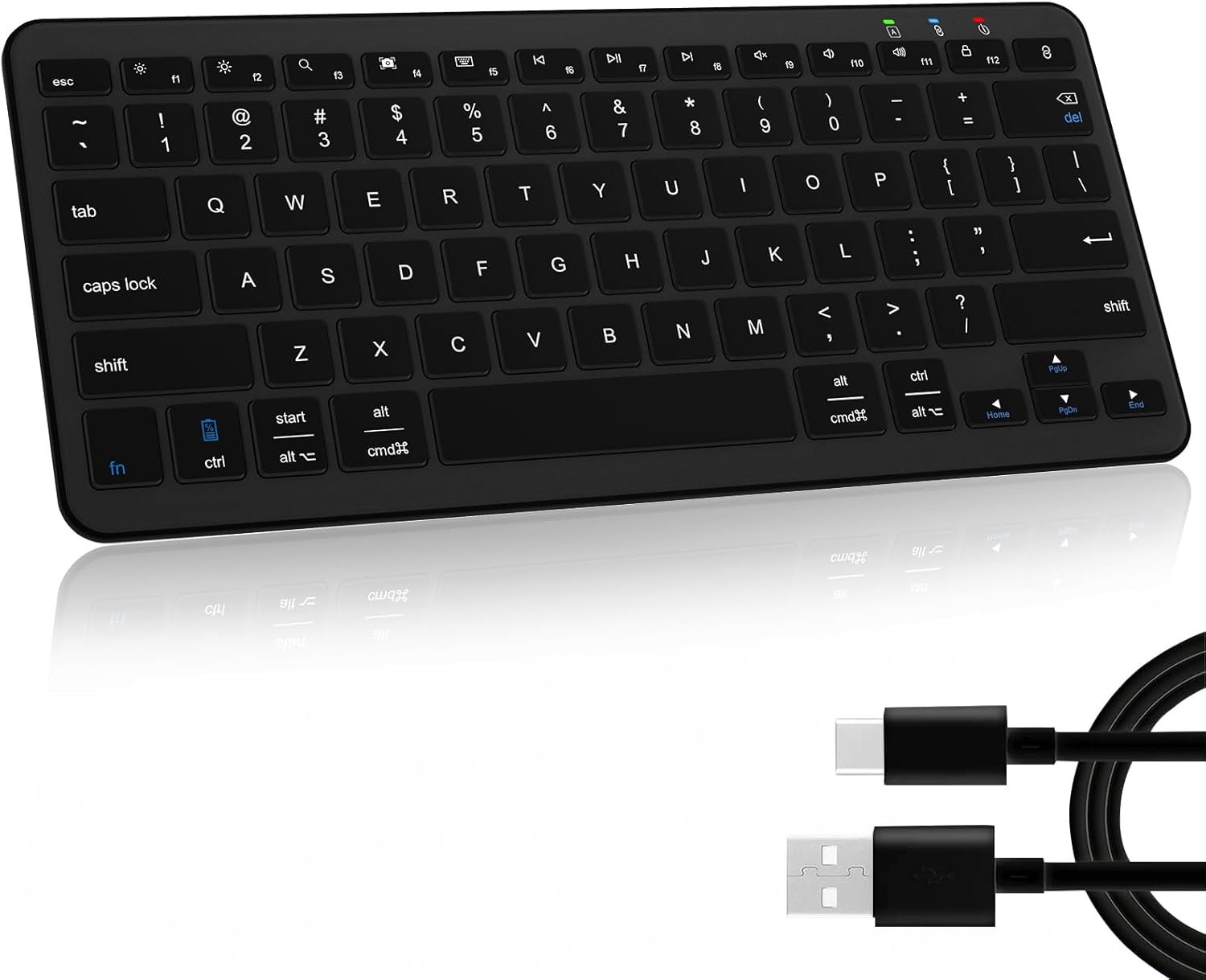
Bluetooth Keyboard, Ultra-Slim Wireless Keyboard for iPad, Rechargeable Ergonomic Computer Keyboard for iOS, Android, Windows PC Tablets Phone, Black
$16.99
Related Products


Product description
Qulose Wireless Bluetooth Keyboard 
Note:
1. This Bluetooth Mini Keyboard could automatic recognize the system, you needn’t press any specific function keys.
2. The wireless keyboard enabled to support up to 1 devices at the same time.

This mini Bluetooth keyboard not for iMac / Windows 7 / XP / Vista.
How to Pair the Qulose Keyboard 
Step 1: On the keyboard, slide the power switch to the ON position.
Step 2: Long press “Bluetooth Pair” Key for 3 seconds to active Bluetooth of keyboard.
Step 3: Turn Bluetooth ON in settings on your device.
Step 4: Select “Qulose Keyboard” and click to connect it.


1 Esc Key Function 2 Scissor Switch Keys 3 Ergonomic Keyboard 4 Shortcut Keys


1 Rechargeable Battery 2 Stable 5.0 Keyboard 3 Mini Size Keyboard 4 Travel Anywhere
4 Colors to Choose , find your own color to brighten up the workspace
Add to Cart
Customer Reviews
4.2 out of 5 stars 1,746
4.2 out of 5 stars 1,746
4.2 out of 5 stars 1,746
4.2 out of 5 stars 1,746
Price
$16.99$16.99
—
—
—
Compatibility
iOS, Windows, Android
iOS, Windows, Android
iOS, Windows, Android
iOS, Windows, Android
Scissor-Switch Keys
Yes
Yes
Yes
Yes
Power
Type -C charge
Type -C charge
Type -C charge
Type -C charge
Connected devices
Up to 1
Up to 1
Up to 1
Up to 1
Connectivity
Bluetooth
Bluetooth
Bluetooth
Bluetooth
Color
Black
Silver White
Silver Black
White
Rechargeable
Yes
Yes
Yes
Yes
Is the keyboard compatible with any system or device?
The wireless keyboard is compatible with iOS, Windows and Android system in Bluetooth mode. Note: Not compatible with iMac, Windows 7,Windows XP, Windows Vista system.
How many devices can be connected to the keyboard at the same time and how to connect?
Qulose silent Keyboard can be connected to one devices at the same time. It could automatic recognize the system, you needn’t press any specific function keys.
Esc key not work ?
The esc key is not home screen function. It acts like a “Cancel” button on most computers. For example, in input dialogs, you can remove an incorrect entry using the Escape key to clear the input field.
How to use multimedia or F1-F12 function?
The F1-F12 functions need to be activated by pressing Fn + F1-F12 keys. Please note that for Android and iOS system users: The F1-F12 key is not function.
How long does it take for the keyboard to enter sleep mode if not in use?
This wireless Bluetooth keyboard will enter sleep mode after remaining idle for 30 minutes. To wake the keyboard, press any key and wait for 3 seconds.
【 𝐀𝐮𝐭𝐨 𝐑𝐞𝐜𝐨𝐠𝐧𝐢𝐳𝐞 𝐎𝐩𝐞𝐫𝐚𝐭𝐢𝐧𝐠 𝐒𝐲𝐬𝐭𝐞𝐦 】 This wireless Bluetooth keyboard for iOS, iPadOS, Android, Windows system. It could automatic recognize the system, so you don’t need to manually select compatibility. Any Bluetooth customized for all iPad , iPhone, iPad, tablet, smartphone, desktops, laptops, notebooks, computers and more. Suitable for families, offices, and travel. Note: The mini Bluetooth keyboard enabled to support up to 1 devices at the same time.
【 𝐒𝐭𝐚𝐛𝐥𝐞 𝐁𝐥𝐮𝐞𝐭𝐨𝐨𝐭𝐡 𝐂𝐨𝐧𝐧𝐞𝐜𝐭𝐢𝐯𝐢𝐭𝐲 】 It is easy to pair with your device by Bluetooth. The working distance is up to 33 feet.This Bluetooth keyboard work with all your Bluetooth devices such as tablets, mobile phones and laptops, etc. It could automatic recognize the system, you needn’t press any specific function keys.
【 𝐑𝐞𝐬𝐩𝐨𝐧𝐬𝐢𝐯𝐞 𝐓𝐲𝐩𝐢𝐧𝐠 𝐄𝐱𝐩𝐞𝐫𝐢𝐞𝐧𝐜𝐞 】 Designed with unique mechanical scissor keys, the Bluetooth keyboard for iPad are highly resilient and noiseless, providing you with a fluid and comfortable typing experience. Ergonomic design provides a comfortable posture angle for your wrist while typing. This mini Bluetooth keyboard type fast and instant access your music, brightness, search, volume, etc by multi-media hot keys.
【 𝐏𝐥𝐞𝐚𝐬𝐞 𝐍𝐨𝐭𝐞 】The keyboard does not compatible with iMac, Windows 7, Windows XP, Windows Vista system.
【 𝐁𝐮𝐢𝐥𝐭-𝐢𝐧 𝟑𝟎𝟎𝐦𝐀𝐡 𝐋𝐢𝐭𝐡𝐢𝐮𝐦 𝐑𝐞𝐜𝐡𝐚𝐫𝐠𝐞𝐚𝐛𝐥𝐞 𝐁𝐚𝐭𝐭𝐞𝐫𝐲 】The keyboard requires charging via a USB Type C cable, quite convenient and quick charging. No need to replace the battery anymore, charge for 3-4 hours and last for 100 hours or more. ( Only a USB A to Type C cable comes with. )
【 𝐀𝐮𝐭𝐨 𝐒𝐥𝐞𝐞𝐩 】With the smart auto sleep feature design for power saving, the Bluetooth keyboard will enter auto sleep mode after 30mins of inactivity. Just press any key and wait 2-3 seconds to wake the keyboard.
【 𝐂𝐨𝐦𝐩𝐚𝐜𝐭 𝐚𝐧𝐝 𝐋𝐢𝐠𝐡𝐭𝐰𝐞𝐢𝐠𝐡𝐭 】 This wireless keyboard for iPad is slim and portable, compact size (11.29*5*0.77in) and light weight (14.82oz) easily put into your laptop bag or backpack, easy to carry for home school office and during business travel.
13 reviews for Bluetooth Keyboard, Ultra-Slim Wireless Keyboard for iPad, Rechargeable Ergonomic Computer Keyboard for iOS, Android, Windows PC Tablets Phone, Black
Add a review
$16.99
B.Denasia –
Great Bluetooth Keyboard (White)
Definitely worth it! connects well! I just have to be better on point with charging it! i’ve used it for a few months now, and it’s working just fine and feels really good (not too cheap or flimsy) Battery life, i’d say is okay, I haven’t used it for an entire day, but it does need to be charged to connect well. The size is well to travel with! even in a medium bookbag I’m able to take it along!. Typing is easy too! the keyboard keys don’t stick and i’m able to type pretty comfortably! i’m using it now to create this review so I like it! It’s a nice solid keyboard and I love the color.
B’Davka –
It’s a Great Bluetooth Keyboard: Works Well!
Wow, gotta say, This thing is great! It connected readily to my IPhone, is easy to type on, and I love that it can be recharged (because it doesn’t require batteries). I use it for texting. To date, I’ve experienced none of the faux paus that typically accompany blue tooth keyboards, such as delayed typing or picking up unwanted querty text, issues I have with an older bluetooth keyboard I keep at home. In sum, this item is great, and I recommend it to others.
mr0017 –
Solid keyboard
Needed a wireless keyboard to replace an expensive Apple one, and this one does the job for a 1/4 of the price. Was easy to set up and holds a charge for a long time. Only negatives are that the keys are rather loud. I kind of like the clacking noise – feels old-school – but it may annoy some people. It also takes a second or two to connect to bluetooth everytime you start type after you’ve been away, but it’s a very minor annoyance.
A. Trudeau –
Solid though imperfect replacement for laptop keyboard
I bought this keyboard as a temporary replacement while waiting for the replacement part for my Lenovo laptop. Specifically, I needed something in this form factor for travel (my spare full-size keyboard just isn’t practical for that). This review is based on this use case.Overall, I strongly recommend the keyboard as evidenced by the 5-stars. I cannot speak to long-term reliability, but I’ve used it heavily the last few days to make sure I’m used to it when I travel over the holidays. I was surprised that the keyboard felt as good to type on as it does for its cost.The battery exceeded my expectations. I used it through a full day of work coding, emails, etc. I purposely didn’t turn it off on breaks and such. It needed charging part way into the 2nd day which I did while I worked. The fact it made it the entire work day is all I needed.The keyboard didn’t get automatically recognized when I awoke my laptop in the morning. It went into a pairing mode and I had to connect it on my laptop. I had initially pushed a letter habitually on the keyboard to initiate the awake (not going to work on a Bluetooth device) and once pairing finished that key repeated continuously until I pressed another key. A small bug in an otherwise solid keyboard.There are also a few keying anomalies that you should be aware of:1. The Delete key is awkward. You need to use the Fn+Backspace. For most people this is not going to be a problem, but in my case it has been a speed bump.2. Speaking of speed bumps, the F12 key by default locks Windows. I’ve hit it often instead of Backspace due to muscle memory on a keyboard that has a larger Backspace key. I realize that key is useful when used on some devices, but I would’ve preferred it to go unset for Windows.3. CTRL+END and CTRL+HOME don’t work. End, Home, PgUp, and PgDown are all alternates on the arrow keys when you use the Fn key. The Fn key doesn’t appear to support key modifiers like Ctrl. Therefore, you should expect that any keyboard shortcuts in any application that need that aren’t going to work. For example, CTRL+Fn+Right Arrow (End) doesn’t move to the end of the document.Finally, it’s worth noting that the package came in the manufacturer packaging. That’s not terribly uncommon, but the packaging is not appropriate for shipping. I’m lucky that the keyboard was in one piece let alone functional!
Amazon Customer –
Smart Pick for Wireless Freedom
If you’re considering a rechargeable Bluetooth keyboard, you’re in for a sleek, cable-free experience that’s both eco-friendly and convenient. This product is perfect, compact and long battery duration. Is very funtional and compact sizes and very light to manage and travel with the keyboard.
Sean O’Hara –
Constant Recharging for Me
Useless for me because if I charge it all night it does not even last through the next workday. The more I used it, the shorter the charge lasted. Amazed that the reviews are so positive. Maybe mine was defective?
Thomas Rohan –
Excellent Blu-tooth Keyboard for working professional writers!
Spacebar requires two taps? (OK update on my review. 6/24/2025) The space-bar issue WAS NOT THE KEYBOARD. This keyboard works great! The issue was MICROSOFT. The seller was informed that there was a defect (it happens sometimes) because the spacebar required two taps to work. Microsoft was the problem, not Qulose. The seller promptly sent me a replacement which alerted me to the source issue: MICROSOFT WORD and my Samsung Tablet settings that others have had the same issues with. 10 STARS to this seller which went above and beyond service, to help me, by providing a 2nd keyboard that I did Root cause analysis which revealed the keyboards worked perfectly and thus, now I can help others with this. A GREAT KEYBOARD. Settings with Microsoft Word and Samsung Keyboard were the issue. After adjusting each accordly I was back to typing away at 60+ WPM . Thank you!!!
Jimmy –
Impressive Battery Life
This thing is awesome, the battery life is very nice since I bought it, I just charged twice. Is very light and easy to carry, the keys still working despite the fact I use it in my 9-6 job every day.
Amazon Customer –
I bought this for my sister. She has been using it for almost a year. And despite the cheap price it’s actually a pretty good quality key board. It’s not a full size keyboard. But, I didn’t want a full-size one. So I like the small size and portability. It connects to both my sister’s Macbook and her PC. For the price this keyboard is great. Oh and the charge lasts a really long time. You don’t have to recharge it very often at all, which is great.
Huppée –
Léger, compact, s’appaire en deux temps trois mouvements et aucune latence. Autonomie plutôt longue (je ne l’ai chargé qu’une fois depuis que je l’ai, ça fait deux mois, et je l’utilise régulièrement, pas de manière intensive mais quasi quotidiennement). Remplit parfaitement ses fonctions ! Il apporte beaucoup de confort lorsque je travaille sur téléphone.
Friedhelm Wolters –
Diese Tastatur ist unschlagbar günstig und sehr gut. Sie lässt sich kinderleicht anschließen und ist sonst ohne Probleme. Nachdem ich mehrere andere Tastaturen verworfen habe, habe ich nun einen tollen Kauf getätigt.
Jérôme Trouvé –
Très bon clavier acheté pour remplacer celui de ma tablette DELL.Autonomie très bonne et connexion stable et facile. Recharge rapide.Pratique, ne prenant pas trop de place (fine) mais avec des touches accessibles comme sur un véritable clavier.Les raccourcis sont nombreux et pratiques : tes que le “capture d’écran” par exemple.Il est bien en” AZERTY”.Bref un très bon clavier de remplacement et nomade, ou en plus sur la TV par exemple.
Jorge –
Die Tastatur funktioniert einwandfrei. Obwohl mein iPad auf Spanisch eingestellt ist, gibt es keine Probleme bei der Nutzung – die Tasten reagieren sehr angenehm beim Tippen und fühlen sich hochwertig an. Auch die Verbindung klappt problemlos und ohne Verzögerung. Besonders praktisch finde ich, dass ein USB-C Kabel zum Aufladen direkt mitgeliefert wird. Insgesamt eine sehr gute Wahl für alle, die eine kompakte und zuverlässige Bluetooth-Tastatur suchen.