
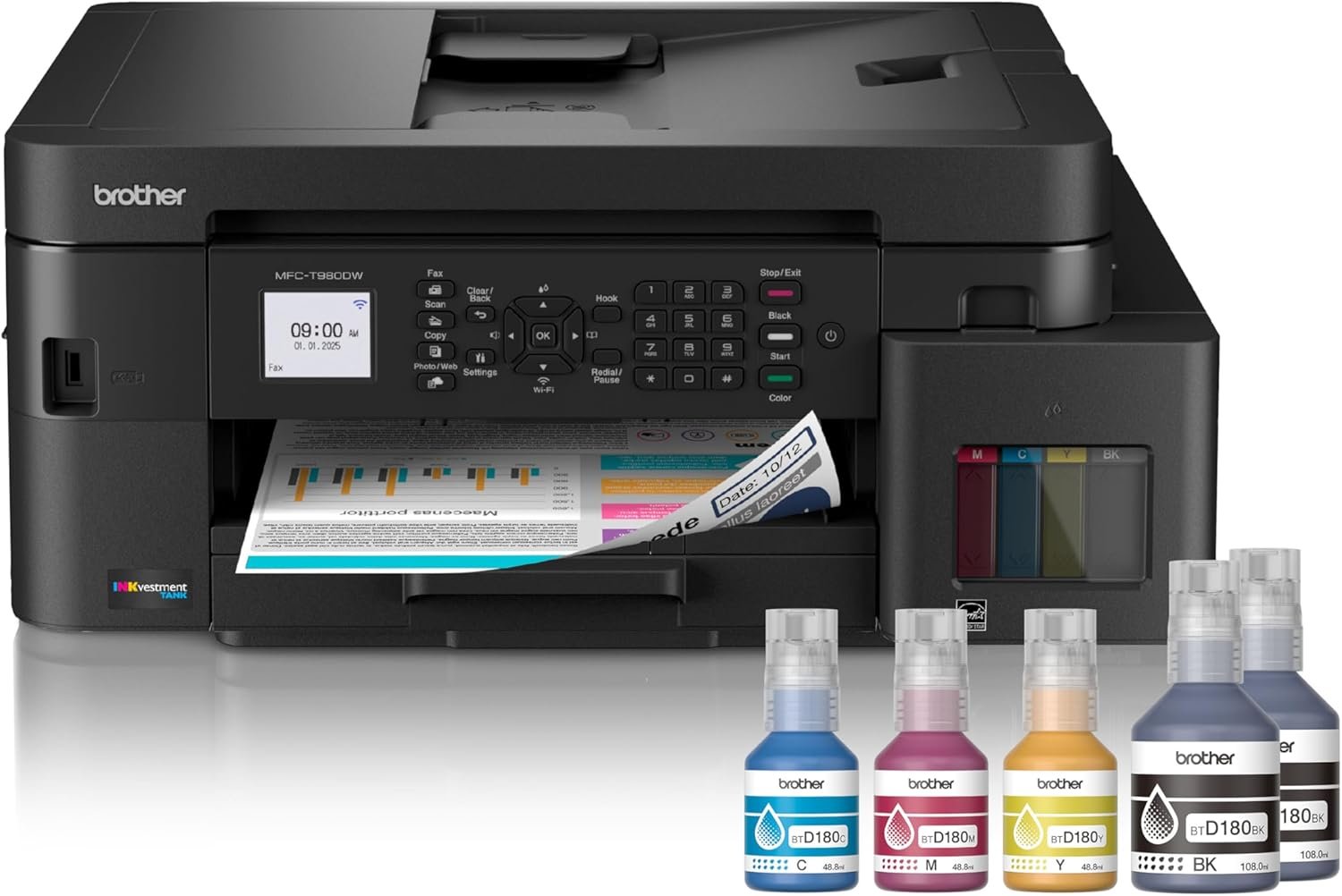
Brother INKvestment Tank 980 Wireless and Ethernet Color Inkjet All-in-One Printer with Multipurpose Tray | Includes up to 3 Years of Ink in-Box(1) and Limited Warranty(2) (MFC-T980DW)
$455.00
Related Products



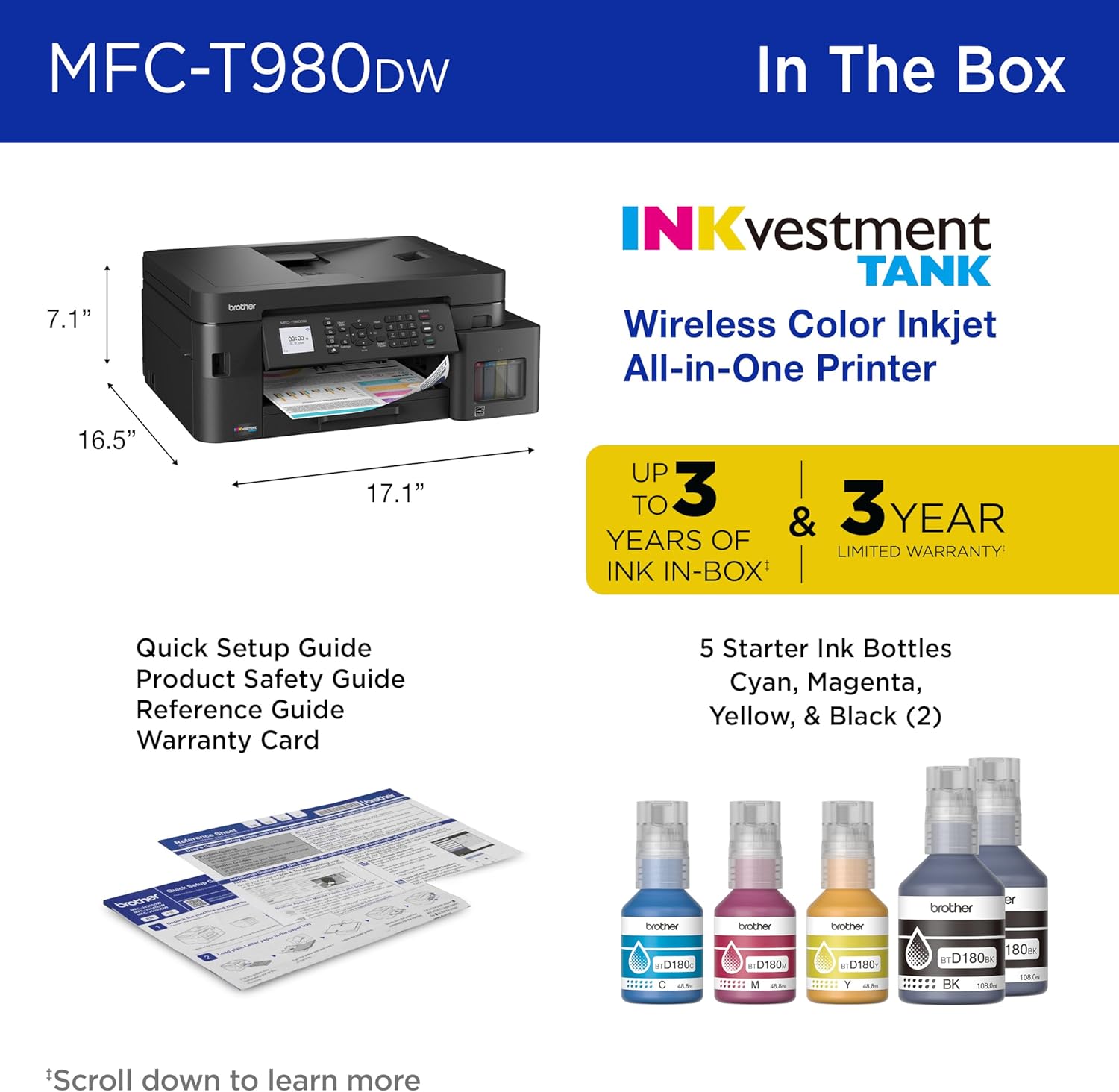
With ink value that speaks for itself and reliable productivity-boosting features, the Brother INKvestment Tank MFC-T980DW Wireless Color Inkjet All-in-One Printer with Duplex Printing will ensure that your small office or business runs smoothly. Enjoy worry-free printing with a 3-year limited warranty(2) and Brother customer service. Innovative ink tank technology provides an easy-to-replenish solution and includes enough ink to print for up to 3 years(1), with spill-free bottles that refill the ink quickly, and a keyed design that prevents adding the incorrect color to each slot. Plus, you’ll do your part to reduce cartridge waste in landfills. For all your professional and personal printing needs, from business presentations to airline tickets, this printer includes convenience-driven features like a single-sided automatic document feeder (ADF) and flatbed scanner/copier capabilities, 150-sheet paper tray(4), and 80-sheet multipurpose tray(4) for flexible paper handling. Plus ethernet or wireless connectivity and the ability to print from virtually anywhere with the Brother Mobile Connect app(7). Produce beautiful prints in vibrant color and bold blacks at fast print speeds with Brother Genuine BTD180 Ink bottles – the only brand we recommend for your Brother printer. Disclaimers: (1) Based on average monthly print volumes of 200 pages at 60% black pages and 40% color pages. (2) Maximum total warranty coverage is 3 years. (3) Requires an internet connection and an account with desired service. (4) Maximum Capacity based on using 20lb. paper. (5) Based on ISO/IEC 24734 (after first set of ISO test pages). For inkjet print speed methodology, please visit www.brother-usa.com/printspeed. (6) USB Host JPEG only. (7) Free Brother Mobile Connect App download, wireless connection and connection of an eligible printer with Brother are required. Compatibility may vary by device, operating system and country.
INNOVATIVE REFILLABLE INK TANK TECHNOLOGY: Brother Genuine no-spill bottles quickly refill the tank in 30 seconds for color, 65 seconds for black. The design prevents inserting the incorrect bottles for each color. Includes up to 3 years of ink in-box(1).
BEST FOR SMALL OFFICE AND SMALL BUSINESS: This multifunction printer does it all, enabling you to print, copy, scan, and fax on one convenient, compact printer. Brother inkjet printers produce beautiful, vibrant color prints you can be proud of.
CLOUD APP CONNECTIONS: Print from and scan to popular Cloud apps(3), including Google Drive, Dropbox, Box, OneDrive, and more on the printer’s convenient 1.8” color display.
PRODUCTIVITY-FOCUSED FEATURES: Automatic duplex (2-sided) printing, 150-sheet paper tray, 80-sheet multi-purpose tray, 20-page single-sided automatic document feeder (ADF)(4). Fast print speeds up to 17 pages per minute (ppm) black/16.5 ppm color(5).
WIRELESS, WIRED NETWORK, AND USB CONNECTIONS: Connect your way. Interface with your printer on your wireless network, ethernet, or via USB connection. A front USB Port provides easy print-from or scan-to functionality(6).
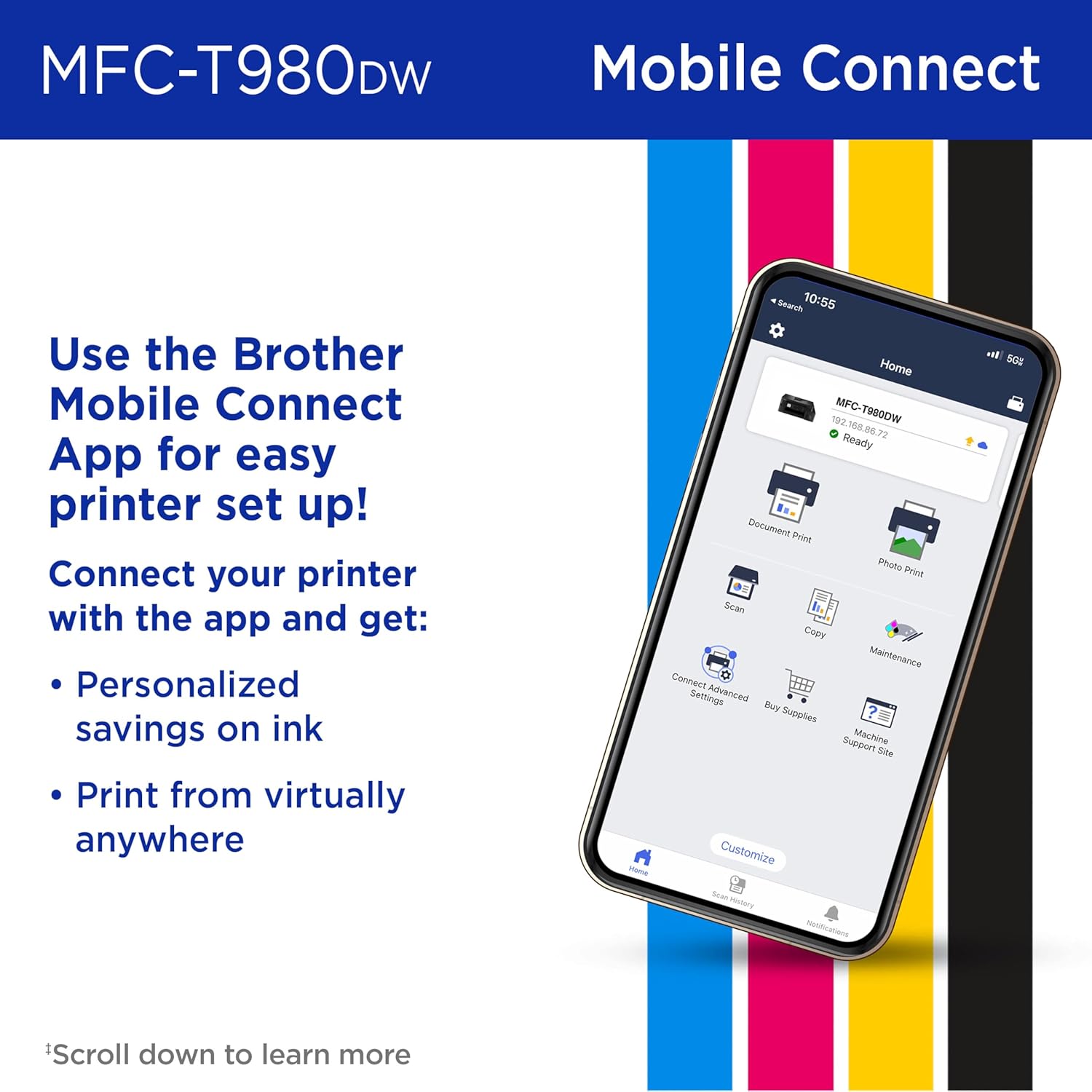
THE BROTHER MOBILE CONNECT APP: Put the power of printing at your fingertips. Go mobile with the Brother Mobile Connect app(7) that delivers easy onscreen menu navigation for printing, copying, scanning, and device management from your mobile device.
CHOOSE BROTHER GENUINE INK: Reliable performance you can count on. Brother Genuine Ink is quality-tested to work seamlessly with your Brother printer. Choose Brother Genuine BTD180 Ink bottles, the only brand we recommend for use with your printer.
13 reviews for Brother INKvestment Tank 980 Wireless and Ethernet Color Inkjet All-in-One Printer with Multipurpose Tray | Includes up to 3 Years of Ink in-Box(1) and Limited Warranty(2) (MFC-T980DW)
Add a review
$455.00
Donald C. Brunell –
Fee free
I am very happy with my Brother printer. It was easy to setup and no recurring fees for ink! I had used HP forever but got tired of their recurring fees for ink and all the controls preventing me from using cheaper refills.
Nicolette Towery –
Quality
Great printer!! Quality product prints fast, cones with enough ink for a entire year and easy set up.
Amador Giles –
Return the printer, thank you Amador Giles
I being having trouble with this printer since I bought it, now it cuts off in about 10 seconds after I make a copy it turns off, I cannot regulate the ink same times is normal and sometimes is very dark, if I connected to my phone, it works a couple of times and stops and I can’t print any more, I had enough I just want to return it and get my money back
allen wagner –
Ok
So far so good
Bryan Andrews –
printing is not as good compared to comparable HP printer
poor quality printing …the colors are not bright like our HP printer was …going to return it and get the HP
Amazon Customer –
Brother’s New Ink Tank System
The Brother inkjet lineup is a little confusing. They have two different Inkvestment systems, one in which you replace the tank, and this newer version in which you refill the tank. I believe this newer system is a response to Epson’s long running EcoTank series, of which I have used two different models over the last ten years. There are, as I understand it, three printers in this new range; the model reviewed here is the most capable.This printer is positioned as a small office printer. I would be hesitant to buy it on two counts. First, the scanner is not duplex. Second, there is only a single paper tray and it is limited to 150 sheets. The Epson models going head-to-head against the Brother 980 offer duplex scanning and larger trays. Performance-wise, the 17ppm rate is about what you get right now. Print resolution falls short of the stated resolution of comparably priced Epson models.I am not too impressed with the ink reservoirs. These feel a bit flimsy and oddly angled outward. Be very careful when loading these inks (Brother, Epson, etc.) as any spill can be a nightmare to clean up. The overall build quality also strikes me as not as robust as I would like for a small office printer. This is closer to what I expect for a home printer. One design oddity is that the telephone jacks are on the left side, but the ethernet and USB jacks are hidden underneath the scanner bed (what you would need to lift to get to a paper jam). I would have preferred all cable connections to be in a single, easily accessible location.With respect to the packaging, watch out for the inks at the top of the box (see my photo). You don’t want a box cutter to slice through a bottle. And I found it safest to remove the printer by laying the box on its side once I determined which direction was up for the printer, and then sliding it out onto the floor. The printer is fairly lightweight.I am a fan of using ink tanks and would probably never return to buying whole print cartridges. I have seen this technology work well for me for the last decade. I think Brother is wise to try out its hand with this system, though I think it needs to evolve a bit and offer more capability to compete.
Jack Petri Jr –
Nice printer.
Nice print quality and easy to set up with the phone app. Filling the ink is very easy and not messy at all. Got this to replace our piece of junk HP. Will see how it holds up over time.Update: realized it can not do full duplex scan/print from the automatic document feeder. Am returning because I need that feature. Otherwise I would still recommend
Stacy –
Excellent Printer with Smart Design and Smooth Performance!
I recently purchased the Brother INKvestment Tank 980, and I’m extremely impressed with its overall quality and functionality. The build feels solid and well-designed, giving the impression of a premium product. One of my favorite features is the refillable ink tank system. Yyou can easily see the ink levels right on the front, which makes monitoring and refilling simple and stress-free.Setup was a breeze. It connected to my Wi-Fi network within minutes, and I was printing almost immediately. The Brother app is very user-friendly, making quick printing and scanning tasks effortless. The scanner is fast and offers flexible options for different scanning needs, which is great for both personal and work use.The auto feeder for copying works flawlessly. It pulled in multiple sheets smoothly without any jams, which is something I’ve struggled with on other printers. Overall, the performance has been consistent and reliable.If you’re looking for a printer that combines easy maintenance, wireless convenience, and strong all-in-one functionality, I highly recommend the Brother INKvestment Tank 980. It’s a fantastic choice for home offices or anyone who wants a hassle-free printing experience.
LM –
This is an all in one printer. The two mains are to print and scan. I haven’t used fax in years unfortunately. It has both wifi and ethernet, which was important to me. Wifi is convenient, but I still don’t trust it to be my main connection. So I set it up via wifi and the app, but then switched over to ethernet for the foreseeable future. Computer connection was easy once ethernet was connected. Saw it on the network right away, and no software needed. Printing from my phone also worked without issue. Not sure if it was because I already had the app on my phone, but when I went to print something, it was the first printer as my option. Print quality is good. I tried doing a nice colour photo as my test, since all my black text documents look like normal, and it was great. And scanning gave me no issues either. I never use the copy option usually, but I used it here, and worked very wall. My only negative really is the build quality of the device. It’s a lot of plastic, and I’m scared to bend and break something. Every flap feels weak, and I worry if I pull too hard, I’m going to snap off a cover. Currently on sale for $499.99. That’s a much easier pill to swallow than the $649.99 original price. It’s a good printer, but over $500 is tough to spend on a printer scanner, but the sale price makes it worth it.
Honest Reviews –
There is a very high start up cost to getting this printer but I have to say the take away and overall cost save was actually well worth it by the end of it.I’m going to start with just the raw difference between this liquid ink taking printer vs a cartridge inkjet printer. Which was one thing. Cost per page. I have actually done an insane amount of research into printers over my time, and one thing I always noticed is cheap printers equal expensive ink refills with low yielding cartridges. Where more expensive base line printers typically took cartridges that provided a much higher higher yield for maybe 25% more of the cost of your lower end printers.I found this new ink inkjet printer was the new turning point of yield vs cost. The start up cost is very high with its listed price, but the yield started to turn into penny’s per page.And that is where I think the value comes into play with the high cost of the printer.Yes it has all the features needed, double sided, fast printing times, scanning, copying etc but you can get all those features for $150 with maybe taking a hit on the speed.The quality is no different from what you will get from your mid range printers, the connectivity is the same.This is purely an investment for high printing people, and as the model states it’s an inkvestment.You are not getting a super printer that you have never seen on the market before. You are getting a printer that has every feature that is available on the market with a lost cost per page.Refilling the printer was really easy too, the ink bottles did a freer job of cutting off flow immediately and avoiding any spillages or leakages from happening. I also liked that you could see your levels real time while using it.If I could recommend this, I would say yes but only if you’re a heavy printer. This printer makesSelf printing photos competitive with going to an outlet to have them printed off strictly due to its low refill cost. To put it in perspective the black ink refill is $25 with a 7500 page yield each colour is $15 with a 5000 page yield.If you are a mild printer I don’t think it would be worth it.
Blackrain –
I have been using this printer for several weeks now before submitting this review because I have really been on the fence about it. I have a great deal of experience with the Epson line of refillable inkjet printers, dating back about 5 years ago to present and I must say, this Brother printer brings nothing new to the table. Nothing. There is nothing special, no amazing new tech, it is offering all the same features as any number of printers on the market, many going for half the price.Is this a low cost printer ? To buy absolutely not, in fact it is pretty expensive. To run on the other hand, over the long term, yes, it is a lost cost printer. I firmly believe however that you need to be a very heavy user or have this machine working as a high volume office printer in order to realize that benefit of low cost operation.I will not spend time describing every little feature and nuance of this printer but the mains will be mentioned. This printer bills itself as an “INKvestment” product and to that, it could be true, only the user can say for sure if it is an investment that pays off or not.This Brother INKvestment Tank MFC-T980DW printer is a full-featured all-in-one inkjet printer that prints, scans, copies, and faxes. The printer has the option of using multi sizes of paper as well as 4 connection options which include LAN, USB, BT and WIFI.This printer can also handle legal and letter sized paper that is housed in 150 page tray plus an additional 2nd multipurpose tray that holds up to 80-sheets. The ADF (Automatic Document Feeder) feature is consistent and reliable, with no jams experienced.Print speeds are solid at 17ppm in Black and just slightly slower in color at 16.5ppm. The text is sharp and crisp as are the colors saturated. Photo quality is on par with other printers that I have used of late. Again, none of the above performance is exceptional and can easily be obtained from printers that cost half as much.Refilling the ink bottles is very simple and mess free, if you take your time. The procedure is straight forward and fill times are between 30 seconds and a minute each. With the purchase of the printer, ink bottles are included and according to the literature, you should be good to go with enough ink to last up to 3 years. Credit where credit is due, that is a very long time. Naturally, this is based on a very specific threshold of use.The flatbed scanner is, once again functional, consistent in ADF performance and provided pretty reliable results with the occasional instance of digital artifacts being noted within the scan file but not exceptional in anyway. High quality scans, double sided scanning and up to 20 sheet capacity in the ADF rounds out the basic features.This printer features a 1.8” colour display that is easy to read and use. It allows for direct commands on board the printer in lieu of the app interface. Some of these include direct to Cloud scanning capabilities. I found that using the app was the most convenient method of interaction and the user interface was fair slick and fluid to use.This printer is very cheap to run, there is no question and on that basis alone, it is a solid buy. It is my experiemce that very cheap printers that do everything well in a household environment, are typically expensive to run. More expensive office oriented printers like this one perform about the same but cost MUCH more to purchase up front and tend to be very economical to run over time. It boils down to these major manufacturers getting your money, one way or the other. They have done the math and engaged in the marketing.Refill bottles are where the gold is with this printer. At about $15 each individually or cheaper still if you buy the complete black and color bundle, the cost of ink is $60 (or lower with the bundle) for approx 3 years worth of ink, that is unheard of BUT you need to use the printer frequently enough to realize that kind of savings otherwise your ink expires before you get through it all.Don’t get me wrong, there is alot to like about this printer, it does everything well, just not exceptionally and for the price, I would expect more innovation and advancement. I have a 6 year old Office jet that does EVERYTHING that this Brother printer does and in some areas (printer quality and speed) it does it better. At $650 (currently) it is a steep initial cost to realize a savings in ink over time.This is very much an individual decision that requires informing yourself of the options versus your needs. THIS is an expensive option, that does not produce any better quality of work or better workflow than many other models and brands. Many of those options are much more reasonably priced to buy and your usage may be in line with a higher operational cost.
James –
This has proven to be a great printer scanner. It comes with enough ink to last a long time and it’s easy to replace and refill the ink when it runs out.It connects over wifi and there’s an app which you can use to connect and configure the printer. It’s great for home office or other light duty occasional use. We’re not really printing pictures or anything more than some shipping labels and documents but it’s great for that.The printer tray is adjustable depending on if you’re using cue cards or smaller sized sheets, and it hasn’t jammed up on me yet which is worth noting.
Séraphin –
First off, as you might already be able to tell from the price point alone, it’s a very expensive printer. It promises ease of use, spill-free refilling and decent performance. To tell the truth, we’ve been using laser printers for ages at the office, so I wanted to know how a modern, relatively expensive inkjet printer would fare.Long story short, it’s good, but not exactly impressive considering the 650$ price tag. To initially set up the printer, you must plug it in and follow the instructions. If you go the Wireless route, it’s easy and you can set it through an App (Android or Apple I suppose), but I went the USB cable route, which I had to find myself as nowhere is it explained how to do so : If you’re looking, it’s under the scan bed, which is kind of an odd place. Setting up through WiFi is kind of easier through the App, but it can take a long time : My WiFi signal is strong, and it still took more than 5 minutes for the App/Printer to detect it.Initially filling is the cartridges is straightforward, and relatively foolproof. If you go relatively slowly, there’s no risk of ink droplets being sent anywhere, and you shouldn’t have to do this very often unless you print at the highest quality setting (which is kind of mandatory if you’re looking to print quality documents : more on this later).However, after that, another thing annoyed me though : The paper tray adjustment is kind odd, and not well explained, if not at all. It took me a few minutes to figure out how to put larger paper (as in Letter) in. Maybe it’s standard for inkjet printers to have very small tabs to push, and no indication as to how to where to push, but I had to look and it took me a while. We only have multiple Brother laser printers here (5, in fact), and the adjustment tabs are kind of easier to find and to move without even thinking about it and it’s the first printer where I literally had to waste time there.Then comes the printing session. After a few tests and cleanups, you’re ready to go. As far as the initial print delay goes, it’s fine. It’s a tad faster than heating up a laser printer, but not by much. On one hand, laser printer smells pretty bad, while an inkjet is noisier. Pick your poison, but if you print a lot near where you sit, and don’t mind the noise, an inkjet printer like this one might be preferred to being intoxicated by laser toner dust and odors.My only grippe as far as printing goes is that even at the highest quality, the print quality isn’t exactly impressive. It’s great for sketches, and maybe some internal documents, but not really for promo materials and the like.Now to scanning : Using the scan bed, it’s kind of slow, and opening and closing the cover is more annoying than on our heavier and older, laser MFC-6700DW. So I wanted to try the automatic document feeder (ADF) : For a 650$ printer, it’s kind of a bummer as how basic and slow that thing is. It’s not bad, but it’s not great either and it scans relatively slowly and can sometimes induces some “vertical lines” in a scan which normally only happens after years and years of use.All and all, it’s a decent printer, but it’s also extremely expensive for what you get. If you don’t need the ADF as you don’t scan often and don’t mind slower color prints (and similar black and white prints speed), I recommend stepping down to another, less expensive model like the MFC-T580DW.