
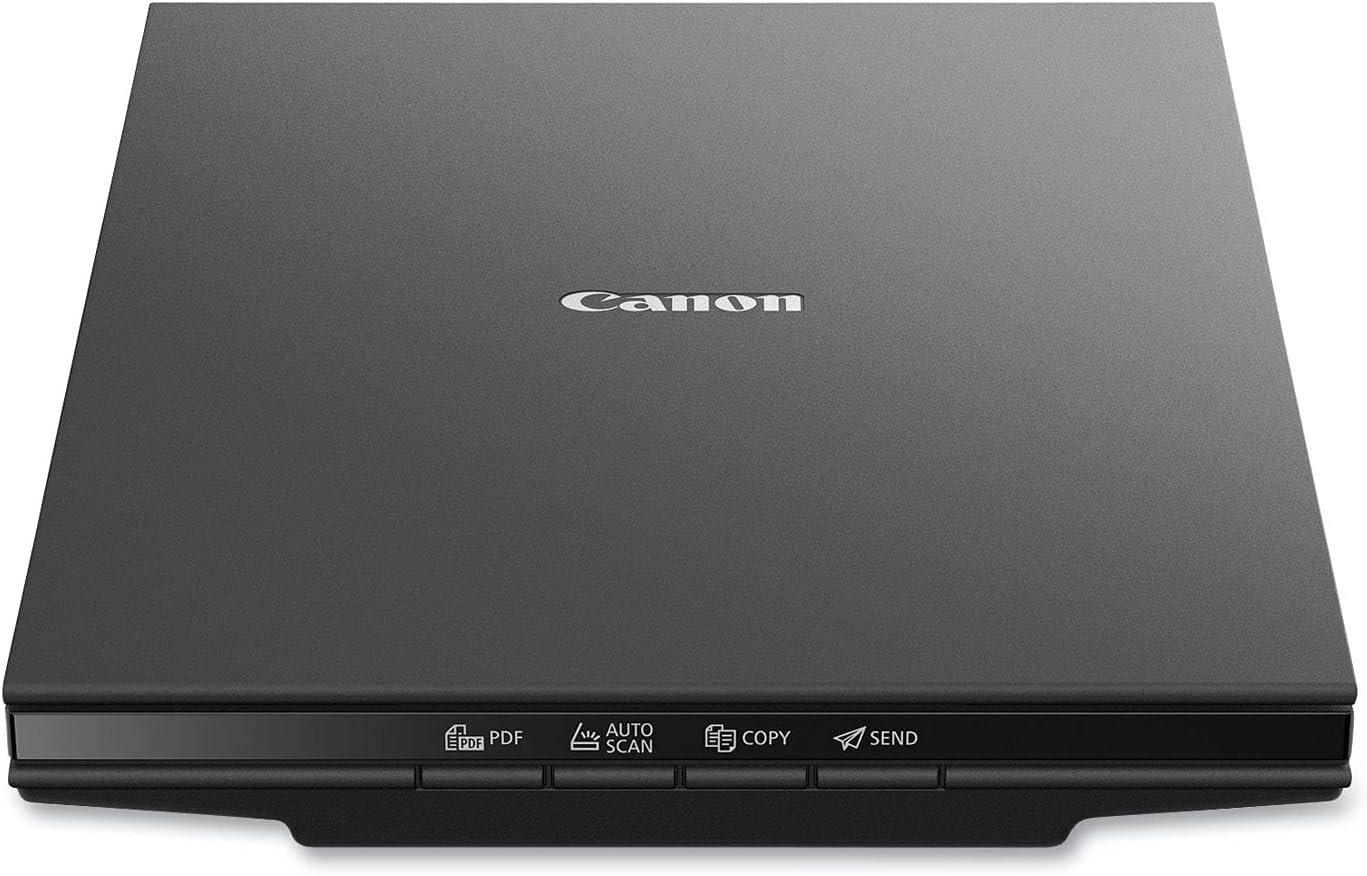
Canon Canoscan Lide 300 Scanner (PDF, AUTOSCAN, Copy, Send)
$71.00
Related Products

The CS300 makes document and photo scanning easy. With 10 second fast scanning, 4 ‘EZ’ buttons and 2400 x 2400 dpi resolution, the CS300 packs great features in a compact design. Digitize documents and images thanks to 2400 x 2400 dpi resolution, and with image enhancements, such as fade correction and dust reduction, your photos will continue to look great. Enjoy ease of use with the 4 ‘EZ’ buttons. With Auto Scan Mode, the scanner automatically adjusts settings by detecting what you are scanning, and the built-in PDF button, easily scan and save PDF’s that are editable and searchable with OCR .With Send to Cloud you can easily upload your photos and documents right to Cloud services like Microsoft OneDrive™ and Dropbox®.
Scanner type: Document
Connectivity technology: USB
With Auto Scan Mode, the scanner automatically detects what you’re scanning
Digitize documents and images
Angela S –
Little scanner, big results!
As an artist, I have been meaning to find myself a nice flatbed scanner for art purposes, scanning sketches or what have you, but found myself procrastinating until I could devote time to really look at reviews and figure out a high quality, high end scanner. I found myself in a position recently that I needed to manually sign some documents and get them to where they needed to be by the next day, but my car was in the shop. I thought maybe one of those portable wand style scanners might be good, and I could use it also to scan receipts, but they are so expensive, and I needed some thing that would be delivered the next morning. What came up was the Cannon LIDE 300, which would be delivered between four and eight in the morning, and this was perfect—I could sign the documents, scan them and upload. And I would also have a nice inexpensive scanner for things. I was looking for something that would be an overnight delivery, and dare I say, on the “cheaper” side and this fit the bill. This printer far exceeded my expectations. I realized with the first scan that this little machine was way more useful, and of a higher quality than its price would suggest. Inexpensive, yes, but by no means a cheap piece of equipment. I am on an older OS Mac, so I was worried I would not find some thing that would be compatible with my system, but in reading the reviews, it looked like the scanner would work—and there were some very helpful reviews on how to use the scanner without having to download any software for Mac. It was pretty much ready to go straight out of the box, plug into your computer, go to system preferences under “printers and scanners”, hit the plus sign and you can add this scanner. Use the “printers and scanners” window to access the scanner—just hit the “open scanner” button and it will give you the scanner “user” window. It starts immediately with an overview scan and from there you can change the resolution, the size, rotation angle, even the format —say PDF or JPG. You can even do image correction with brightness and contrast. It’s pretty intuitive —all you really need to do is play around with that scanner window for a few minutes and do some test scans and you’ll see exactly where you’re at. For each new page/item that you scan you need to close the scanner window, go back to the “printers and scanners” window and hit the “open scanner” button again… There may be a way for it to auto detect when you put a new page in the scanner, but I have not figured that out… Maybe I should take a look at the manual, which is still in its plastic bag… L O L. There is a “combine into single document” option, but I chose to just do separate PDFs, and then combined them in Acrobat. And it worked out great. The quality was fantastic! And the color 300 dpi test scans I did on some color items were phenomenal, and when you enlarge them up and look at the detail, I was just blown away… Much higher quality than I expected, and I’m starting to think maybe I don’t need a higher end scanner. As I said, I bought it as an emergency measure, but now I find myself with quite a useful, high-end (in my eyes), and inexpensive little scanner. I will probably be saying quite often “how did I ever live without this”… And again I’ll mention the price is right on point, pretty inexpensive for the quality that I’m seeing, and I deal with resolution/dpi levels In my job as an artist…If you need additional information, go in under the (Amazon) reviews for this scanner and type in Mac in the search window—that was very helpful for me in making my decision to buy this scanner… The information I ultimately used for how to access the scanner without software was from one of those reviews. The scanner worked with the cable that came with it, and in less than 10 minutes I was scanning…No download of software needed for now, but I might check that out in the future. I thought this review might be helpful for others who are on an older system Mac… Sometimes it’s really hard to find useful information on products, regarding compatibility with the older systems…For reference I am on Mac, Mojave 10.14.6. Because yes, sometimes the newer OS does not always equal the best. I will say, with the positive experience of this little inexpensive model scanner, I will upgrade to another Cannon scanner, when and if needed. That’s how strongly I feel about this scanner.PS the scanner does have copy, scan/auto send as part of its functions (buttons), but I’m guessing you probably would need to download some software for those functions. As noted, this was a quick solution for some “emergency” scans, and this device was perfect! I am looking forward to seeing what else this scanner can do.
Mr. Jones –
Quality Scanner That Works w/Windows 11 machines
Great scanner. Love the printer cable charging. Only 1 cord. And it works with Windows 11 machines. Just plug it in, find it on your computer, and Microsoft has software you download. Great workflow too with the Windows ui. I did 200 scans, quick and efficiently. Great image quality, decent lightweight build. Highly recommended.
L. J. Ross –
Great scanner!
Easy to set up and works great! I use this scanner with a HP notebook computer running Windows 11.The only drawback I have found is that it did not function when I plugged the USB cable into a USB hub. This computer only has two USB connectors, one of which is taken by the connector for a wireless mouse. When I switched the scanner’s USB cable to the connector on the computer, it worked fine.This is the best moderately priced flat bed scanner that I’ve owned.
Patrick H. Nguyen –
great scanner especially for the price with great photo reproduction. 4800dpi requires setup
I love this scanner, but I’ll start off talking about a certain aspect because I did see a lot of reviews saying you can’t scan at 4800DPI or you are limited to a tiny image. After some trial and error, I found out you can do 4800 DPI. The limitation of the ScanGear software (included with the scanner) is apparently memory. But oh well. The image cannot exceed 50,000×50,000 pixels or 4GB. so that means the biggest image I was able to scan at 4800 DPI is 6.7 inches x 9.20 inches which is just below 4GB in size for a JPEG. I shouldn’t have any limitations because my PC has 128 GB of RAM and 80 TB of storage but oh well. Note that this 6.7 inches x 9.2 inches is the output resolution. The input can be whatever can fit on the glass (example, 8.5 inches x 11 inches).In order to get to 4800 DPI, if you want to use the included Canon software, you have to use ScanGear. It doesn’t appear to be available in Canon’s other scanning modes. If you use a paid commercial scanning software like Vuescan, maybe this 4800 DPI memory limitation doesn’t exist because the hardware can do 4800 DPI. Here’s the key point, you have to go to the settings for ScanGear and select the checkbox for “Enable large image scans”. I don’t know why this is even an option. Whoever wrote the software should just allow for large image scans because it’s only going to confuse people.If you don’t set this checkbox, the biggest image you can scan is something like 14000×10000 pixels which means at 4800DPI, the biggest image is something like 2 inches x 2.5 inches. Once the setting is saved, go to ScanGear to scan the image. TYPE 4800 into the resolution box (don’t use the dropdown arrow). Set max scan to 6.7″x9.2″. That will produce a 4GB data file. If you’re expecting to scan a 4800DPI 6.7″x9.2″ TIFF image, you would probably need terabytes of RAM because it doesn’t scan to your storage. It scans into your memory and then saves that image to disk. Considering a lot of users have only 8GB or 16GB of RAM, scanning a 4800DPI TIFF image isn’t really feasible.Then you will be able to scan at 4800DPI. Remember, this 6.7″x9.2″ is the output resolution. The input can be the full size of the scanner glass. For example, you put on a 8.5 inch x 11 inch paper. and then the output is 6.7″x9.2″. And the last aspect of 4800 DPI scanning is how long it takes. This is not the seconds of scanning you get with 300 DPI or 600 DPI. No, this is many minutes. You really have to realize whether 4800 DPI is worth it to you. If you’re scanning a printed photo, 4800 DPI won’t really make it better. you’re at the limit of the print.4800 DPI aside, how is this scanner? It’s super thin as a scanner. You can put books or whatever on the glass (platen). I thought about the Epson photo scanner where you can feed pictures. But then I realized it was $600 and that you can’t scan books and non-fed sheets and it was limited to 600 DPI. This Canon is super fast at more normal resolutions (300, 600, 1200, etc.). It comes with a stand so you can have the scanner vertically positioned while scanning! Not sure how useful that is but it is neat to see it scanning something while vertical. The color reproduction and the scanner features are top-notch.I totally recommend this if you’re scanning at 2400 DPI and below. I bought it mostly for photo scanning.For photos I plan to share through social media or email, I’ll probably scan at 300 DPI or 600 DPI (that I then compress down) because email’s limit is 25MB which is something like 7000×7000. I know the JPEGs I output out of photoshop from my digital camera are 45 megapixels (8192×5464 resolution) and 31.5MB in size so already too big for email or social media.If your main thing is scanning everything at 4800DPI, then I would suggest getting something else. For photos I’m going to print, I’ll probably scan at 1200 or 2400 DPI. But if you’ll only occasionally use 4800 DPI, then this can totally do it and do it well (as long as you’re below 50000×50000 resolution). I just scanned a 32162×44160 which ended up being a 410 MB JPEG. It took about 20 minutes (ballpark estimate). Note that if 4800 DPI was seamless and was selectable from a dropdown menu, I would’ve given this scanner 5 stars. But for making it a hassle, I knocked off a star.
rboaxx –
Après plus d’un mois d’utilisation, ce scanner répond très bien à mes besoins relativement limités.
عادل صابر –
ممتاز وسهل الاستخدام
It met my expectations fully and delivery was carried out expediently.extremely satisfied with the dealership Bob –
Scanning paperwork, extremely happy with it portability
Refugio Arriozola Barrera –
Llegó en buen estado.Simple de instalar siguiendo las instrucciones del manual.Escaneé un manual de 40 páginas sin problemas.Ese va a ser mi uso primario, digitalizar textos, recibos y manuales
V G Mohanavelu –
Very simple to use. Quite sturdy too. I recommend this for all scanning needs at home