
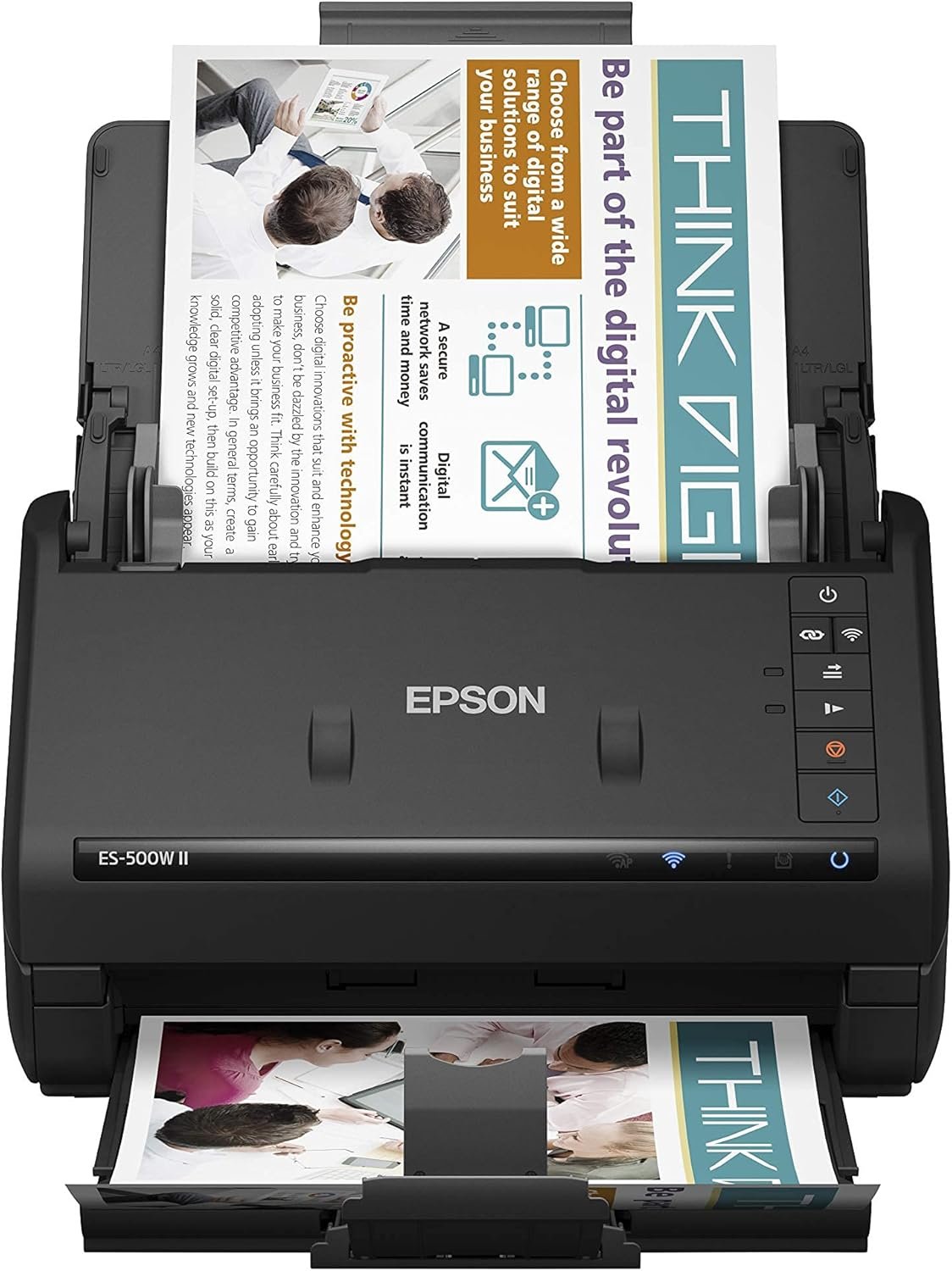
Epson Workforce ES-500W II Wireless Color Duplex Desktop Document Scanner for PCand Mac with Auto Feeder (ADF), Scan from Smartphone or Tablet
$384.31
Related Products



Get organized fast with the WorkForce ES-500W II wireless duplex desktop document scanner. This reliable, easy-to-use performer speeds through scans up to 35 ppm/70 ipm (1), capturing both sides of each sheet in one pass. Its 50-sheet Auto Document Feeder allows you to breeze through stacks of documents of varying sizes. Intuitive Epson ScanSmart Software (2) means you can easily preview, email and upload your scans. The included TWAIN driver ensures compatibility with most document management software. Wirelessly scan to cloud storage accounts (2) and create searchable PDFs. You can also scan directly from your mobile device using the Epson Smart Panel app (3). Color and image adjustment features such as auto crop, staple protection, dirt detection and paper-skew correction help ensure remarkable image quality.
1. Based on letter-sized scans at 300 dpi in Black-and-White, Grayscale or Color Mode.
2. Wirelessly scan to smartphones or tablets (Android/iOS devices) via the Epson Smart Panel app; wirelessly scan to the cloud, PCs or Macs with Epson ScanSmart Software installed on the connected Windows PC or Mac.
3. Requires Epson Smart Panel app download. Data usage fees may apply.
4. Check for convenient and reasonable recycling options with us
5. SmartWay is an innovative partnership of the U.S. Environmental Protection Agency that reduces greenhouse gases and other air pollutants and improves fuel efficiency.
Easy wireless scanning — scan to smartphones, tablets, computers and online cloud storage accounts (1) from your desktop, smartphone or tablet using the Epson Smart Panel mobile app (3)
Get organized in a snap — scan up to 35 ppm/70 ipm (1); Single-Step Technology captures both sides in one pass
Quickly scan stacks of paper — robust 50-sheet Auto Document Feeder easily accommodates multiple paper types and sizes in one batch
Powerful software included — easy scanning with intuitive Epson ScanSmart Software (2); preview, email, upload to the cloud and more; automatic file naming saves time
Seamless integration with most software solutions — the included TWAIN driver allows you to easily incorporate your data into most document management software
Easy sharing and collaboration — email or upload to popular cloud storage services (2) such as Dropbox, Evernote, Google Drive and OneDrive
Simplified file management — create searchable PDFs with included Optical Character Recognition (OCR); convert scanned documents to editable Word and Excel files
Intelligent color and image adjustments — auto crop, blank page skip, background removal, dirt detection and paper-skew correction with Epson Image Processing Technology
Reliable paper feeding system — Ultrasonic Double Feed Detection prevents missing pages; also prevents damage from staples
Versatile scanning of everyday documents — scan extra long pages up to 240″, business/ID cards, contracts and more
13 reviews for Epson Workforce ES-500W II Wireless Color Duplex Desktop Document Scanner for PCand Mac with Auto Feeder (ADF), Scan from Smartphone or Tablet
Add a review
$384.31
The Particular Discerner –
A high-speed high-quality desktop scanner that scans as fast as you can feed it.
I am so glad that a coworker recommended this scanner to me. I have used flatbed scanners for decades and love their ease of use. However, they take up room and are slow. Likewise, I have had multi-function printers that serve as a scanner as well. They work when they work, sometimes hit or miss because sheet feeding on consumer grade units isn’t the best. This scanner remarkably provides the flexibility of a flatbed with the speed of a professional sheet feeding scanner – including two-sided at the same speed. It is extremely fast and can easily feed small items like photographs or business cards as easily as it can a 3 foot long banner. I had to laugh while at the doctor’s office the other day. The receptionist scanned my health insurance card on this very same scanner. If it can hold up to constant use in a high volume clinic, it should do well in a home office. My only disappointment is that it doesn’t like legal size or larger sheets scanned at high resolutions, particularly in color. In these cases it generates a memory overflow message. However, this is a relatively unusual use case. A typical letter sized sheet can be scanned under the same conditions with no problems. Do not spend the extra money for the model with a color display screen. It is an identical unit simply with the screen tacked on, which is rarely used and not worth the extra $75 to $100. You will notice that those using this scanner for commercial applications have typically reached the same conclusion and go with this less expensive unit. Highly recommended.4/2025 UPDATEAfter uninstalling the drivers and software available in early 2024, cleansing all EPSON files and registry entries, and installing the 2025 Epson updated drivers, the memory overflow problem noted above appears to have gone away. I have upgraded the review to a 5 star rating. Note, though, that if you install the scanner via a WIFI connection, it does not appear possible to switch to a USB link. It keeps hunting for the WIFI connection and won’t recognize the USB wired connection. I presume that you could totally uninstall and reinstall the package again, omitting the WIFI option,but that is a real hassle considering the uninstalling, deletion of EPSON file folders and purge of EPSON registry entities necessary for a totally clean reinstall.
Jason Gittelman –
Works great!
Unbelievably fast, easy set-up.
Steven Cepeda –
good value
I’ve been using the Epson ES-500W II for a few weeks, and it’s been fantastic for my home office.Durability: The build feels solid and can handle daily use without issue.Functionality: Scanning speed is impressive—35 pages per minute—and it scans both sides in one pass.Ease of Use: The setup was easy, and the Epson ScanSmart software is simple to navigate.Comfort: The compact design saves space, and the wireless connectivity is convenient.Quality: Scan quality is sharp and clear, with great OCR features for text recognition.Possible Issues: Initial wireless setup can be a bit tricky.
Angela –
Excellent once installed
Time saver. Scans fast and great quality. Practical to use. A nightmare to instal the drive and use with different computers. packaging does not come with instructions.
Sarah G –
The Only Scanner That Got Me Through a Lifetime of Photos
I grew up in a house where every moment was documented. My mom wasn’t just into photography, she was extremely committed. Camera always ready, film rolls everywhere, and photo envelopes stacked in bins. I’m convinced there are 100,000+ photos spanning decades of birthdays, holidays, pets, vacations, and a lot of “why do we have three of this?” shots.When I first tried tackling all of it, I started with a more traditional scanner and completely gave up. It was slow, clunky, and made the whole process feel impossible. I truly didn’t think I’d ever get through all those photos.This scanner was night and day by comparison. Setup was easy, it handled large batches smoothly, and suddenly the project felt manageable instead of overwhelming. Knowing everything was backed up digitally also made it so much easier to let go of less meaningful photos like random landscapes and duplicates without guilt.It turned something I’d abandoned into something I could actually finish. My mom would’ve loved this thing, and probably would’ve scanned everything twice just to be safe.Highly recommend if you’re buried in photos and procrastinating because it feels like too much.
Willie Gregory –
Great
This is a great product, use it regularly.
Nora Marie Gaines –
Dependable. Sturdy. Affordable.
Perfect for my mobile notary business. Easy to set up and works great. Dual-sided scanning is a bonus!
Stephanie S. –
Firmware crashes device
I only used this a handful of times. It worked wonderfully until it needed a firmware update and now its in recovery mode or malfunction. Epson wont cover it. Ugh
Juan Francisco Villalobos Sierra –
Me ha logrado sacar de una montaña de trabajo. Lo que hacía en un día. Lo realiza en 20 minutos. Igual cuenta la capacidad de la PC que procesa los datos. A mi me resultó súper excelente!!
fallon aubee, fallon –
This is an amazing product, extremely happy with this scanner. it is well worth the money. It saves time and frustrations. I would like to add that this product seamlessly connects to my cannon printer and all my Microsoft programs and operating systems.It’s fast and one time operations. No repeating work and wasting time and money.And, im still learning more about this amazing Epson Scanner. The best money I’ve spent on years.Love this product.
Abraham Eduardo Navarro Lopez –
La uso en oficina, muy eficiente, fácil se vincular con Windows, con Mac no tuve tanta suerte, pero la velocidad de escaneo es muy buena, diversos documentos y no ocupa mucho espacio, la vinculación de WIFI es buena, recomiendo ponerla lo más cerca posible del módem para mayor eficiencia en la señal
Serge Beaudoin –
Genial
From the 613 –
It arrived quickly and was very easy to set up with a wireless connection to my devices. It replaced a Fujitsu Scansnap scanner that i have used for many years. I had originally intended to buy another Fujitsu but after reading the great reviews for the Epson I thought I’d give it a try and was not disappointed.