
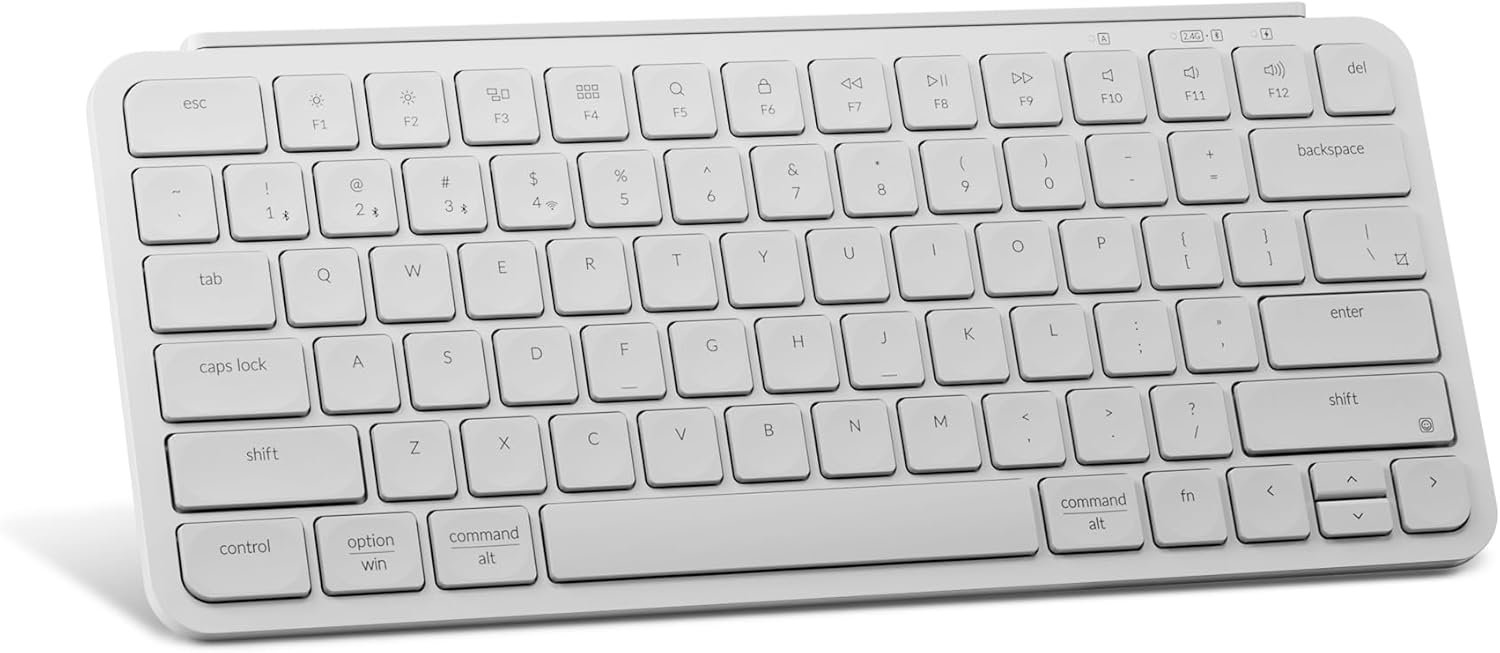
Keychron B1 Pro Ultra-Slim ZMK/Launcher Wireless Bluetooth 2.4 GHz/Wired Connection Keyboard for Mac Windows Linux – White
$39.99
Related Products




Product description

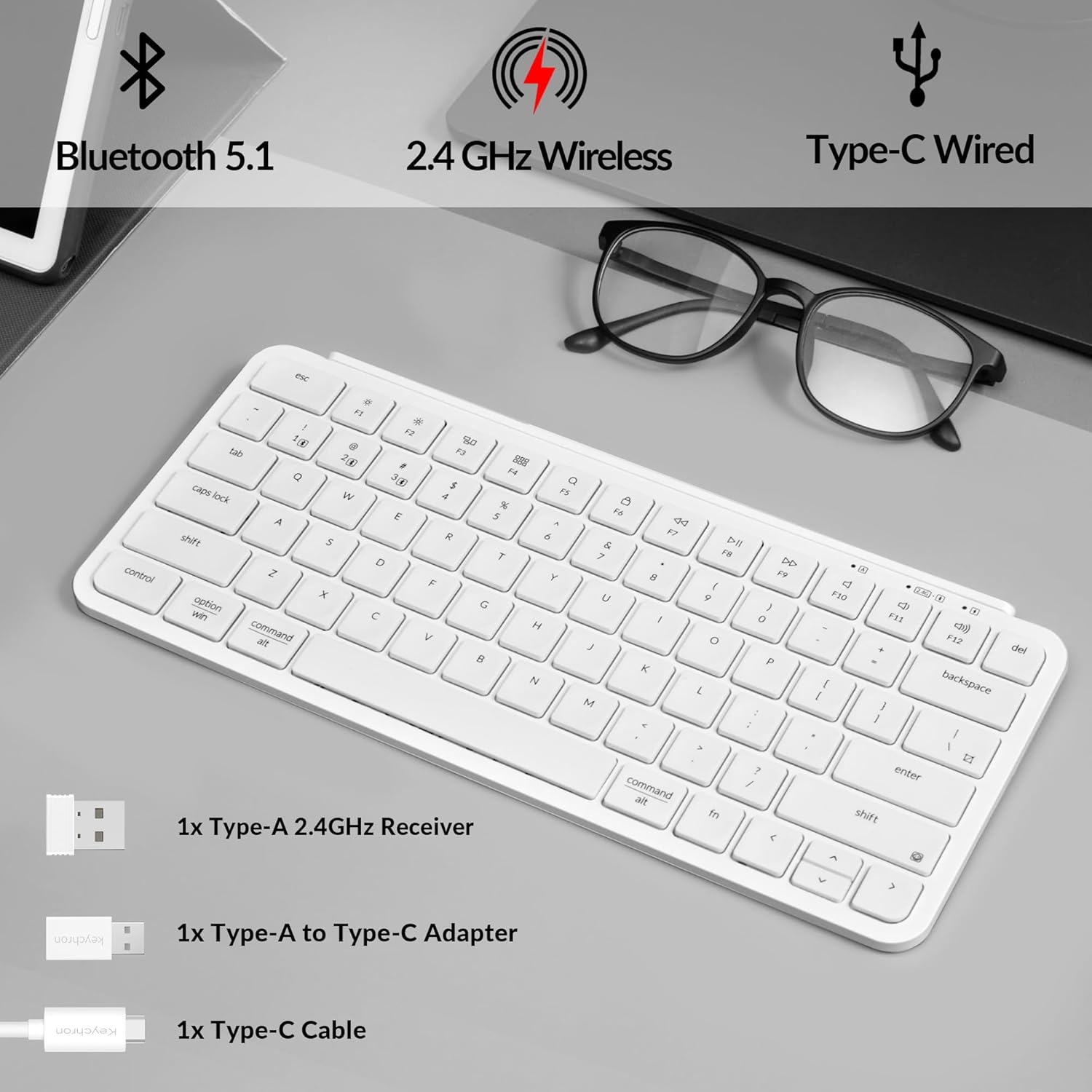
The B1 Pro is an ultra-portable, lightweight wireless keyboard that supports 2.4GHz, Bluetooth, and wired modes. With ZMK customization, you can connect your phone, tablet, PC, and Mac simultaneously using three Bluetooth connections and one dedicated 2.4GHz dongle.
The B1 Pro currently doesn’t support N-Key Rollover (NKRO) or 6KRO.

2.4 GHz & Bluetooth Connection With Up To 1200 Hours of Use
The B1 Pro boasts a rapid 1000 Hz polling rate on 2.4 GHz wireless mode that is cable-free to meet your desktop aesthetics. Switch effortlessly between devices via Bluetooth 5.2 for seamless multitasking.
Enjoy uninterrupted use with up to 1200 hours of battery life, or about 8 months of use with 5 hours of daily use. The concave keycaps also ensure precise input and comfortable typing to fit your fingers naturally.

The open-source QMK firmware unlocks endless options for remapping, macros, and shortcuts. Easily customize each key using the Keychron Launcher web app.
*Please use the latest Chrome, Opera, or Edge browser and connect the keyboard via wired mode.

Designed For Precision
Concave keycaps ensure precise input and comfortable typing. Designed to fit your fingers naturally, they reduce errors and enhance efficiency.

Ergonomic Support
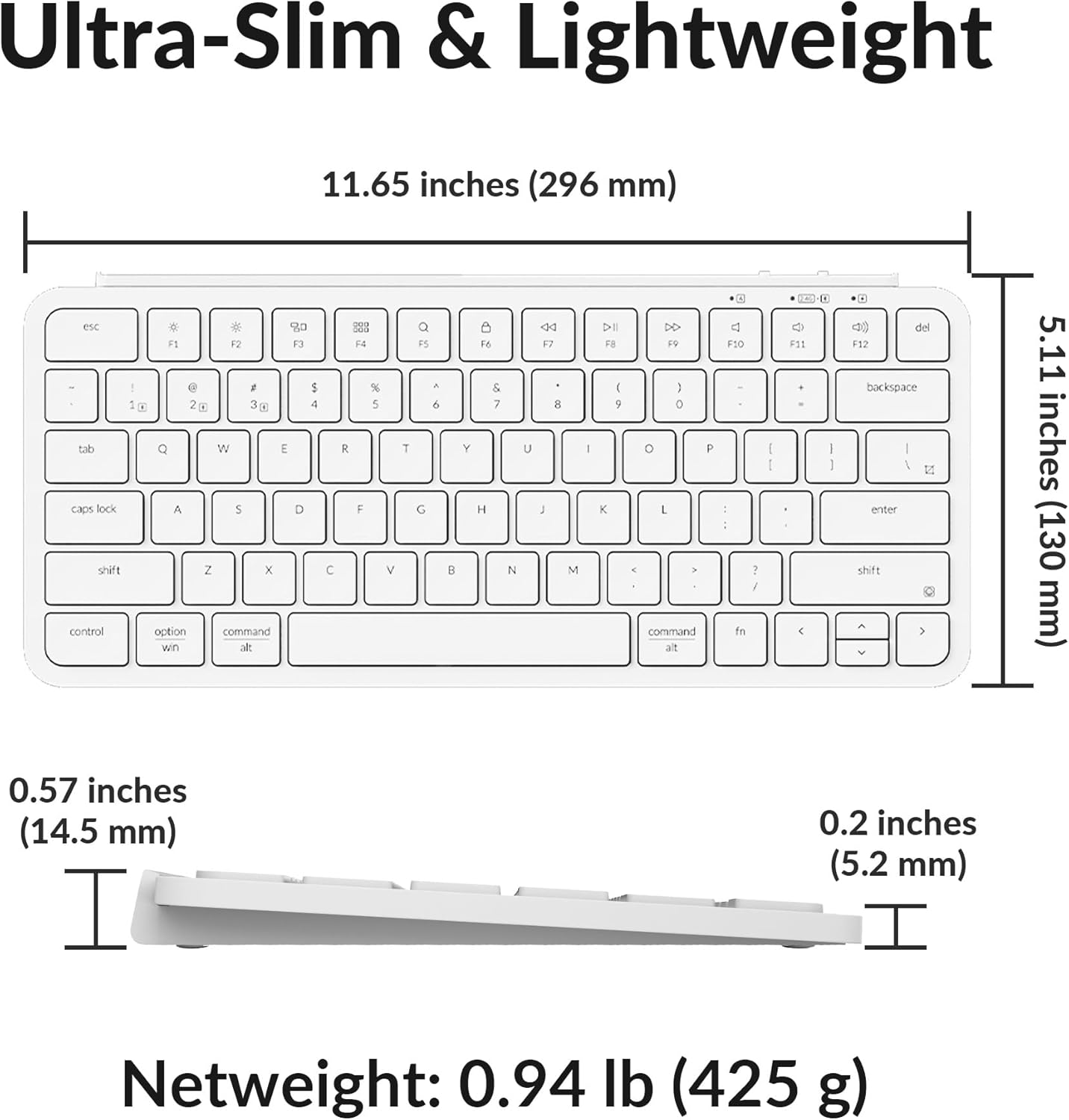
With a tilt angle of 3.2 degrees, a height of only 0.2″ (front) and 0.57″ (rear), the B1 Pro is easy to carry, and it helps to prevent wobbling and reduce fatigue during long typing sessions on the go.

Quickly Access Emojis
Use ‘fn’ + ‘shift’ to effortlessly bring up emojis with your right hand while typing, allowing you to quickly and easily express your emotions instantly. This shortcut makes it convenient to add a personal touch to your messages.

 Missing Keystroke?
The B1 Pro does not support NKRO or 6-KRO, so if you type very quickly, some keystrokes may not register. Try typing more slowly to check if the keys respond correctly.
Bluetooth Mode:
Slide the toggle switch to the Bluetooth position.Hold Fn + 1 until the Bluetooth indicator flashes repeatedly.Enable Bluetooth on your device, search for the keyboard, and connect.
2.4G Mode:
Plug the 2.4GHz receiver into the device USB port.Switch the keyboard to 2.4GHz mode
What’s in the box?

2.4 GHz & Bluetooth Wireless Connection – The B1 Pro boasts a rapid 1000 Hz polling rate on 2.4 GHz wireless mode that is cable-free to meet your desktop aesthetics. Switch effortlessly between devices via Bluetooth 5.2 for seamless multitasking.
Type Quietly – The scissor-switch keys are quiet and especially appreciated in quiet environments like in the office or late night at home. While quick access to emojis with fn+shift helps chat with friends easily and funnier.
Program Any Key with Web App – Remap any key and macro with the Keychron Launcher web app (no download required) or ZMK firmware on the latest Chrome, Edge, and Opera browsers, no matter on macOS, Windows, or Linux.
Up To 1200 Hours of Use – Enjoy uninterrupted use with up to 1200 hours of battery life, or about 8 months of use with 5 hours of daily use. The concave keycaps also ensure precise input and comfortable typing to fit your fingers naturally.
Ultra-Slim and Portable – With a height of only 0.2″ (front) and 0.57″ (rear), the B1 Pro is easy to carry, and the protective silicone skin helps to protect the keyboard for a long time.
8 reviews for Keychron B1 Pro Ultra-Slim ZMK/Launcher Wireless Bluetooth 2.4 GHz/Wired Connection Keyboard for Mac Windows Linux – White
Add a review
$39.99
Brent –
A Tiny Overlord of My Workspace
The Keychron B1 Pro is not just a keyboard; it’s a lifestyle revolution disguised as a peripheral. Before it arrived, my desk was a digital disaster zone. Wires snaked across the surface like angry pythons, and my old keyboard, a clunky relic from the Stone Age, occupied more real estate than a suburban McMansion. It was a chaotic landscape of crumpled sticky notes, rogue coffee mugs, and the ever-present threat of accidental key presses. Then, the B1 Pro entered my life, and with a click and a satisfying thock, it became the tiny, sleek overlord of my workspace. It’s like a minimalist ninja that glides effortlessly across the battlefield of my desk, ready to strike at a moment’s notice.The first thing you notice is its remarkable ability to disappear. Not literally, of course, but it’s so svelte and compact that my desk, once a cluttered horror show, now looks like a page from a home decor magazine. I can easily shove it to the side to make room for my afternoon iced coffee or to engage in some spirited paper-folding. If you told me a keyboard could be a tool for achieving zen, I would have laughed in your face. Now, my desk is a beacon of calm and order, a direct result of this beautifully engineered piece of plastic and metal. It’s the Marie Kondo of keyboards, sparking joy by simply not being a giant, cumbersome eyesore.But its greatest trick is its chameleon-like ability to jump between devices. One minute, I’m hammering out a witty email on my laptop, the next I’ve flipped a switch and am drafting a profound, 280-character masterpiece on my phone, all from the comfort of the same keyboard. It’s a seamless transition that makes me feel like a tech-savvy magician. My phone has never felt so powerful, and my tablet has never felt so… keyboarded. It’s a connectivity superpower I never knew I needed. It’s so efficient, I’m convinced the B1 Pro is secretly running a side hustle, managing its own social media accounts and trading stocks while I’m sleeping.Beyond its physical prowess and connectivity wizardry, the typing experience is a pure delight. The keys have a satisfying, responsive feel, and the sound is music to my ears—a muted, yet confident, thock that whispers, “You are getting things done, my friend.” It’s an auditory reassurance that your productivity is soaring. The low profile is comfortable, and the tactile feedback makes every keystroke feel purposeful, like you’re not just typing, but composing a symphony of words. I’ve found myself typing things just for the sheer joy of it, like a cat batting at a string, all thanks to the sheer satisfaction of the keystrokes.After only four days, I can confidently say the Keychron B1 Pro is an absolute game-changer. It’s transformed my desk from a chaotic wasteland into a productive paradise and elevated my typing experience from a chore to a pleasure. It’s the kind of keyboard that makes you wonder how you ever survived without it. If you’re looking to declutter your life and add a dash of effortless cool to your tech arsenal, look no further. This keyboard isn’t just good; it’s the quiet, understated star of the show, and my desk has never been happier.
Curiosity Cat –
Perfect size and price
I immediately love this keyboard. I’m typing this review on it. It’s so very hard to find a smaller sized keyboard that has the feel of a laptop, takes up less room than a regular sized board and has this many connection options (BT, 2.5 and wired – adapters included in the packaging) and works out of the box. It’s incredibly comfortable to type on, although I would have loved to have some sort of back risers because it’s flat.I’ve tried a lot of 75% type keyboards, and most are mechanical, and just not quiet enough for me, no matter what switches I’ve tried.The build quality feels amazing – I’ve gotten some BT keyboards before that feel like they would just snap if you tried – this one has some weight to it – it’s the kind of thing I would use as an everyday keyboard – and my plan is something easy to take up and down the stairs depending on where I am working on any given day. (I have a laptop on a stand so it’s nice to be able to connect a keyboard for it.) This is perfect for that.Some plus: The keyboard did include a card for hotkeys that worked right out of the box (I’m a Linux user). I type a lot and so things like an END key sometimes is very important. This covered that right away, and without me even referring to the ‘cheat sheet’ I or needing to install any software it was super easy to figure it out.I don’t feel like I need giant buttons when I’m gaming, so this works quite well even with that as well.Cons? I’m a touch typist, so this works well for me, but one thing that is a little off for me is that I could use a little higher raised F and J to align my fingers, because often I am sitting in a dark room and I rely on being able to feel those keys.Also, the keys look like the print is just some sort of glued on lettering that I don’t think I can capture in a photo to show what I am talking about. This shouldn’t be an issue with a touch typist, but for the price I wouldn’t really complain it something wore off.The only other thing I’d love to see in this keyboard is a back-light. Nothing fancy, I don’t need the crazy RGB distraction, just something that could be a little more to help with visuals in a dark room.Overall, I feel like my hands have adapted to this keyboard extremely well, and if it holds up, I will be happy. I’ve tried some other keyboards from different brands, and this one is nearly perfect for what I’d like.
Oliver –
Good chiclet keyboard with some miner drawbacks
I had been using an older Apple bluetooth keyboard that used two AA batteries (see picture). Got tired of constantly replacing the rechargeable batteries so I switched to the Keychron B1. Overall, I’m quite satisfied with the keyboard.The typing experience is very similar to the Apple keyboard soI felt right at home after switching. The keyboard can be used in both wired and wireless mode. Using it in wireless mode the battery life has been excellent. So far I have charged it once on 11/27/24 and it still has a 37% charge, that’s spending about 4-5 hours a day on the computer.One drawback/difference I had to get used to is that the ‘bumps’ or homing points on the ‘F’ and ‘J’ key are not very pronounced, quite delicate actually resulting in incorrect finger position at times and/or hunting for the home keys.Also, since the keyboard is designed for both Windows an Mac it does not have the dedicated Window/Mac symbols on the keys, rather just over/under text on the key – ‘option/win’ and ‘command/alt’. Finally, the keyboard is not height adjustable. Again, coming from an Apple keyboard I was used to a steeper incline (18mm height in the back vs 12mm for the B1). For my purposes, I simply added some self-adhesive felt pads (see the picture) to increase the height.Overall, I think this keyboard offers a good combination of features and performance at a decent price point. Plus, the color scheme works well with the black Apple Magic Trackpad and a darker office table setup :-).
eric –
Excellent clavier compact et solide.solide, j’ai essayé le bluetooth, le usb et le dongle et tout fonctionne très bien
ojiichama –
Apple純正magic keyboardを常用していますが、遜色なく使えてます。値段も手頃。MacでもiPadでもmagic keyboardの様に使え重宝してます。
JB –
Very great! I’m coming from several years daily driving the Lenova Compact keyboard, then the Microsoft Designer Compact, as well as a couple of Perrixx 75% sized keyboards. I’ve put a picture with them together so you can compare the size and button layouts.The keys on the B1 pro have a sort of loose feel, comparable to loose trucks in skateboarding. This gives them a bit of a rattle’y sound, but not in a bad way (to me at least). The keys are spread a littler farther apart and are slightly bigger, so everything is a slightly bigger stretch, but I think at the benefit of better precision.I’ve been trying to find a mechanical 75% low-profile keyboard but I always hate the sound. It’s the look that draws me in. When I stumbled upon the B1 Pro in Retro Red I knew it was a must have. That said, it’s not just the colors that I’m loving. It’s the total package – wired connection, perfect size and feel, amazing looks. I suppose the 3x bluetooth and wireless modes are nice to haves but I don’t plan on using them. I’ve got my keyboard plugged into a UGreen 4:1 KVM, so all my computers are strapped in physically to this thing.
Gino –
Keys are starting to do things I didn’t tell them to do. Iv had this keyboard 3 months. I loved it, but it has failed me.
gabriel –
Best keyboard I’ve ever had. Super lightweight but still feels good to type on. Does bot take up a lot of desk space. Very low profile keys which is great for fast typing. I never had an issue with it.