
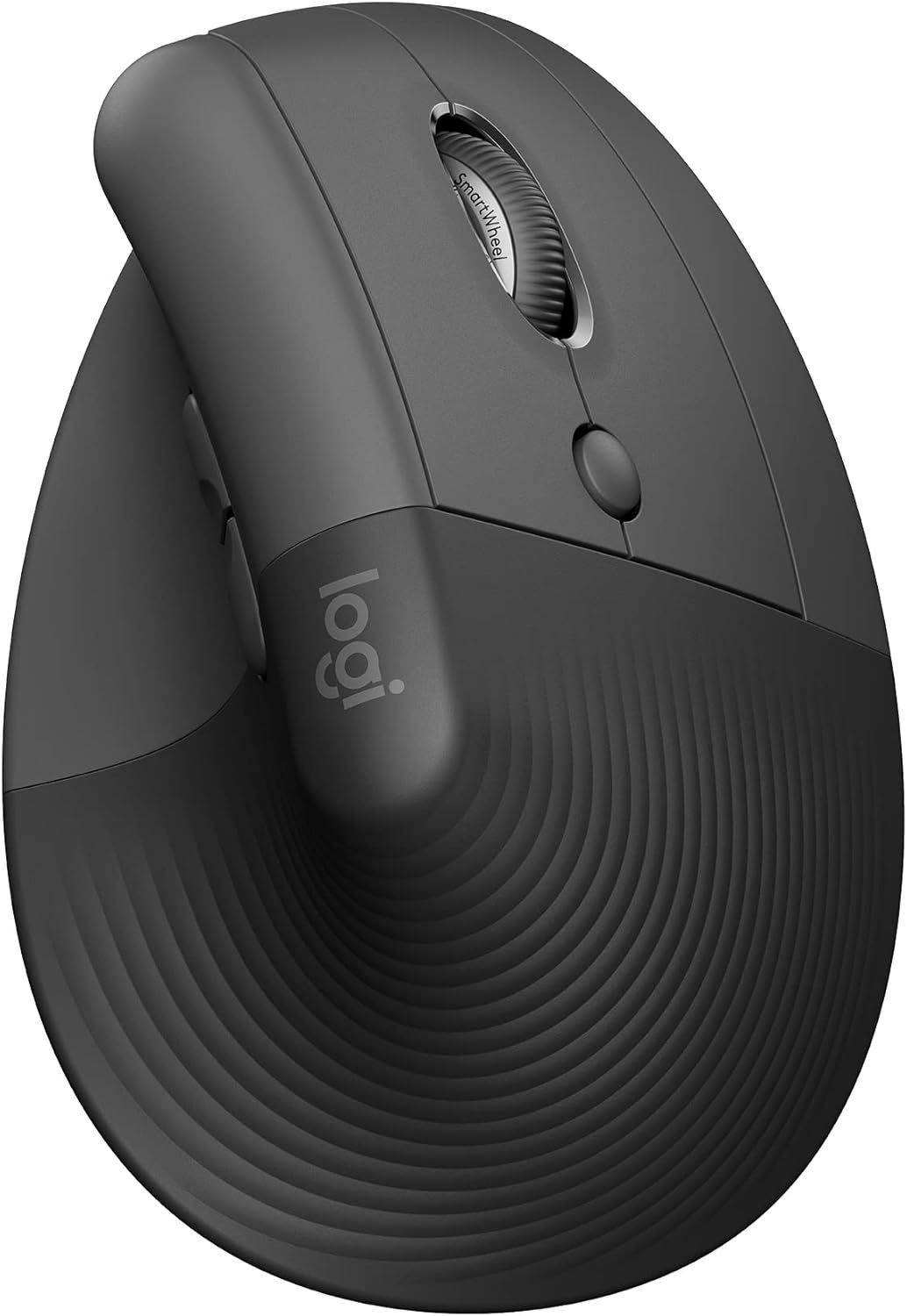
Logitech Lift Vertical Ergonomic Mouse, Wireless, Bluetooth or Logi Bolt USB Receiver, Quiet clicks, 4 Buttons, Compatible with Windows/macOS/iPadOS, Laptop, PC – Graphite
$59.49
Related Products


Logitech Lift Vertical Ergonomic Mouse Desk life getting you down? Lift yourself up with the Logitech Vertical Mouse – a comfy and intuitive wireless mouse for PC and Mac crafted specially for small to medium hands. Available in right and left configurations, this Logitech ergonomic mouse features a unique 57-degree angle that elevates your wrist for ergonomic comfort & design, bringing relief to your forearm and upper body. Scrolling feels natural with SmartWheel, offering precision and speed-scroll. Customize your ergonomic Bluetooth mouse with Logi Options+ Software, easily assigning each of the 4 customisable buttons to handy shortcuts as you switch between apps.* Connect with up to 3 devices, using Easy-Switch to toggle between them at the click of a button. Utilize Logitech Flow to move across screens and transfer files with simple commands.* This vertical mouse wireless is multi-OS compatible (Windows, macOS, iPadOS, Chrome OS**, Linux**) and boasts two years of battery life from a single AA***. Product Details: Weight: 125 g; Dimensions: 108 x 70 x 71 mm; Tracking: 4000 DPI (fully adjustable); Battery type: 1x AA; Battery life: 24 months***; Wireless range: 10 m; Connectivity: Bluetooth wireless mouse or Logi Bolt USB receiver; Platform compatibility: Windows 10, 11 or later, macOS 10.15 or later, iPadOS 14 or later, Chrome OS, Linux, Android 8.0 or later**. The ergonomic mouse Logitech ensures seamless functionality on your laptop mouse wireless, USB mouse wireless, or wireless computer mouse needs. *Requires Logi Options+ software, available for Windows and macOS. **Basic functions supported without additional drivers for non-Windows and macOS systems. ***Battery life may vary based on user and computing conditions.
Lift yourself up: When the desk life gets you down, lift yourself up with Logitech Lift Vertical Ergonomic Mouse – a great fit for small to medium right hands
Raise your hand into comfort: Rest on Lift upright mouse throughout the day, with a softly textured grip and snug thumb rest for level-above coziness
57 degrees of sooooothe: Lift’s vertical shape helps wrists feel like “ahhh” at work, and promotes a more natural posture in the forearm, for day-long comfort and productivity
Relax into focus: Settle into work with a wireless computer mouse featuring easy-to-reach customizable buttons, whisper-quiet clicks, and a SmartWheel for smooth, seamless scrolling
Ergo-certified: Lift wireless vertical mouse has been designed, developed, tested, and approved according to criteria set out by leading ergonomists
Connect your way: Connect via Bluetooth Low Energy or Logi Bolt USB to Windows, macOS, iPadOS, Chrome OS, or Linux, and enjoy up to 2 years battery life
Plastic parts in Lift include certified post consumer recycled plastic (Graphite: 70%, Sand 56%, Off-White and Rose: 54%(6))
9 reviews for Logitech Lift Vertical Ergonomic Mouse, Wireless, Bluetooth or Logi Bolt USB Receiver, Quiet clicks, 4 Buttons, Compatible with Windows/macOS/iPadOS, Laptop, PC – Graphite
Add a review
$59.49
J –
Good scroll wheel, coming from g305, 18cm hand
For reference my hand 18 cm measured from the first crease after your palm to the end of my middle finger. I flexed my wrist and the first crease I used as my end point for my palm. My arms are at a 90 degree angle, and my wrist is neutral (not flexed up or down) due to my wrist rest keeping my wrist straight. Most of my arm weight is on my memory foam wrist rest. My review is based on my personal hand size1 month update: I have not noticed any staining on my white lift. But I am also a pretty hygienic person and I never touch my mouse if I touched food.1 year update: Still have not noticed any staining. I do wipe it with a baby wipe maybe once every 1-2 weeks though. One thing to note is that in order to use shortcuts you need to have the Logitech Options+ software installed. The shortcuts/settings you program to you buttons aren’t saved on the mouse. Also annoying since the software takes a substantial amount of CPU usage (why????).Wrist pain:This might be because I don’t have arm rests so the weight of my arm is resting on the wrist wrest, but I had some minor wrist pains within an hour or so. It didn’t really feel like a muscle or bone kind of pain, but a nerve/soft tissue pain. When I didn’t use a wrist rest, the weight was mostly the side of my hand, in particular the bony part near the wrist. That part rubbed when moving the mouse around if you don’t lift your arm.Edit: After some adjustment I no longer get any wrist pain, even when gaming.Palm grip:I think palm grip would be unusable for this mouse. My fingers extend 0.5-1 cm after the end of the mouse (where the left and right buttons start curving). When clicking the mouse it almost feels like im clicking with my finger joint instead of my fingertip. With a relaxed thumb (thumb slightly curved and only fingertip touching mouse) it is pretty easy to click the side buttons. Side of thumb can press upper button, thumb joint can press lower button. With the entire thumb fully in contact with the mouse, the upper button is a bit awkward to press but possible, and the lower button is the same as relaxed thumb position. Awkward to use the scroll wheel since you have to curve your fingers quite a bit to get your finger tip on the scroll wheel but still usable. Also because of the hand angle, I found it much more comfortable using my middle finger to use the scroll wheel instead of my pointer finger that I use normally.Fingertip grip:Personally I found it feeling different, but perfect. My finger length is perfect so my fingers land around or slightly below where the left and right mouse button start to curve. When I click, the direction of the force from my finger is more diagonally down and to the left. If my fingers were a bit shorter, it the force would be to the left. I found this diagonally force feels more natural, kind of like squeezing a trigger (kinda) instead of just squeezing a mouse. It is hard to describe. In this grip, the only part of my fingers (including my thumb) that are touching the mouse are my fingertips. My palm is resting on the mouse. Thumb characteristics is same as palm grip. Scroll wheel characteristics same as palm grim.Claw grip:Works fine, only problem is pushing lower thumb button is a bit awkward since you kind have to shift your entire thumb back but it is still possible. Easy to use scroll wheel since your fingertips end right next to itCompared to g305:The Lift is much more comfortable and natural. I got used to the Lift very quickly. In comparison, the g305 felt like a petite mouse. The g305 felt hollow, like there was nothing supporting my palm. I didn’t have any issues with the mouse shifting when clicking it on my mouse pad. Even on a smooth surface with no mouse pad it would happen rarely.Scroll wheel:Excellent combination of a normal scroll wheel and a free one. I can scroll down all the way to the end of reddit threads and spotify playlists in one scroll. Going back up takes a few scrolls however since I apply less force. Smooth scroll supplied by Logitech Options+ is also nice. Makes it feel like scrolling has inertia. There a lot of very nice features in Logitech Options+ like Logitech Flow
Anymuon –
Bad auto driver install. Great mouse. Few of the left hand mfgs.
Really crappy auto driver install. Locked up my USB ports for my usb keyboard, usb mouse, all usb ports in fact. Had to reboot multiple times with an old style 5pin keyboard since the software screwed up my usb ports. All of them. Lucky I have a motherboard with an old style keyboard port. A reboot of W11 in safe mode, ripped out auto-installed software, registry keys and rebooted to regain control of my USB ports. I do not know what went wrong. Alls I know is Logitech loaded something, it locked up my USB ports and I had to rip everything Logitech out to get control again. I downloaded the software, installed it and it worked fine. I’ve had no problems since.I’m an old lefty and as such am ambidextrous in most areas, since there just was not left handed oriented items readily available. You had to have left handed stuff made so you learned to do things right handed. I’ve developed carpal tunnel in both elbows and had purchased a couple of vertical mice, one left and one right. I took the left into work and was looking for a replacement. My other two were around $30 ea. I liked the right handed vertical mouse (Anker). They do not make a left handed version. The left handed mouse is ok, not as good as the Anker. I decided to go above my spend tolerance and get the Logi after reading many reviews. It has not disappointed me. The auto-install sucked. Never letting that happen again.It is a nice smooth mouse. Fine movements that are easily adjustable. The hand position is excellent. I can use this all day without switching to the right because of elbow pain. If you have the pain, you know what I am talking about when it flares. It takes some getting used to the subtlety of the clicks when coming from lower cost mice. Soft and gently like a newborn’s ….One of my big criteria for a vertical mouse is a landing area for the outer two fingers (pinky and next to pinky for finger orientation challenged). When you go to a vertical mouse, it takes some adjustment to moving the mouse since you can’t really press down with your palm and inside two fingers (the ones next to the outside two fingers). It is helpful to be able to use the two outer fingers and thumb to aid in moving the mouse. You have to experience a vertical mouse to understand. The right handed only Anker goes from an inch to a half inch in the length of my pinky below the buttons on the side. This is a really nice landing area for the outside fingers to assist moving the mouse around. You can squeeze a little and the mouse glides. The Logi mouse is a wee shorter than the Anker and the area below the buttons in a mostly straight 3/4″. Both mice curve quickly down to the inside below this area. I was used to a vertical mouse by the time I purchased the Logi and I have no issues with the pinky dragging the table and the finger next to pinky resting on the landing. I move the mouse with no problems. It is the subtlety of how one interacts with these style of mice. The big plus, takes a long time before mouse use causes pain flareups. And this isn’t just a pain and done. Depending on how one ignores the pain, often determines how many days life sucks. The Logi mouse minimizes the flare ups. I’m thinking of taking the Anker in and getting a right handed Logi for home. I like the Anker, I’m frugal and highly recommend it for getting your feet wet. I love the Logi (auto-install sucks) and will probably ignore my frugal tendencies and get a right handed one since I don’t switch hands as frequently with the Logi in the mix. Don’t have to suffer auto-install either.
abitbookish –
Saved my wrist
My old version of this mouse finally died and I immediately bought another as a replacement. I work a lot on my computer and my wrist was starting to feel it. This mouse has saved my wrist. Battery life is amazing, quality is great, scroll wheel is quiet, and I use it for precision work on a Mac with zero issue. Not a travel mouse, but I have something else for that. Would buy again and again.
DianeH –
Don’t Delay – Get One
Make sure you get the right size – I got the Small/Med. Perfect fit. Have had tennis elbow for years and the computer use exacerbated the issue. Very comfortable, great fit. The best position for your hand is in the upright position. Would recommend one for everyone. Good, solid mouse.
Samadrita Sapra –
I recently purchased the white Logitech Lift Vertical Ergonomic Mouse, and it’s exactly as described. It fits my small hands perfectly, and the ergonomic design sits comfortably in my palm, making long hours of use a breeze. The off-white color looks even better in real life—sleek and modern. The clicks are truly silent and smooth, adding to the overall premium feel. It connects easily via Bluetooth or Logi Bolt, and setup was quick. I’m really glad I chose this model—convenient, comfortable, and stylish. Highly recommend!
Mohamed Shereef –
Comfortable mouse, very customizable, I have tested it on different surfaces, and still works very well & smoothly on all surfaces including “plastic & glossy surfaces” :D.
Carolina jardim –
O mouse é realmente muito bom, leve na medida, encaixe perfeito para mãos pequenas/médias, o clique e a rolagem são super silenciosos. Comprei um mouse vertical mais em conta para me adaptar, o conforto me conquistou, porém o barulho do clique e da rolagem me incomodavam muito, então esse da Logi foi excelente
Yara –
I really love it! Works great but for me it hurts my hand more than the horizontal one.
Siddharth G –
The only and best left handed mouse made by logitech. Quality quality quality product. I would buy this again and again forever if I need to. It surely has made my wrist pain disappear.