
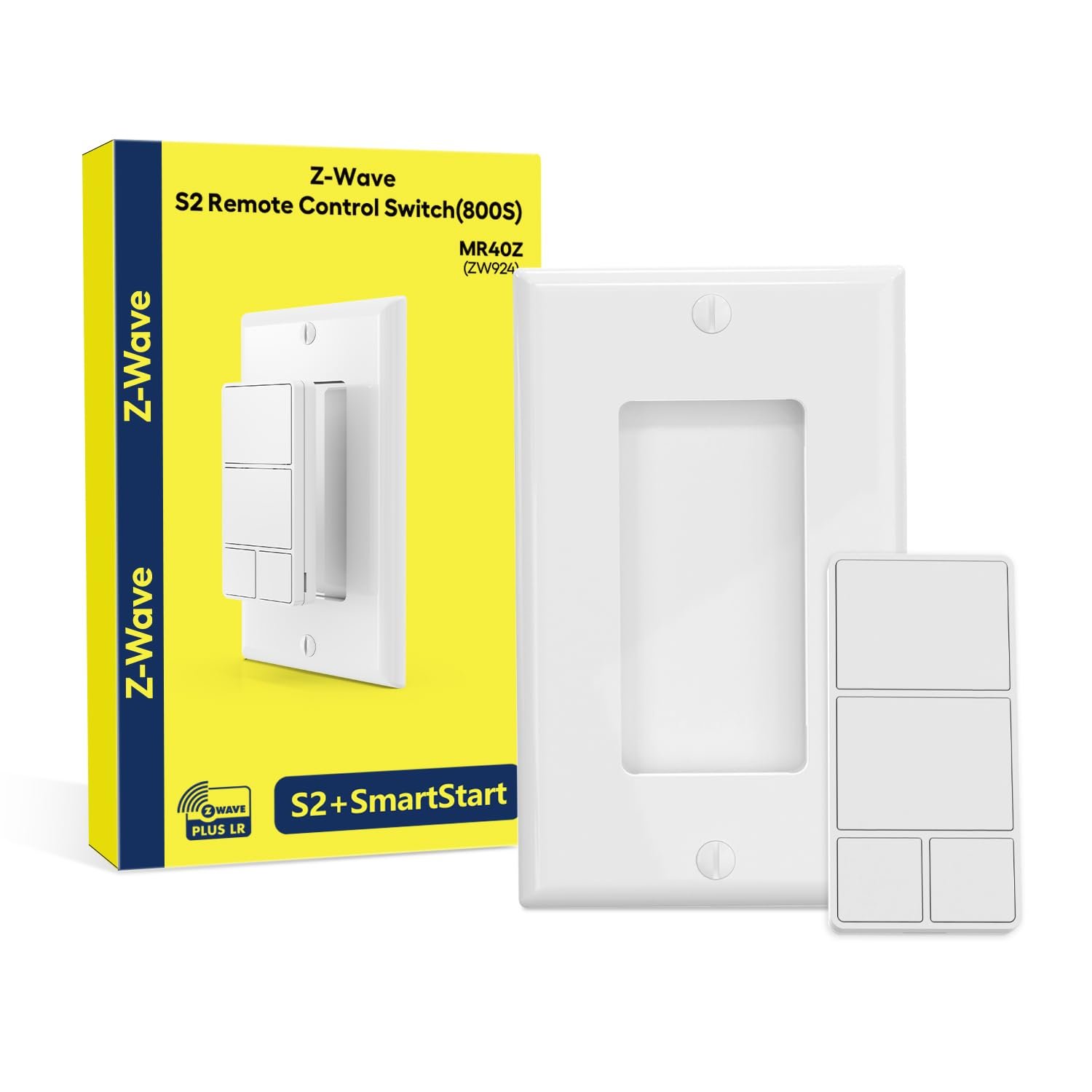
Minoston 800 Series Z-Wave Scene Controller, 4 ZWave Button, Zwave Plus Wall Switch Remote Control, Support Long Range, Work with Z Wave Hubs (MR40Z)
$29.79
Related Products


From the brand

Swipe right to see more.

Minoston Smart Life is a dynamic and innovative brand dedicated to transforming the home into an intelligent and connected living space.
Minoston is committed to user experience-centered design and offers a range of smart home solutions aimed at enhancing comfort, safety and energy efficiency. We envision the seamless integration of future homes with intelligent technologies, making daily life simpler, safer and more enjoyable.
Minoston Best Seller
New Release
Matter Smart Plug
WiFi Outdoor Plug
Z-Wave Smart Plug&Dimmer Plug
Z-Wave Outdoor Plug
Countdown Timer Switch
Outdoor Timer
Minoston Smart Home
[NEW Z-Wave 800 Series] This Z-Wave scene remote control utilizes an 800 Series Z-Wave chip, offering enhanced signal penetration and interference resistance. It features S2 security certification and SmartStart technology, ensuring full compatibility with all legacy Z-Wave devices
[REMOTE CONTROL] Use remote control buttons to trigger scenes and turn other smart home devices on or off. Z-Wave hub required, sold separately
[Anywhere Switch] This device easily fits into standard switch boxes or attaches magnetically to any flat surface for wireless control. No wiring needed—powered by battery—allowing you to add control points anywhere in your home without an electrician
[Z-WAVE HUB Compatibility] Works with SmartThings, Homeseer, Home Assistant. Note: Basic Z-Wave systems may have limited functionality and might not support scene programming directly. If using SmartThings, refer to the included guide to enable full scene control features (manual provided)
[SCENES CONTROL] 4 buttons in total. 4 scenes for each button of this zwave scene controller.16 different scenarios supported
4 reviews for Minoston 800 Series Z-Wave Scene Controller, 4 ZWave Button, Zwave Plus Wall Switch Remote Control, Support Long Range, Work with Z Wave Hubs (MR40Z)
Add a review
$29.79
The Goat –
Sleek, easy to mount, and once setup…works great
I bought this to work with my Hubitat C8 Pro smart hub… and after finally figuring out that the driver code I was using was an older version that did not work — I finally found the updated code and it works as intended. I already have a couple of the SmartThings/Aeotec single buttons… and they work fine, but as I am working towards more inclusion and automation — they are limiting being a single button. For my setup I bought a 2-gang Decora wall plate so I could mount this on one side and an actual switch on the other side. Each of the large buttons control a scene and it makes it easier for us to manipulate specific devices together. The other two buttons control various lighting that we turn on from time to time.Overall once I had the correct driver code, it setup quickly and without issue. The best part is that in the future I can always add more to create more functionality as my system expands. I also like the fact you can remove it from the wall mount (it is magnetic) and use it at your desk, chair, etc.
Oakende Rex –
Much better than others
When I ordered these controllers, I was sceptical about what I would receive. I have tried many other controllers and they have either been very cheaply made, incompatible with SmartThings, difficult to pair or work with ST and limited in function. This controller is none of that.They are solidly built, compact and multifunctional in design. You can mount them like a regular switch, alone or in an electrical box. You can use it as a remote and have it with you, wherever you are. The magnetic base holds it solidly in place when on the wall. The controller is solidly built and doesn’t feel flimsy. Button presses are firm and don’t leave you guessing if it pressed or not.Pairing was easy and simple. I had 3 of them completely programmed in less than 3 minutes each. The first one required an applet addition to my ST account but the download and installation instructions were clear, concise and complete and left no room for question or error. That took an extra 2 or three minutes to set up the first one.Pairing & programming was easy and straightforward. I have used these everyday for the past week and they have performed flawlessly with great distance reception wherever I am on the property.I ordered 4 to begin with and will be ordering more in the future.The only complaint that I have is that it took 2 weeks for them to arrive.
Aronai –
Very Functional in HA
Really nice for Home Assistant. Each button sends 1x, 2x, 3x pressed events, and can do Held and Released events as well, so each button can perform ~4-5 different actions.It’s easy to set up if you look online for the blueprint for HA, which allows you to just select the action to perform for the above 20 different events.My only complaint is the build quality. The buttons like to remain tilted to one side or another (see image) due to the fairly lax tolerances in the housing.
frescolito –
Versatile, Ingenious Little Gadget; Extra Setup Steps With SmartThings
This button controller makes a versatile addition to your smart home setup, offering a range of customization options for seamless control of your devices. While the initial setup with a SmartThings hub may require a bit of effort, it’s well worth the time.I recommend installing the required driver from Minoston’s website BEFORE attempting to pair the controller with your hub. Instructions on the packaging direct you to their website. Once there, head to the “Support” section where you’ll find “Edge Driver for SmartThings” at the bottom of the page. Following the steps provided will ensure a smooth installation process. (Logging into your hub is necessary to complete the driver installation.)Once set up, this handy little controller proves its worth. The ability to assign multiple functions to each of the four buttons transforms it into a kind of universal remote for your smart devices. The magnetic feature adds a practical touch, and the option to mount it on a wall plate, either alone or alongside other switches, enhances its versatility. All necessary hardware for wall mounting is conveniently included.Performance is commendable, and I’ve noticed minimal delay between button presses and programmed actions. This controller feels responsive and snappy in operation. Overall, I’m pleased with this little gadget, and I appreciate Minoston’s decision to offer a somewhat niche product that proves to be super useful in the smart home landscape.