
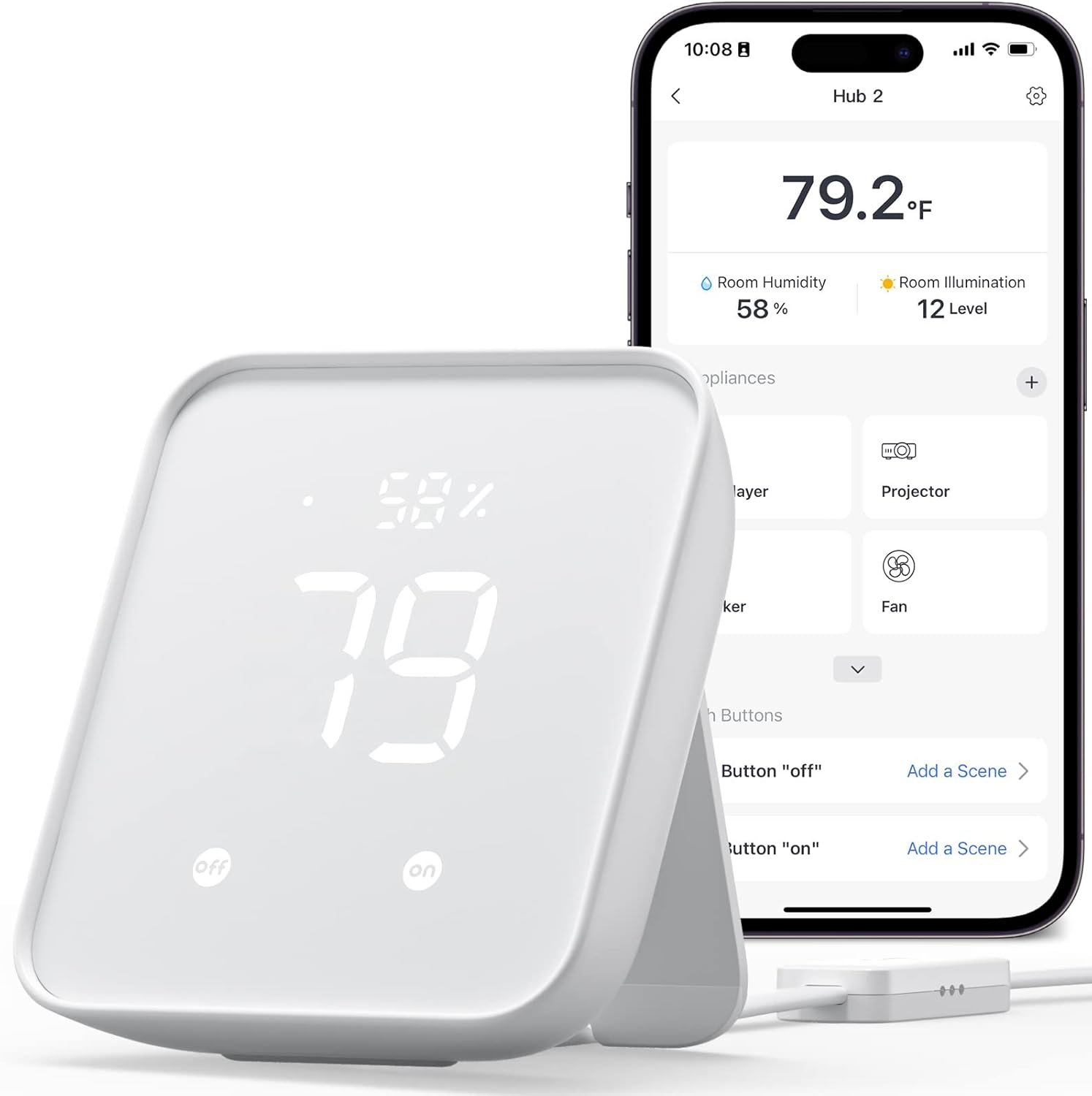
SwitchBot Hub 2 (2nd Gen), work as a WiFi Thermometer Hygrometer, IR Remote Control, Smart Remote and Light Sensor, Link SwitchBot to Wi-Fi (Support 2.4GHz), Compatible with Alexa&Google Assistant
$59.99
Related Products


From the brand


More popular
Mechanical control
Improvement of air quality
Home security
Environmental regulation
Sensor
Smart switch
Robot Vacuum
Gift Series
Smart Lighting
Smart WiFi Thermometer Hygrometer: The SwitchBot Hub 2 features a built-in industrial Swiss-made chip (accuracy up to ±1.8% RH/±0.36°F) in its cable. Additionally, the panel comes equipped with a light sensor, which enables the screen brightness to adapt to the environment seamlessly. The WiFi functionality allows you to monitor your home’s temperature, humidity, and light data, as well as their variations, anytime, anywhere.
Helps Consolidate All Your Infrared Remotes: With Smart Learning, our smart home hub can help you add tons of home appliance infrared remotes to our app to help make home life simple. You’ll then be able to control appliances such as TVs, Air Cons, and more using Voice Commands (e.g. Alexa) or even using our app or your Apple Watch.
Use with Scenes and Geo-fencing: Temperature, humidity and light detected by SwitchBot Hub 2 (2nd Gen) can be used as automatic scene conditions as the trigger condition to control devices such as air conditioners to help maintain a comfortable environment at home. Use with other SwitchBot products to realize more automation scenarios with the help of our smart home ecosystem.
2 Smart Buttons Included: Our device comes with two buttons to allow you to set up household appliances or automation scenes to be controlled when using our app. Just simply tap lightly and enjoy a host of different home automation possibilities, especially suitable for the elderly or children who cannot use smart phones or voice commands.
Supports Matter: SwitchBot Lock, Curtains and Blind Tilts are supported via Matter when using SwitchBot Hub2 (2nd Gen), which in turn helps make your device supported via HomeKit (support across other devices will come shortly after). Our hub also allows you to use third-party smart assistants such as Alexa, Google Home, and Apple Home for an even better smart home experience.
8 reviews for SwitchBot Hub 2 (2nd Gen), work as a WiFi Thermometer Hygrometer, IR Remote Control, Smart Remote and Light Sensor, Link SwitchBot to Wi-Fi (Support 2.4GHz), Compatible with Alexa&Google Assistant
Add a review
$59.99
Aguaman –
Works Great With HomeKit and Alexa!
There’s was a lot of buzz last year about the HomeKit compatible infrared blaster the Nature Remo Nano. It looks like a great product but unfortunately it is only for the Japanese market. The Switchbot Hub 2, however, beat it to the American market! And I have to say it’s great! The update to change the IR blaster over to Matter was seamless and easy. The blaster works like a charm too!If there is anything to nit-pick about, I’d say that the Switchbot’s phone app simply doesn’t have very many pre-programmed templates to control various devices. Not that they are necessary. The Switchbot’s ability to learn IR codes and button from current remote controls is fantastic and easy. As long as you have the remote, Switchbot can learn it! For all the devices I wanted to control, I ended up just creating my own templates using the “Others” category under “IR Appliances”. Works great!A note note Apple TV users. Although Switchbot support will tell you it’s impossible to control an Apple TV with Switchbot, that’s just not true. It controls it fine. ALL Apple TVs can be controlled using IR signals from IR remote controls. You don’t even have to mess with settings in the Apple TV. It just works out of the box. The hurdle to overcome, however, is to get a IR remote control for the Apple TV. Only a bluetooth remote comes with the Apple TV 4 and later, not an IR remote. Apple TVs gen 1-3 had IR remotes. You can still buy these older model remotes and Switchbot can learn them just fine, but the gen 4 and later Apple TVs added a new Home button which is not on the older remotes. The new Home button is how you put the Apple TV 4s and later to sleep. Luckily, there are many cheap ($10) 3rd party IR remote controls for the Apple TV 4 and later that have the new Home button. Just buy one of those, and you can use it to teach Switchbot how to control your Apple TV.Switchbot uses Siri Shortcuts to allow Siri to control an Apple TV. Would be nice if it had built in support for Siri, but using Siri Shortcuts works fine. Amazon’s Alexa voice assistant can also control the Apple TV with Switchbot. So best of both worlds!I highly recommend Switchbot if you want to use it with Apple’s HomeKit. It’s not like we have much of a choice in any case. As far as I could tell, Switchbot is currently the ONLY smart home IR blaster in the American market that is compatible with HomeKit. But at least you know it works, and works well! 🙂
Cyber Woodsmith –
Great solution for my needs.
I bought the hub with 4 sensors. Setup was pretty straight forward. Hub integrated easily onto my Wifi network and Alexa environment. I have one sensor in my pump house with an alarm when the temperature drops near freezing. A second is inside a freezer watching for temperatures above 10 degrees. This sensor does not update very often, I think the Bluetooth signal has a hard time getting out. However all I need to do is open it and I have the history of it’s performance. The third sensor is inside my small wood drying kiln I use for bowl blank. Here the humidity sensor is very useful. The 4th is inside my workshop so I know what issues I will face with glues and finishes. There are issues with the speed of the updates, probably caused by the distance from the hub, but the data is updated eventually. However the fact that each sensor records readings about every 2 seconds and stores those results helps remediate the slow updates. The data is there. Like I said it fulfills my needs. The app is well designed, robust, and provides a good set of tools to review this recorded data. All in all I would recommend this to anyone who doesn’t need instantaneous temperature reading and alarms.
Brucet –
Easy setup, great features
Installed Jan 6, 2024 – I bought this Switchbot Hub 2 primary as an IR blaster to control an electric fireplace and an older Samsung TV in my bedroom to use my iPhone as the remote. Short story – works well, good app. Bonus: There are 2 physical buttons on the front you can use to trigger devices/scenes.Longer story for enthusiasts:Based on reviews of competing products, I am happy I chose this one, easily worth the extra money. Using the native hub automation you can use the built in temp sensor and set a threshold and corresponding action.Ultimately I plan to do automation via HomeKit but assumed it would take some time before matter functionality worked. So for the short term, using Switchbot hub2 as the automation engine is simple and intuitive. Also the app works with Apple shortcuts on IOS. Widget sort of works, only scenes (switchbot scenes) show up so far, not devices. These are native switchbot devices/scenes, not to be confused with Apple home.Apple HomeKit and Matter- I have done no research on matter, I keep hearing it is coming. I don’t care to promote or consult on it, I’ll use it when it’s ready. That said, I am pretty impressed so far:Upon pairing with HomeKit (read the included directions, they are far better than average) the temp and humidity icons show up immediately in the IOS Home app. Matter seems to be working. It takes a very long time for IR devices to show up in the IOS Home app. Several hours. I have fairly old Apple TV series 4, this could be why it takes a while? Again, it’s worth reading the instructions. Far superior than typical instructions from other device manufacturers.I am pleasantly surprised by this device. I never heard of them before yesterday!
Ronny –
Gaat perfect
Victor Du Solier –
Funciona muy bien. En apple HomeKit hace lo básico, pero se batalla para agregarlo y se desconecta con frecuencia.
Sezai –
användbar och högkvalitativ
SAV –
El hub es el accesorio principal que necesitas para poder controlar el resto de dispositivos, a pesar de ser algo caro para tratarse de un hub, no es un aparato simple en si.Dispone de:- Un higrómetro para ver la temperatura y la humedad.- Un sensor de luz- Un emisor por infrarrojos que a través de la aplicación puedes accionar, por ejemplo para encender la TV o el aire acondicionado, cualquier aparato que permita la recepción por infrarrojos ya que es configurable 100%. De esta manera puedes accionar cualquier dispositivo desde cualquier parte del mundo que tengas acceso a internet.- La pantalla tiene 2 botones configurables para accionar escenas.- Y para mi lo mas importante, es que soporta Matter, así que todos los dispositivos que enlaces al hub, estarán disponibles en otros asistentes inteligentes como Alexa, Google Home y Apple Home.Switchbot pone al alcance una domotización barata y de calidad con soporte Matter.Si no necesitas tantas funcionalidades, hay otro hub (Hub mini) como puerta de entrada al ecosistema bastante mas barato.
DiDi 🐺 –
POTESSI, DAREI ANCHE 10 STELLE!!!Benvenuti nella nuova generazione di SwitchBot! Cosa ne penso dell’Hub 2?MONTAGGIO & POSIZIONAMENTO:Io l’ho attaccato alle piastrelle col biadesivo 3M fornito dal produttore , un biadesivo potente e resistente adatto a qualsiasi tipo di pareti e superfici. Potete appoggiarlo su un piano in posizione eretta o inclinata e addirittura se volete è possibile anche tassellarlo alla parete.Il Cavetto fornito è molto lungo (2 Metri) quindi se avete problemi di prese distanti questa lunghezza lo risolve.. ricordatevi di tenere il sensore del cavo allo scoperto.DISPOSITIVO:Esteticamente Bello, Semplice e Intuitivo con numeri abbastanza grandi visibili a chi ha più difficoltà. L’Hub 2 vi mostra sul dispositivo % di umidità e Gradi° percepiti all’interno dell’INTERA stanza , estremamente precisi (verificati con Igrometri professionali). Sono presenti nella zona bassa due pulsanti configurabili per qualsiasi scenario domotico desiderato per avere due soluzioni istantanee.FUNZIONALITA’ & APPLICAZIONE:Personalmente lo trovo super funzionale e facile da configurare.L’applicazione anche se ha ancora qualche parola da tradurre risulta semplice e intuitiva, senza troppe funzioni e gestioni strane. Nella pagina dell’Hub 2 in alto troverete Temperatura , Umidità e livello di luminosità della stanza in cui avete posizionato il dispositivo; in centro i vostri dispositivi agganciati; in basso i grafici dei vari andamenti igrometrici. L’Hub 2 si lega al 95% circa dei dispositivi che dispongono di un telecomando/controllo a infrarossi , nella configurazione potete trovare già una vasta gamma di marche e prodotti selezionati altrimenti c’è la funzione di configurazione di un dispositivo nuovo con la possibilità di salvare sul telecomando virtuale ogni tasto del telecomando fisico con una lettura infrarossi perfetta e istantanea. Incredibile la possibilità di creare scenari personalizzati su più dispositivi assieme senza mai sbagliare o mandare in blocco il dispositivo.CONTROLLO VOCALE ALEXA o ALTRI:Reazione al SECONDO!!! Questa è una qualità che distingue Switchbot dagli altri produttori. L’incredibile velocità nell’eseguire i comandi dai vostri dispositivi Alexa ecc ecc.. Una configurazione semplice e veloce.. Dimenticatevi dei telecomandi!! Poi, se non l’avete letto, potete controllare il vostro Hub 2 anche da Smartwatch!!!