
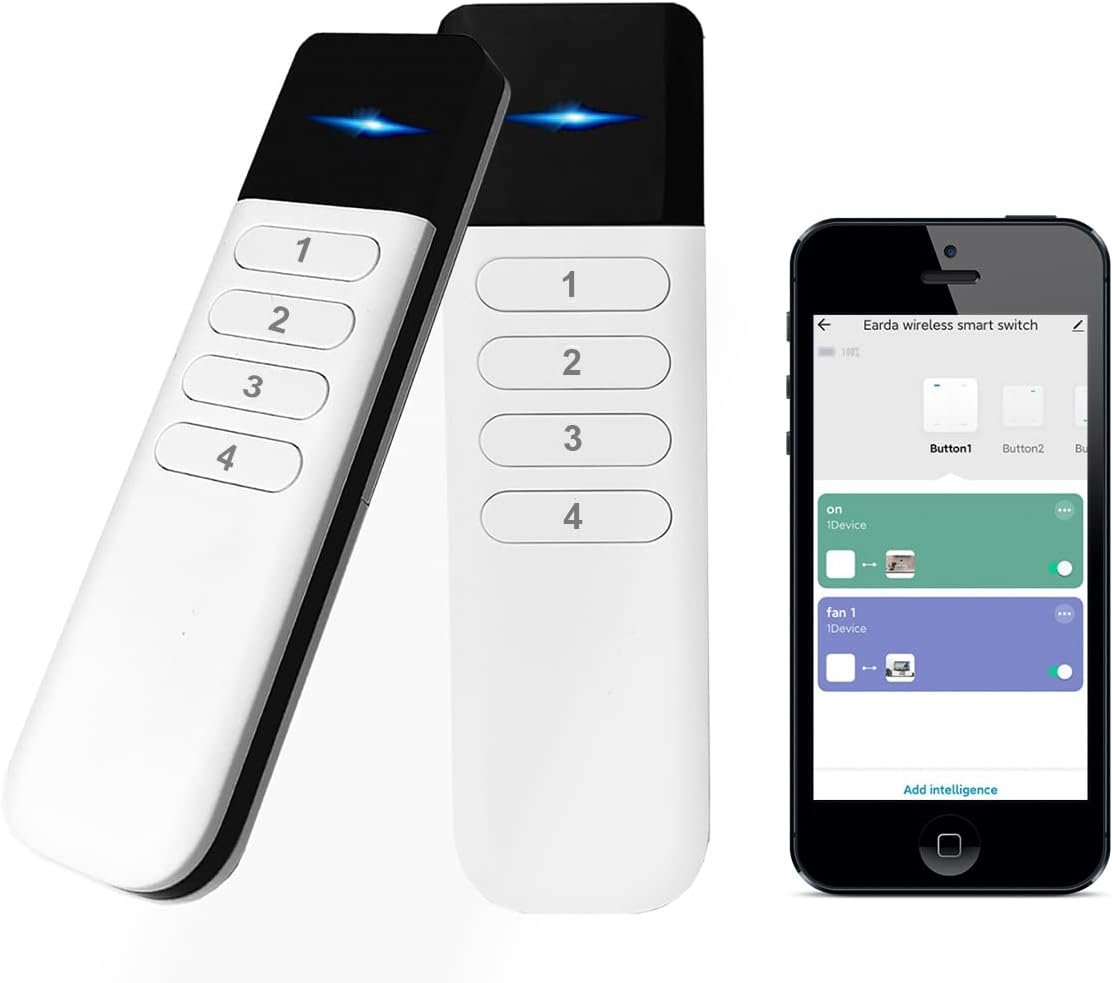
Wireless Zigbee Smart Button, 12 Scene Controller, 4-Way Remote Control Button Switch for Smart Home Devices, Compatible with Tuya, Home Assistant, Homey, Hubitat, Requires Tuya Zigbee Hub
$23.95
Related Products




Product description


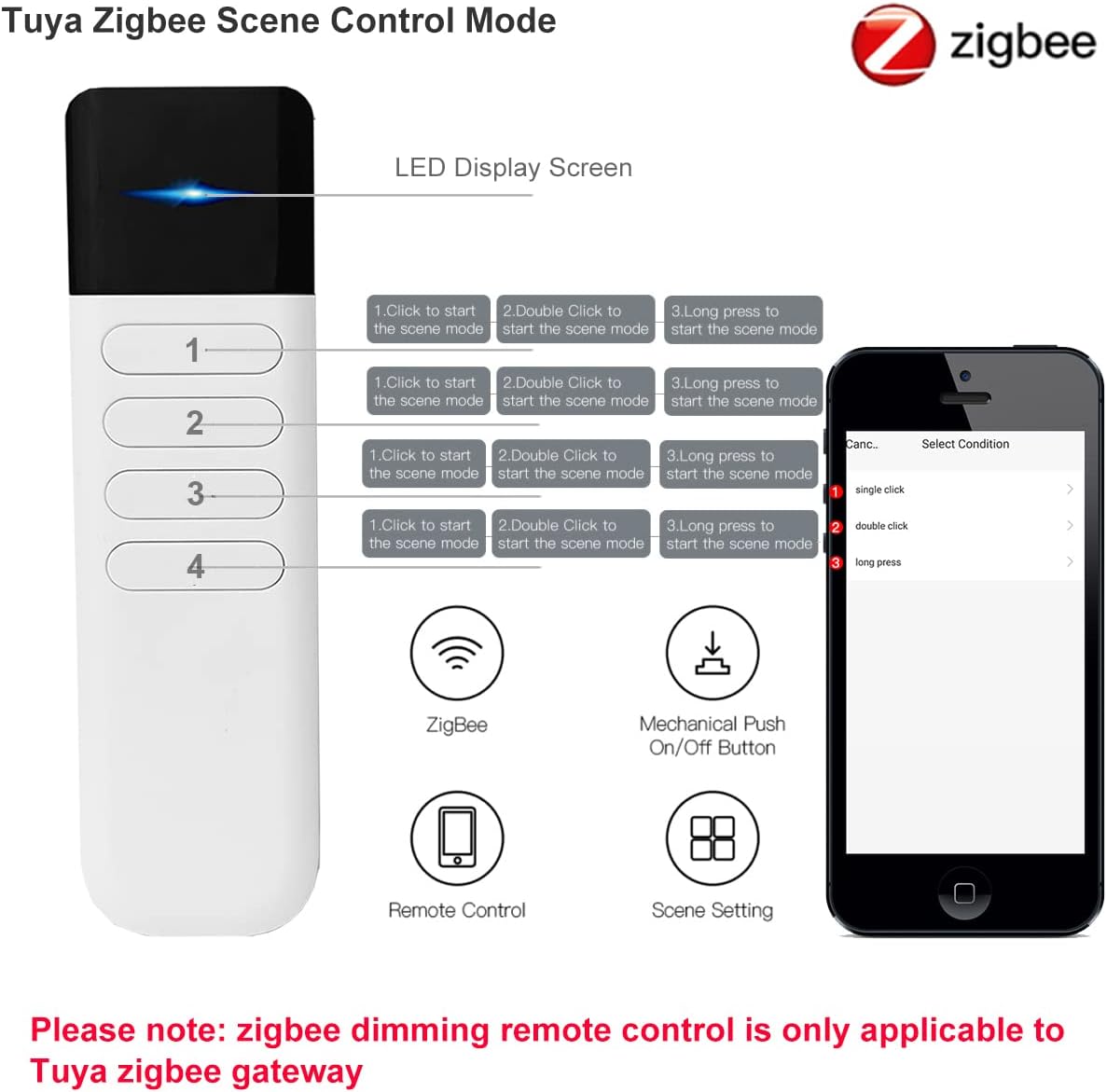
Seamless Wireless Control:Leverage Zigbee wireless technology for reliable remote control of compatible smart home devices and scenes. Pair effortlessly with platforms like Hubitat, Zigbee2MQTT, Homey, and Home Assistant — please feel free to contact us if you encounter connection issues.
Customizable & Versatile:Features 4 buttons that support single-click, double-click, and long-press actions. It allows users to easily trigger device operations, adjust smart lighting, smart curtains, switches, or activate pre-programmed scenes.
Simplified Smart Automation:Each button has 3 pairing modes, enabling up to 12 scenes to adapt to different scene changes and lifestyles. No need for extra voice commands or keeping the app open for a long time; just a gentle press after a tiring day at work is all it takes.
Energy-Efficient Design:Powered by 2*AAA batteries, it delivers reliable performance for up to 2 years. The robust structure balances a compact design with the advantage of long-lasting battery life.
Wide Compatibility for Enhanced Control:Connect via Tuya Zigbee Hub, Zigbee 3.0 USB Dongle, or Home Assistant.
13 reviews for Wireless Zigbee Smart Button, 12 Scene Controller, 4-Way Remote Control Button Switch for Smart Home Devices, Compatible with Tuya, Home Assistant, Homey, Hubitat, Requires Tuya Zigbee Hub
Add a review
$23.95
WL –
Great physical button remote add-on for Home Assistant! Best value option in my opinion.
Over the past 1-2 years, I’ve slowly integrated a Home Assistant (HA) Green into my smart home devices. I’m pretty happy with how it all fits together, but I still appreciate a physical remote with actual buttons.My HA Green came purchased with a Zigbee SkyConnect, now called the ZBT-1. I hadn’t used it since I purchased it as I had no other Zigbee devices. After looking into options for a physical button, I found there are several options, most of them Zigbee. This seemed like the best option. One other option cost 75% as much with 75% less buttons, so it was an easy decision. The description states you need the Tuya Zigbee hub, but any Zigbee hub is fine.I connected the SkyConnect dongle to the HA and had to decide between 2 protocols, Zigbee (ZHA) vs Zigbee2MQTT (Z2M). There are several pros/cons between the two, but since this was my first Zigbee device, decided to go with ZHA. The Skyconnect updated itself, and we were ready to go.Pairing mode requires a very long press on button 1. At first it wasn’t working, but after looking up similar Zigbee devices, I realized I was not pressing it long enough. It requires a full 10 seconds before entering pairing mode. It was quickly recognized in HA, and it was easy to set the buttons to several automations I had already made. Each button can be activated 3 different ways: single press, double press, and long press (5s). Within the Zigbee device settings, you can see when each type of button press is activated.There are some complaints posted here about how long-pressing button #1 can accidentally cause it to jump into pairing mode. I don’t see how that is an easy thing to do. Long press requires 5 seconds, and the indicator light turns off when it activates, letting you know to let go. In order to get into pairing mode, you have to hold it down 2x as long, a full 10 seconds. As I wrote above, I couldn’t initially get it into pairing mode because I wasn’t pressing it long enough.The range of this is impressive. That’s perhaps more of a testament to the SkyConnect, which looks like a very flimsy tiny thin piece of plastic. The remote lives in a room 1 floor down and halfway across the home and each button press is registered without issue.
a guy –
Good simple remote to use with Home Assistant
Works with Home Assistant. The 12 “scenes” is from having 4 buttons and 3 types of button presses: short, long, or double press. All work fine for me. The long press takes 5 seconds so that’s a bit too long IMHO. I’ll probably only use the short or double press. The only useful exposed entity is the battery (haven’t confirmed yet that it decreases with time). FYI to utilize this in automations, you’ll want to use event triggers. An example is below, where the endpoint is the button and the command contains either short, long, or double. I like that it uses AAA batteries. I hate having to keep 10 different button cells on hand for my other devices. Overall, it is simple and does exactly what I want.triggers:- trigger: eventevent_type: zha_eventevent_data:endpoint_id: 1command: remote_button_short_pressid: 1 shortalias: 1 short
Anand –
It does work with Smartthings
Took some digging but was able to use this with Smartthings. Driver details are in the picture
CC –
Works well.
Works great with home assistant, three commands per button: press, double tap, long press.
Scott D. –
Exactly what I was looking for…
I wanted a generic remote to trigger automations, scenes, or toggle switches in Home Assistant. I’m using it stand-alone with a Zigbee dongle connected directly to my HA VM. Works like a champ even from across the house with no mesh devices in between. Getting it in to pairing mode almost had me sending it back thinking I really did need the specific hub mentioned in the listing, but someone else’s review mentioned holding button 1 for a solid 10 seconds, (manual says 5 secs) and that did the trick!Each button 1-4 can have three total functions- single press, long press, and double tap.
MattW –
Homeassistant zigbee compatible
These were easy to program and worked great with homeassistant ZHA. The feel well built and react quickly to button presses. I’ve had zero issues with these remotes. These are great for the price.
D71 –
Works well
Easily paired and integrated with Hubitat, works as expected
Kodie –
Does not work with hubitat
I tried to add this to my Hubitat C8-Pro and while it was found during Zigbee search, and my hub added it, the device itself never leaves pairing mode. I removed, reset, re-added it several dozen times and found that it never finishes the zigbee setup, so after it’s detected and added by Hubitat, the remote itself keeps trying to pair.Sometimes I could get it to add, and it recognized button inputs for about 5 seconds, before it spontaneously started pairing again and then would no longer work.I configured, I used the built in, and community driver versions of the tuya scene driver, and I spent an hour I wish I could get back trying to get this thing to pair.
TheRulez –
Ich habe die Fernbedienung gekauft um Sie an Zigbee2MQTT anzubinden und dann das ganze im ioBroker weiter zu verarbeiten.Das funktioniert gut. Pro Taste hat man drei Datenpunkte, so das man 12 Aktionen triggern kann.Ich würde die Fernbedienung mehrfach kaufen, war bisher leider vergriffen.
João Cunha –
Comando excelente, com boa qualidade e bonito. Faz todas as funções descritas e agora também compatível com smartthings através de driver edge! Recomendo!
Robokop57 –
Dans la description sur Amazon et dans la documentation il est précisé qu’il faut une passerelle Z2MQTT ainsi que l’application Smartlife.Je n’ai ni l’un, ni l’autre, car je suis passé par l’application de chez Konyks et j’ai une passerelle Homefurnishmall Smart Tuya. Eh bien agréable surprise : reconnaissance immédiate !Programmation facile, faible latence (même si de temps en temps c’est un peu plus long sans raison apparente).Concernant le contrôle des ampoules je n’ai pas trouvé d’inverseur, c’est à dire la possibilité par un premier appui d’allumer l’ampoule, puis de l’éteindre par un second (peut-être parce que je n’ai pas utilisé smartlife ?).Par ailleurs je déconseille fortement de programmer le bouton 1 en appui long car vous risquerez fortement de déclencher le mode de configuration.J’ai un peu de mal à trouver le bon rythme avec le double appui mais cela viendra certainement avec le tempsLe désespérais de trouver des interrupteurs afin de commander les objets de chez Konyks, ce n’est plus un problème
Ky –
Had no hope of this working as there were not many purchases and reviews but I’m happy I still tried it out. It works just as intended.I wanted a smart remote which had multiple buttons which had the features to be able to click, double click etc and this works as intended. I have set mine up to work with home assistant via Zigbee2MQTT.There is no significant lag or delay from pressing the button to completing the action set up.My only gripe is that the hold down feature on the buttons seems to be a bit sometimeish where if you hold down a button for too long, the led light will begin to flash (I’m assuming it’s trying to repair itself)But for my needs. It has been perfect. I would recommend it definitely just off the price and the multiple buttons alone.It Takes AAA batteries but does not come with any.It also comes with a holder as you can see in my picture for you to mount it on the wall. Mine is mounted using sticky Velcro strips but you can drill it in as there are 2 mounting holes.
Jan H. –
Fungerar utan problem i Home Assistant med Zigbee2MQTT.