
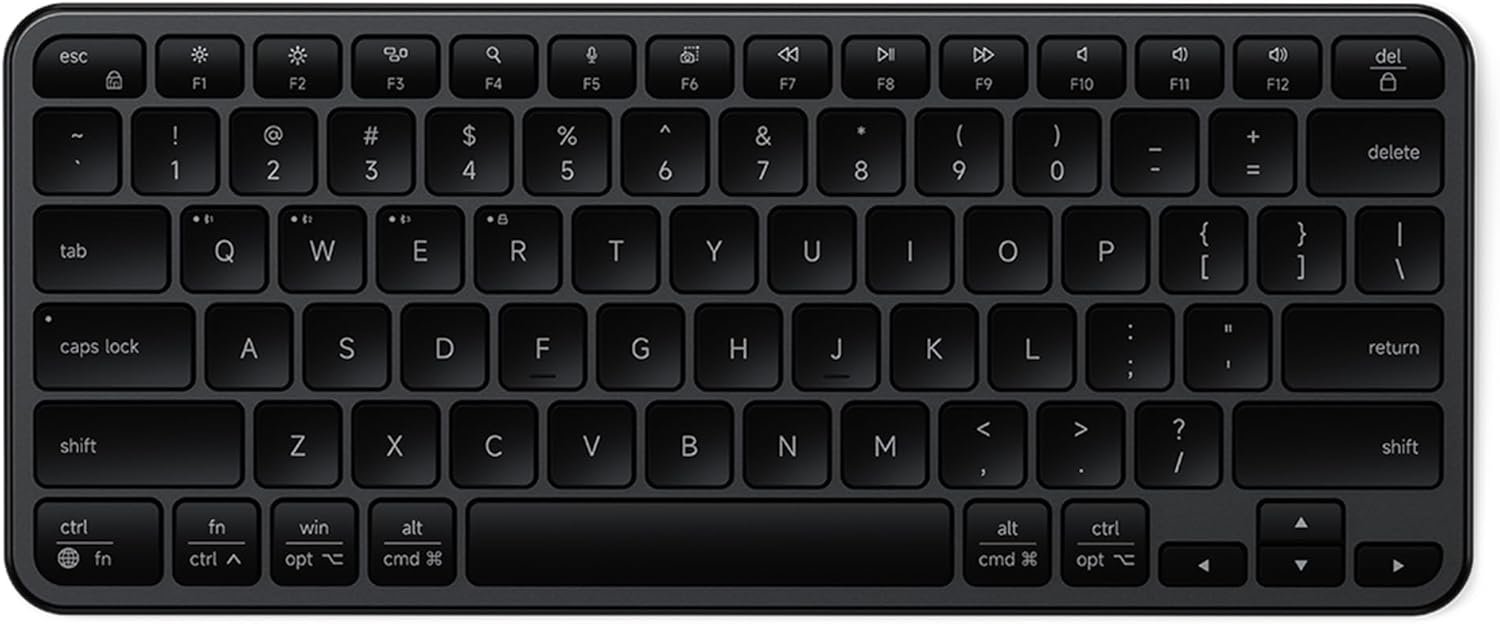
Satechi Slim EX1 Wireless Keyboard, Compact Keyboard for Mac, Windows, Android, Multi-Device 4-in-1 Connectivity (3X Bluetooth + 2.4GHz), Instant OS Remap, USB-C Rechargeable Battery, Space Black
$49.99
Related Products


Product description
The video showcases the product in use.The video guides you through product setup.The video compares multiple products.The video shows the product being unpacked. Slim EX1 Wireless Keyboard Merchant Video
 Universal 4-in-1 Connectivity
Connect to Mac, Windows, tablets, and phones — switch in seconds without re-pairing.
 Seamless Control, Anywhere You Work
Use three Bluetooth channels plus a 2.4GHz dongle connection for reliable, wireless control.
 Shortcuts at Your Fingertips
One-touch quick access to everyday media and system controls.
 Designed for Smaller Spaces
Slim, space-saving design with quiet scissor keys—perfect for compact desks and mobile work.

 All-Day Comfort, Built In
A subtle tilt supports a natural wrist angle for comfortable, extended use.
 Power That Lasts
One charge lasts weeks, featuring a removable, USB-C rechargeable battery.
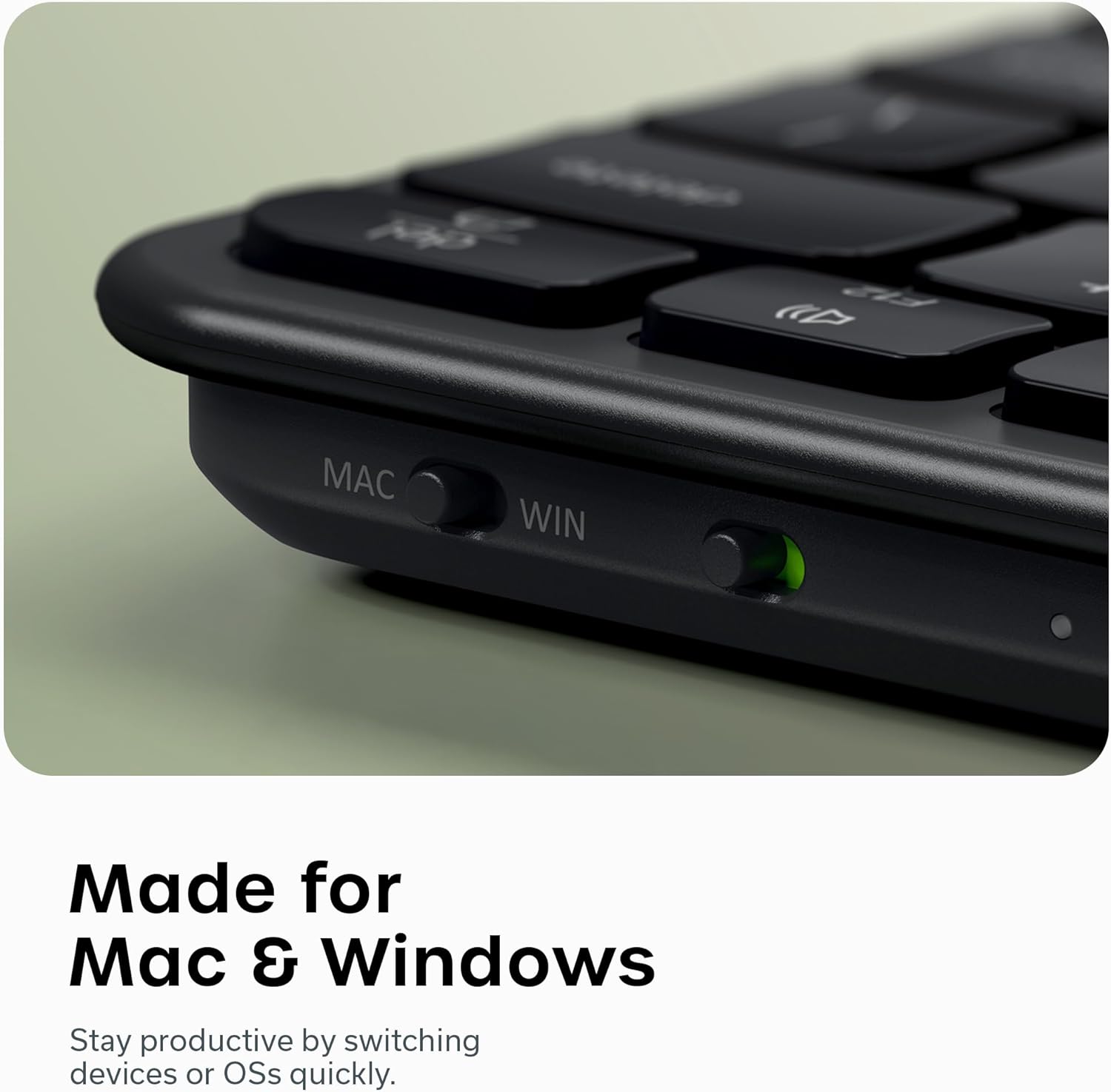
 Made for Mac and Windows
Flip the OS switch to reconfigure the keyboard for Mac or Windows—keys and controls align instantly.
1 Ergonomic Tilt
2 Rechargeable Battery
3 OS Switch
EX1 Wireless Keyboard
Satechi Slim Keyboards
11.24×4.7×0.66 in
Dimensions
11.14×4.53×0.47 in
11.89 oz
Weight
10.37 oz
450 mAh
Battery
1000 mAh
Backlit Keys
3
Bluetooth Channels
3
2.4 GHz Receiver
Removeable Battery
11.24×4.7×0.66 in
Dimensions
16.79×4.7×0.66 in
11.89 oz
Weight
19.47 oz
450 mAh
Battery
450 mAh
Backlit Keys
3
Bluetooth Channels
3
2.4 GHz Receiver
Removeable Battery
11.24×4.7×0.66 in
Dimensions
16.7×4.53×0.47 in
11.89 oz
Weight
15.52 oz
450 mAh
Battery
1300 mAh
Backlit Keys
3
Bluetooth Channels
4
2.4 GHz Receiver
Removeable Battery
11.24×4.7×0.66 in
Dimensions
14.29×4.5×0.47 in
11.89 oz
Weight
13.11 oz
450 mAh
Battery
1300 mAh
Backlit Keys
3
Bluetooth Channels
4
2.4 GHz Receiver
Removeable Battery
X1 Wireless Keyboard 
EX3 Wireless Keyboard 
X3 Wireless Keyboard 
X2 Wireless Keyboard 
How many devices can the Slim EX1 connect to at the same time?
The Slim EX1 supports up to three Bluetooth devices and one with the included USB receiver; four devices total.
What should I do if the Slim EX1 won’t pair via Bluetooth?
Reset Bluetooth on your device and re-pair the keyboard. For best results, ensure your device supports Bluetooth 5.3.
Does the Slim EX1 include a USB wireless receiver?
Yes. The Slim EX1 includes a 2.4 GHz USB receiver for users who prefer a wireless connection without Bluetooth.
Can I use the Slim EX1 while it’s charging?
Yes. The keyboard supports simultaneous charging via USB-C, so you can continue working while it charges.
Does macOS show the Slim EX1’s exact battery percentage?
No. macOS may show ~60% even when fully charged. This is a macOS limitation. Use the keyboard’s LED for low-battery alerts.
𝗖𝗼𝗺𝗽𝗮𝗰𝘁 𝗣𝗼𝘄𝗲𝗿 – A minimalist keyboard that blends portability and performance. The EX1 keeps you connected to all your devices — Mac, Windows, tablet, or phone — while fitting effortlessly into smaller setups. Its calm, quiet typing experience lets you stay in your zone anywhere.
𝟰-𝗶𝗻-𝟭 𝗠𝘂𝗹𝘁𝗶-𝗗𝗲𝘃𝗶𝗰𝗲 𝗖𝗼𝗻𝗻𝗲𝗰𝘁𝗶𝘃𝗶𝘁𝘆 – Connect to Mac, Windows, tablet, and phone — three Bluetooth channels + one 2.4GHz dongle for instant switching.
𝗜𝗻𝘀𝘁𝗮𝗻𝘁 𝗢𝗦 𝗞𝗲𝘆 𝗥𝗲𝗺𝗮𝗽 𝘄𝗶𝘁𝗵 𝗤𝘂𝗶𝗲𝘁 & 𝗣𝗿𝗲𝗰𝗶𝘀𝗲 𝗧𝘆𝗽𝗶𝗻𝗴 – A physical OS toggle ensures shortcuts feel native on macOS or Windows, while low-profile scissor keys deliver smooth, tactile, and quiet keystrokes.
𝗪𝗲𝗲𝗸𝘀 𝗼𝗳 𝗣𝗼𝘄𝗲𝗿 – USB-C rechargeable 450mAh battery lasts up to five weeks per charge. No backlit keys, prioritizing power efficiency and affordability.
𝗪𝗵𝗮𝘁 𝗬𝗼𝘂 𝗚𝗲𝘁 – We offer prompt customer service and a user manual for your convenience. Plus, Satechi products are backed by a 2-year limited warranty, protecting against defects in materials and workmanship under normal use.
13 reviews for Satechi Slim EX1 Wireless Keyboard, Compact Keyboard for Mac, Windows, Android, Multi-Device 4-in-1 Connectivity (3X Bluetooth + 2.4GHz), Instant OS Remap, USB-C Rechargeable Battery, Space Black
Add a review
$49.99
Ashutosh Goswami –
I liked it! should’ve had backlights
well the keyboard is great I love it ergonomics and the since its really thin although made of aluminium so some sort of bending us there and its not at all what u will fell when placed on a table, compatibility is great, ease of use is good and just like macbook pro’s keyboard well I think i like its appearance at this price point it there should have been backlights but Satechi did a great job with user friendly replaceable battery good job sustainability design
Storm –
Great but not excellent
I chose this keyboard because one review said it was better than the Logitech MX Keys. That hasn’t been my experience — it’s a good keyboard, but not comparable. I ended up going with a cheaper option since I didn’t want to spend more on another Logitech for something I’ll only use occasionally.
Mark Caudill –
Excellent Chiclet Keyboard
Great keyboard with very little key wobble. No issues with the battery, keyboard angle feel, or Bluetooth connection at all.
Steve –
Absolutely fabulous typing experience, superb build quality, effortless setup and configuration
The EX1 keyboard arrived in exceptionally well-designed retail packaging that made setup effortless. Configuration took only a few minutes, as everything was intuitive and functioned flawlessly right out of the box.The keyboard itself is a standout in both form and function, offering noticeably superior typing feedback and overall feel compared to Apple’s current Touch ID–enabled keyboard.Build quality is excellent, with a solid, premium construction and an ideal typing angle. The tactile response is crisp and highly satisfying, complemented by a refined, well-balanced audible click with each keystroke.Think of the EX1 as a modern interpretation of the legendary IBM keyboards, retaining their typing competency while eliminating overly long key travel and excessive noise.That said, the EX1 does not have Touch ID or backlighting. If either feature is essential to your workflow, Apple’s keyboard or a backlit alternative such as the Satechi X1 might be better suited to your use case.
Ana Tereza Diaz Posada –
Mi teclado
Muy fácil de instalar teclado cómodo y elegante
AndrewMD –
Great Keyboard for daily or travel use.
I got this keyboard for a travel companion for my MacBook. The typing experience is satisfying with good tactile feedback. It has a USB-C based 2.4ghz receiver which is something more wireless keyboard makers need to adopt. There really isn’t many cons with this keyboard. The one con is lack of backlight.Great improvement from their previous iterations. Highly recommend.
Amazon Customer –
Seems solid, works flawlessly with my Macbook
Using with my MacBook Air—incredibly simple to connect via Bluetooth (instructions are on the inside of the box—and also in the product manual). So far has been working flawlessly. Color matches my midnight colored MBA. Only downside: no illuminated keys—but I knew that before hand and wasn’t really required where I’m using it. Seems nice and solid in terms of construction (unlike some cheap keyboards out there).
JBHorner –
No Backlight, Unreliable Typing, Odd Design Choices – Pass.
The overall feel of this keyboard is okay. I do find that it repeats keys when typing, which is one of the reasons I’m knocking the stars down. Another is because it also misses keystrokes. Both need to be flawless on a keyboard, in my mind, to even earn three stars. (Three is where I start; it goes up or down from there.)To switch from MAC to Windows mode on this keyboard (or the opposite), it is necessary to move a physical slider (switch) on the back of the keyboard. Silly. It has a lot of other functions that can be done using keystrokes–but not that one. If further thought was given to this product, it would have had a “soft” method to do this, and would remember the setting across paired devices. But, no.I am also trying to understand the presence of two keys labeled “ctrl” on the left side of the keyboard. Again, a curious decision they’ve made. I am both a mac and Windows (and Linux) user, and I have yet to understand this curious decision. My guess is that they’re trying to mimic MAC/Windows layouts. I have other keyboards that work with both that do not have this very odd choice of keys.With that said, the biggest flaw of this keyboard is that it has no backlight. I suppose there are people who don’t mind that omission. I just do not happen to be one of them.There are many alternatives out there
Asad –
Ich bin zufrieden👌
M du Toit –
I’m so impressed with this keyboard! It surpassed all my expectations. Very high quality, heavier than I expected, very smooth soft typing. Works perfectly with my iPad Air (M3) 11”
Rilsant –
No es un mal producto, en verdad bastante bien construido calidad/precio acorde con lo pagado pero me esperaba que las teclas fueran silenciosas. Adicionalmente no me gustó el color del teclado
Macuser79 –
La tastiera è sicuramente valida ma non è ai livelli delle tastiere Apple che hanno una fluidità migliore.
とりの –
ノートパソコンのキーボードのような、薄型のキーボードです。私はワンサイズの方を注文しました。小型で薄い上にバッテリー内蔵でBluetooth接続可能なので持ち運びも便利で、外にタブレットを持ち出して使う場合にもちょうどいいですね。打鍵感はノートパソコンのキーボードと同じイメージで、軽くて打ちやすいですよ。デスクトップPCと、iPadAirに同時にBluetooth接続を試してみましたが、どちらも問題なく繋がり動作しました。手軽にデバイスを切り替えて使用できますよ。ゲームをやるならゲーミングキーボードのほうが向いていると思いますが、やはり最大の魅力は薄さによる持ち運びやすさとスタイリッシュな外観だと思います。外に持ち出して使う機会が多い方には特におすすめします。