
VEXA Zigbee Hub for TUYA Smart Products Only, Smart Home Zigbee Bridge with Device Counter, Supports TUYA Zibgee & Bluetooth Sub-Device, Compatible with Alexa and Google Home, 2.4GHz WiFi Required
$26.99
Related Products



Product description


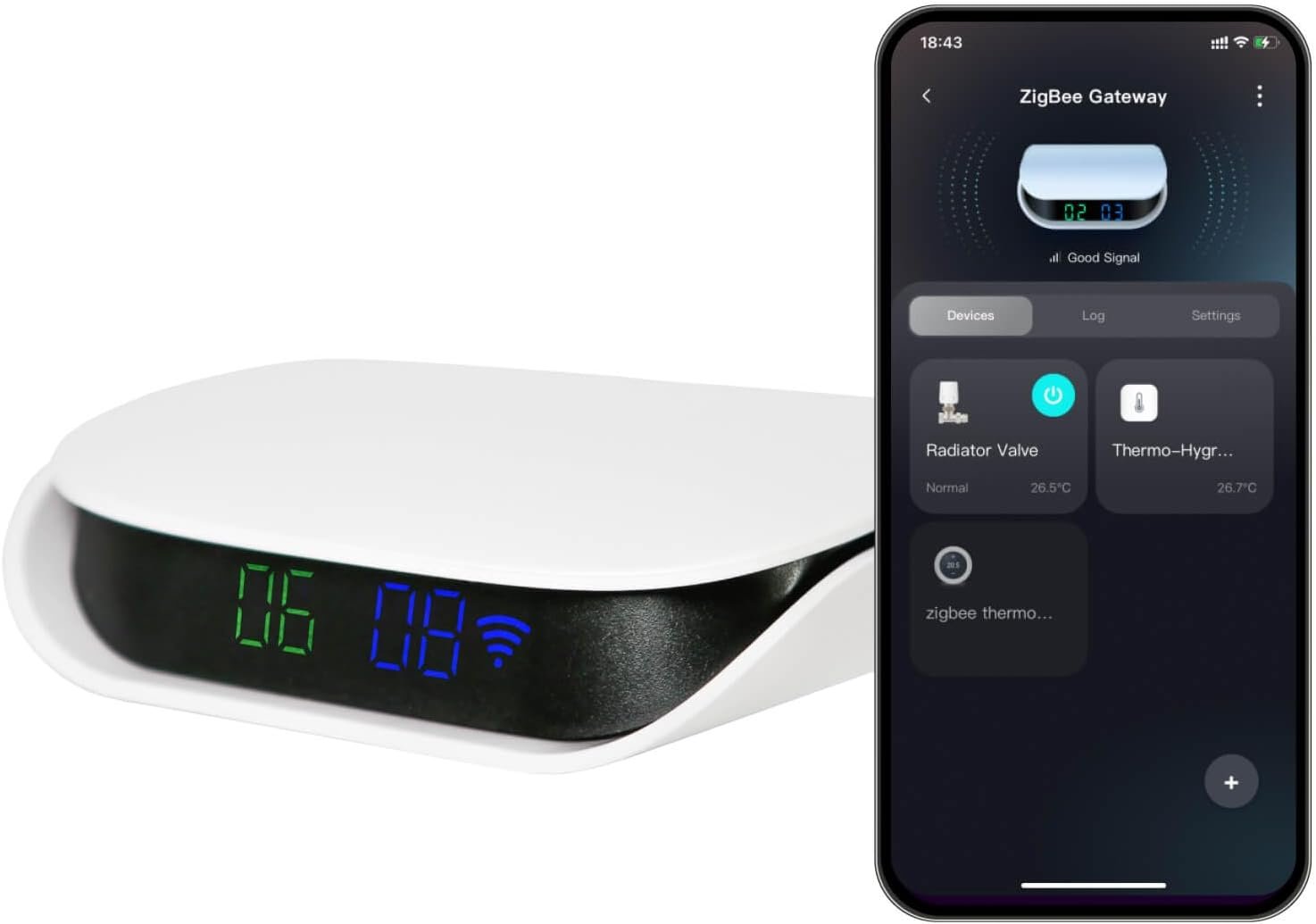
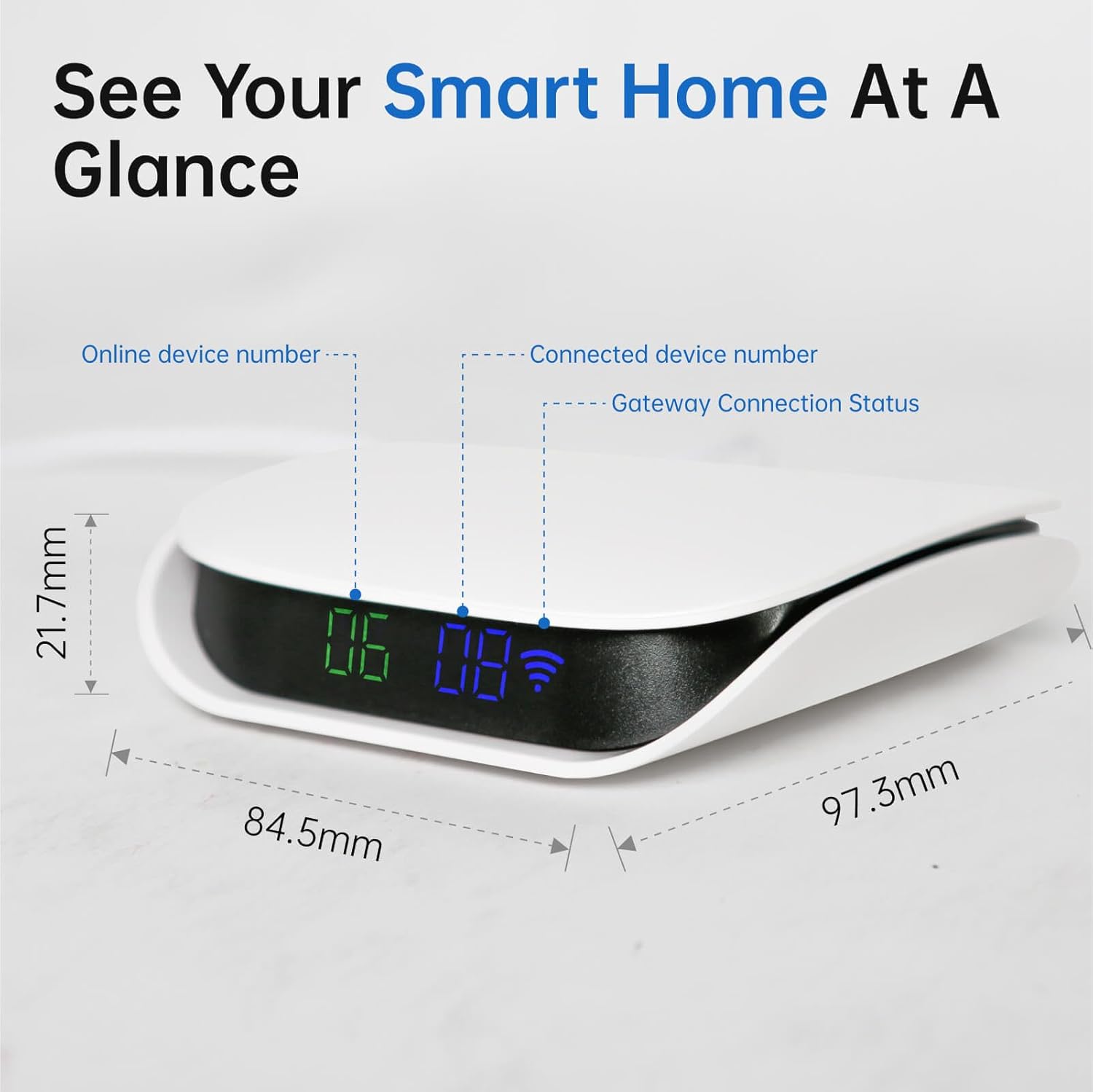
[Visual Interface] Zigbee hub with device status display, which shows the gateway connection status, total number of connected devices and the total number of online devices.
[Easy Setup] Plug in to install-no wiring is required; Mobile app page lists all connected devices, which enables fast control without navigating to individual pages and enables gateway and cross-gateway automation setups for synchronized multi-device control.
[Protocol Compatibility] Supports Zigbee and BLE sub-devices, allowing cross-protocol control, and partial Zigbee 3.0 devices.
[Subdevice Compatibility] This hub is only compatible with sub-devices that use Tuya protocols, and certain types of Zigbee 3.0 products. Works with 2.4GHz WiFi Networks Only.
[Stable Connection] Ensures reliable multi-device connectivity for home scenarios and may connect 100+ sub-devices all at once.
[Multiple Installation Methods] This gateway hub can either be set up on a table or on the wall. Both installation accessories are included in the box.
2 reviews for VEXA Zigbee Hub for TUYA Smart Products Only, Smart Home Zigbee Bridge with Device Counter, Supports TUYA Zibgee & Bluetooth Sub-Device, Compatible with Alexa and Google Home, 2.4GHz WiFi Required
Add a review
$26.99
CAM –
Solid Tuya hub with a clever display, but read the protocol specs first
As someone who has a house full of Zigbee gear, I bought this VEXA hub primarily for its unique form factor. Most gateways are just black boxes, but the on-device display showing the active/total device count is a brilliant touch. It saves me from opening the Smart Life app just to check if my mesh is healthy.The design is sleek, modern white finish. It doesn’t look like a piece of networking gear; it looks like home decor.Within the Tuya ecosystem, it’s rock solid. I’ve linked 18 devices (sensors, switches, and the VEXA temp monitors) and the latency is sub-50ms.You have the “”Online/Total”” count on the front, which is a massive UX win. I wish every hub had this.My only gripe is the Zigbee 3.0 compatibility. While it works perfectly with all my Tuya-branded 3.0 gear, it struggled to pair with a few of my older, niche non-Tuya Zigbee 3.0 sensors. It seems heavily optimized for the Tuya stack, which is fine if you stay in that ecosystem, but true universal 3.0 support is a bit hit-or-miss.The verdict is, if you’re building a Tuya smart home and want a stable, great-looking bridge that gives you at-a-glance status, this is a 5-star value. If you’re a hard-core tinkerer trying to mix every random brand under the sun, just be aware of the protocol limitations. For the price, it’s a very fair deal.
Tambone –
Plug n play – kind of
I got this because I wanted to simplify and organize my smart devices. The main focus I wanted to use this for is the door locks. I finally had gotten one of my security deadbolt locks set up and able to be controlled through the app – security screen door, I have a different lock on the regular door, I also have different cameras that I would like to be controlled through one place. (The state Prior to the hub ).There’s not a lot of instruction other than plug and Play! It will pick some stuff up fairly easily. I got it to recognize both of those locks but I think I pushed it too far wanting it to be controlled by Alexa. And in order to have a voice unlock scenario you need to have a passcode! I don’t know if there’s any way around that but it seems kind of silly because if anybody were to hear it and they use the AI app too , they would be able to unlock the door.So I have given up the voice unlock for now and wanted to concentrate on just getting both locks to unlock the way I need them to.The original lock that I finally had gotten to work from my phone is no longer communicating while the one that I had a problem with before works like a charm.Not knowing that this had changed, after going outside to check the mail the door had shut closed and locked and Unfortunately my code did not work and I was locked out. Thankfully the back door wasn’t locked so I could get back in.Needless to say, I uninstalled everything even the Tuya app and I’m starting over from the very beginning. I believe that it will work fine after I install them one by one and just to The ZigBee/tuya and leave out the voice unlock feature for now.It is capable of interconnecting Bluetooth / Wi-Fi zigbee and Tuya smart apps , devices.It is small lightweight and can be mounted on the wall or sit on a table. It has a recent button comes with its own C power cable. You need to download a smart app like Tuya.