
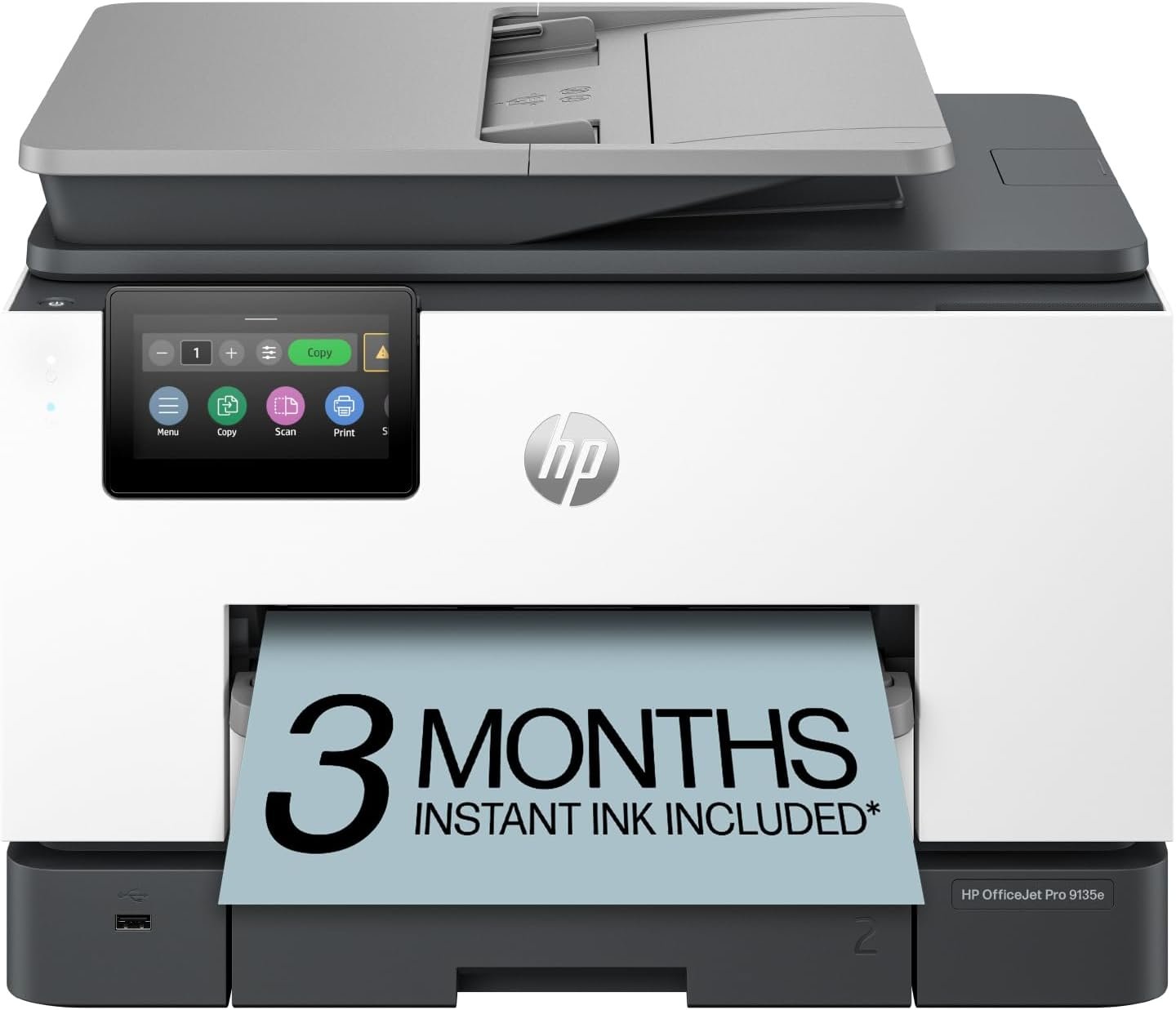
HP OfficeJet Pro 9135e Wireless All-in-One Color Inkjet Printer, Print, scan, copy, fax, ADF, Duplex printing best-for-office, 3 month Instant Ink trial included, AI-enabled (404M0A)
$299.89
Related Products




The HP OfficeJet Pro 9135e delivers fast color printing, 500-sheet paper capacity, and duplex scanning and copying. It’s AI-enabled to intuitively adapt to your workflow, with wireless and security features that keep your multifunction printer up to date and secure.
The OfficeJet Pro 9135e is perfect for offices printing professional-quality color documents like presentations, brochures and flyers. Print speeds up to 20 ppm color, 25 ppm black.
UPGRADED FEATURES – Fast color printing, copy, fax, auto 2-sided printing and scanning, auto document feeder, and two 250-sheet input trays.
WIRELESS PRINTING – Stay connected with our most reliable dual-band Wi-Fi, which automatically detects and resolves connection issues.
HP APP – Print, scan, copy, or fax right from your smartphone with the easiest-to-use print app.
3 MONTHS OF INSTANT INK WITH HP+ ACTIVATION – Subscribe to Instant Ink delivery service to get ink delivered directly to your door before you run out. After 3 months, monthly fee applies unless cancelled.
10 reviews for HP OfficeJet Pro 9135e Wireless All-in-One Color Inkjet Printer, Print, scan, copy, fax, ADF, Duplex printing best-for-office, 3 month Instant Ink trial included, AI-enabled (404M0A)
Add a review
$299.89
Love Amazon! –
Very Fast and Saves Time & Frustration
I’ve had this printer for one month now and so far, I love it. First, it’s beautiful and looks great with my white office furniture. Second, it holds a lot of paper as there are 2 paper trays. Third, it prints as clear as any other deskjet that I’ve owned even at its high speed (I haven’t printed on photo paper yet). Fourth, it copies double sided from the feeder, without having to touch the paper. Fifth, it’s FAST, fast, fast. I love the speed at which it gets things done. Sixth, the top tray can hold paper or envelopes, which I print a lot of, and it’s so easy and convenient. The printer will alert you when you’re low on paper so you don’t have to worry about running out of paper and it printing on envelopes for the rest of your print job. A couple of things to note; carve out a couple of hours to set it up. I did have to replace the old printer with this one on instant ink (very simple and I got the 3 months free) and I believe that the security on this printer makes it more secure but takes longer to setup. Worth the time. Keep in mind that the machine may need some updates so if you have any weird troubles with it at first (as I had a copy job from the feeder stop and refuse to continue) just turn it off and on again. You’ll see that it takes a couple of minutes to boot up and it’s probably because it’s updating. The AI shrunk one of my pages in an effort to fit all the words on it as they were running off the page. It didn’t know that the sentences were cut off on the original so it didn’t help, but it tried. I appreciate that. I use a high speed scanner, this printer and an high volume shredder for all my paperwork (pictured). I save everything in 3 places, including a Samsung 4TB external hard drive (best and fastest I’ve ever had) so I only need one file drawer to store certain original hard copies, and I have a LOT of paperwork. Overall, totally worth the effort, time and price. I got mine on sale for 299. I would have paid over 400 for it. It’s awesome.
WilliamPeyser –
Title: This printer is a disaster
First the good news. The HP OfficeJet Pro 9135e is fast. Now the bad news. This printer is so poorly designed that it shouldn’t even be on the market.It’s a cheap looking, ugly, square-cornered box. It’s noisy unless you use Quiet Mode, which slows it down. Worst of all, there’s no way to stop a print job in progress.You can’t leave envelopes or labels in Tray 1. If you do, the printer will grab them every time it runs out of letter paper in Tray 2, creating a huge paper jam.If Tray 1 is empty when the paper in Tray 2 runs out, the printer ought to continue printing when more paper is loaded. It won’t. The user has to intervene by pressing buttons on the control panel.1. Printer runs out of paper in Tray 2 and stops printing. Control panel displays an “Out of paper” message. DO NOT press “OK.”2. Load paper into Tray 2, and close the drawer.3. The message on the control panel changes to, “Did you change the paper?” Press “OK.” This message persists for only a few seconds, so be sure to press “OK” immediately. If the message doesn’t appear, open and close the paper drawer until it does.4. Control panel displays the “Out of paper” message again. This time, press “OK.” Printing will resume.If the user fails to follow this procedure exactly, the printer will stop printing after the current job completes and won’t print anything more. The control panel will continue to display an “Out of paper” message even though paper has been fully loaded. The only way to get the printer to start printing again is to reset it by unplugging it and plugging it back in or by turning it off with the power button and waiting for it to boot.The same remedy applies when it refuses to print after a software update. Unplug it and plug it back in, or turn it off and wait for it to boot.It shouldn’t need updates in the first place. The product should have been finished before it was brought to market. The updates improve the printer’s performance not one iota anyway.This printer turns pressing an application’s Print button into an adventure. The user never knows whether it’s going to print or not. When it doesn’t, no explanatory message appears on either the control panel or the computer screen. Nothing will print, but the user doesn’t know why. The baffled user has no recourse but to reset the printer. When he/she presses the power button to turn it off, the notification, “Error printing” may appear. How helpful!Sometimes, it loses contact with the wireless network. When it does, and the user tries to print, the notification, “Printer offline” appears on the computer screen. In this case, pressing the power button to reset it won’t work. The power button has no effect at all. The printer has to be unplugged and plugged back in to get it to print.You can avoid the wireless connectivity problem by connecting the printer to your router by an Ethernet cable or to your computer by a USB cable (neither supplied). Do this after the initial WiFi setup.However, even after the printer is connected to the router or computer, it frequently refuses to print. There’s never any apparent reason except that the software controlling the printer is defective. Every time the printer balks, the user has to press the power button and wait while the printer shuts down and reboots before it finally starts to print again.HP’s warranty is worthless. If you’re fed up with struggling with this printer, and you think you’ll get a better one if you return it to HP, you’ve never been more mistaken. The “replacement” you’ll receive will have no ink and no printhead. If you try to install the ink and printhead from your original printer in the “replacement,” you’ll find that you can’t. The “replacement” lacks not just ink cartridges and printhead. It’s also missing the mechanism that holds them in place. It’s a useless shell.If you purchase this printer, be sure to buy it form a retailer that offers a generous return window.
Rory Mecham –
Works great!
FAST, FAST, FAST! This machine will save you valuable time.
Ralph of Memphis –
The time to install, verify, & fix the HP OfficeJet Pro 9135e might be more significant than planned
The HP OfficeJet Pro 9135e is a network device. The printer contains many features where some may not be used. My initial installation did NOT test well. Some features worked some did not. I did not test those features that would not be used. When there is a problem, the vendor provides an APP that evaluates the device for known issues and report potential solutions. I have not seen this APP complete without another issue. When I tried to remove the installation APPS from my computer, the process did not complete and forced me to rebuild my computer.I extended the rebuilding effort to the new printer. After factory reset completed, the printer was unplugged. Later, I repeated the installation process with some prior experience and to my happy surprise the testing almost completed as expected.There are some functional issues that might be addressed by the vendor. The function, Scan to USB does not include a flash drive eject button. I have removed the flash before the transfer has completed and the document file was not usable. I found that another Scan to USB request with no document corrects the issue. Another issue is that the ADF has a capacity limit. There is no querry from the printer to insert more pages into the ADF then select CONTINUE or select DONE. I assume large documents will need to be manualy scanned. The CONTINUE function does exists for the flatbed scanning. There are more issues from my testing. There may be more issues within those features that I did not test because I do not intend to use, such as the FAX feature.I find the HP OfficeJet Pro 9135e has met my objectives. I never had any issue with the printing options. My print requirements are simple. The scanning features have been invaluable to me in the past. My testing of some scanning options have been most acceptable. The existing scanning issues have ways arround.
Cedric D. –
Highly Efficient!
Outstanding professional product!
Franck Chiesurin –
Good quality, price and reliable product.
Daniel Cyr –
Très satisfait !Super service comme toujours !
User –
I ignored the negative reviews when I bought this as I was happy with my old HP Laserjet.Unfortunately this is the worst printer I’ve ever had, despite the print and scan quality both being fine (when working that is). But the negatives are overwhelming (and I wanted to love it). This is a needy machine that constantly demands your attention due to constant messages that halt any action until they are acknowledged – plus just the WORST Windows software.Even the initial install was aggravating. I prefer a wired connection but it forced me to use wifi – ok – which then turned out to be constantly problematic, with problems connecting at startup despite the modem being a few feet away (sometimes requiring several restarts to connect). Then there are the messages and more messages. Every time I open a paper tray I’m prompted to update the type of paper in it. Then printing error messages saying the paper in the tray doesn’t match the paper specified in the printing preferences (even when it did). Then random error messages every now and then which halt any action because the the printer door is supposedly open (it’s not), or a tray is supposedly open (they’re not). A printer just needs to print – not ‘talk’ constantly about nothing! It also makes a LOT of noises at startup every single time, like it’s running through a full diagnostic, even if it’s just a restart.But the real nightmare began when I finally had enough and uninstalled the software and reset the printer to factory settings, and tried re-installing. The installer would not recognize the device (and hence wouldn’t install the software), despite various troubleshooting attempts, and when it finally DID after 2 days of efforts, only the printer worked (not the scanner, and still not working).BTW I’m a techy guy who figures out everything – except this piece of junk. Unbelievably bad software for a pricey inkjet, and they’ve had a full year to fix it. This is how you lose loyal customers.
SERGE HUOT –
Mainly use for printing, copying and scanning. However, installation could have been smoother, as I had to ask for technical support (Staples as opposed to HP technical because it does not offer support service 24/7) to complete the installation as the scanner function was not working. I did not install the fax function, as it is set-up on another 4-1 HP printer that I have. The only set up information that came with the printer was a note to go online at : hp.com/start/404M0A and even though I followed exactly to steps to carry-out the installation, the scanner did not work (irrelevant that the printer test page indicated that I had correctly installed my “HP OfficeJet Pro9130 Series”. I think the issue was that the relevant drivers were not installed, why – I do not know. In terms of performance afterword, it seems to be working correctly so far.
yves pronovost –
High quality, faut and easy to setup and use.