
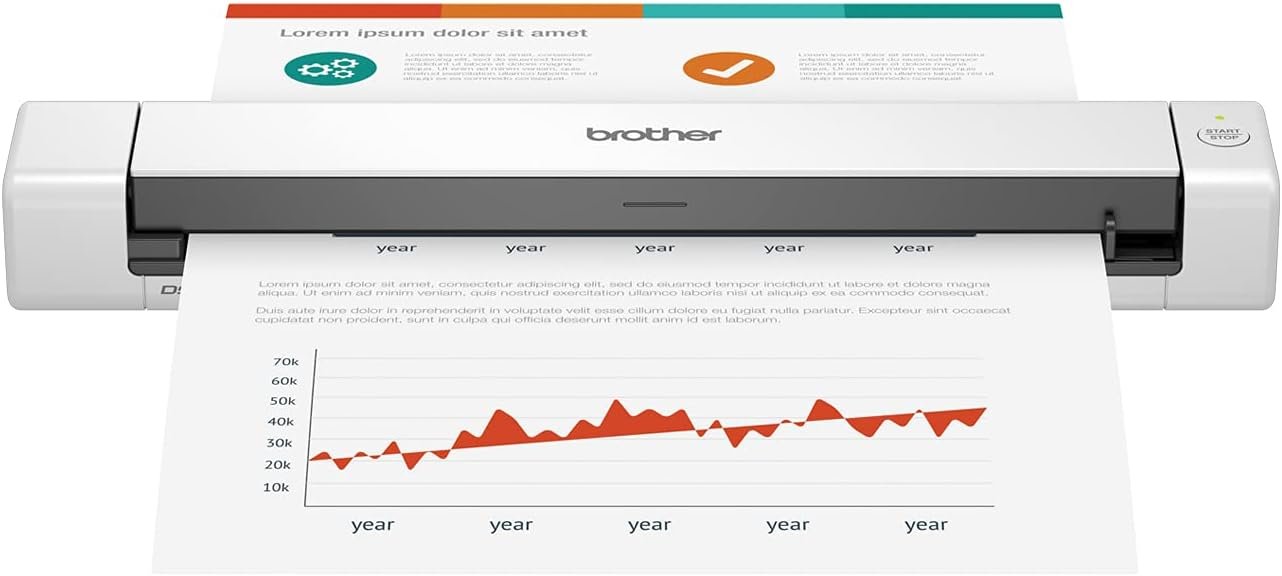
Brother DS-640 Compact Mobile Document Scanner, (Renewed Premium)
$94.93
Related Products


With its compact design and simple workflow applications, the Brother DS-640 mobile scanner is ideal for on-the-go, small office/home office professionals. It scans color and B&W documents at up to 16ppm. The DS-640 measures less than 11. 8 inches long and weighs about 1. 5 pounds, so it’s easy to take with you wherever you go. The DS-640 handles a variety of documents up to 72 inches long and up to 72 pounds. bond weight paper. Easily scan business cards and plastic ID cards through the same location as other documents. Power the DS-640 scanner through the included micro USB 3. 0 cable to a laptop or PC to enable true on-the-go scanning from virtually anywhere. The included software lets you to scan to multiple “Scan-to” destinations including File, Image, OCR, Email, and cloud services. The DS-640 enables you to optimize images and text for storage and retrieval. Included document management and OCR software enables you to turn your hardcopy documents into editable Microsoft Word files for easy storage, retrieval and usability. Enhance scans with automatic color detection/adjustment, image rotation (PC only), bleed through prevention, background removal, text enhancement and color drop. Image optimization lets you enhance scans for optimum imaging. The DS-640 is compatible with Windows, Mac and Linux and supports TWAIN/WIA for PC/ICA for Mac/SANE drivers. The DS-640 scanner includes a one-year limited and free lifetime product online, call or live chat support. Disclaimers: Color and monochrome scan speed, letter size paper at 300dpi. When connected to a PC with applicable software. Drivers and bundled software available via download at solutions brother. Internet connection required. Refer to User Guide for more information.
FAST SPEEDS – Scans color and black and white documents at blazing speed up to 16ppm. Color scanning won’t slow you down as the color scan speed is the same as the black and white scan speed
ULTRA COMPACT – At less than 1 foot in length and only about 1.5 pounds in weight you can fit this device virtually anywhere (a bag, a purse, even a pocket)
READY WHENEVER YOU ARE – The DS-640 mobile scanner is powered via an included micro USB 3.0 cable, allowing you to use it even where there is no outlet available. Plug it into your PC or laptop and you are ready to scan
WORKS YOUR WAY – Use the Brother free iPrint&Scan desktop app for scanning to multiple “Scan-to” destinations like PC, network, cloud services, Email and OCR. Supports Windows, Mac and Linux and TWAIN/WIA for PC/ICA for Mac/SANE drivers
OPTIMIZE IMAGES AND TEXT – Automatic color detection/adjustment, image rotation (PC only), bleed through prevention/background removal, text enhancement, color drop to enhance scans. Software suite includes document management and OCR software
Zane –
Great Document Scanner! – not a texture scanning wand.
Super easy connect and start scanning. Great form factor easy to bring with you. Doesn’t get jammed easily, I even use this to make janky images by pulling the paper while it’s being scanned – doesn’t bother the machine too much. Only says jammed when the paper stops, so long as it’s flowing through it doesn’t stop. If there is a jam it is easy to clear.This is not a pocket wand that you can scan any surface. It is strictly a portable document scanner and a good one at that. the brother app is easy and intuitive to use; you can make full multiple page pdfs in minutes.I can’t really attest to the durability as I haven’t really put it through the wringer in this department, but it feels like I could drop it a few times and not hurt anything.
DMN –
Easy Setup and Eady To Use
Works absolutely great, so easy to use we don’t even keep it out on the computer desk. Keep it in a drawer and just take it out when needed
Momof7Ps –
Fabulous little scanner!
Love how sleek & easy it is to use. I love how you can add a page & keep the whole document saved as one instead of separate pages.It did prompt me to download extra software, do NOT download the unnecessary software, it created spam problems.
H. K. –
Excited then mildly disappointed
I was excited to receive this. It has been an up and down experience on day one. It wasn’t a plug and play product. I had to download the driver and then 2 additional applications to use it on my Mac mini. Not terrible. I got it working and was super pleased with the compact size and how easily it scanned items. The software wasn’t terrible either. Then, as I started to attack my receipt pile, I came across 2 annoyances that might have me return it. The first, the “start/stop” button doesn’t actually start or stop. You have to control it from the computer. It will also shut off after a while and then I hit the button and it blinks red and takes a few times of cancelling the error in the app before it starts working again. Tolerable for the price point. The second part that is irritating but also doesn’t happen that often is, for longer receipts, it stops and claims there is a jam. There is no jam. I tried it several time with a few different long receipts. I ended up having to cut off part of the receipt to get it to work. That was annoying because I also had to do some trial and error about how much I was cutting off so I had to scan it 3-4 times before I got it to save a file.I like the small size so that it doesn’t take up much room on my desk and it will travel well, if needed. I don’t know if I love the quirks for the price. I will see after this week. Hope this was helpful!
Peepers –
Glowing Review ~ 2.5 Years Post-Purchase
I purchased this scanner about 2 and a half years ago and it continues to work flawlessly… This is impressive as I admittedly purchased this portable on-the-go scanner for a very different task – to digitize all the documents in my filing cabinet from the last 30 years. The initial wave included around 5000 documents soooo no question it has paid itself off.To be honest, at this point, there isn’t much I haven’t tried feeding through this thing – credit cards, sparkly greeting cards, supplement cardboard box packaging, etc. so I’m continually impressed it hasn’t broken. When theres an issue (feeding documents too quickly, a paper jam, etc) the indicator light blinks red and, as far as I know, to remedy this you lift the top portion and close it… I’ve had to do this many times (which is not to say it malfunctions often) but each time it sounds/feels like the act alone should break the thing.The only bummer to me is the scanning length limitation. While the width limitation is a given due to the physical dimensions of the scanner, the documents are fed through and each individual scan is limited to around 14″. That is, it stops feeding through at a certain point and if the item hasn’t cleared, you get the red indicator light and the image isn’t processed.Other things I like:+ the cord is detachable+ I was able to download and operate the supporting software on my dinosaur 2011 mac air+ the software has a continuous feed feature to scan multiple documents in a row (without having to interact with the software between pages)
Allen T. –
Scans nice when it works, but tends to blue screen on Windows 11
As other’s have mentioned, this scanner can result in frequent blue screen events. When it does work, it scans well. I scanned a total of 3 documents, each time, I experienced a blue screen on Windows 11. What happens, is that if you leave it connected after the scan, Windows seems not to like that, and retaliates with the dreaded blue screen. And that’s only about a minute or so after you scan something, so if you have another sheet queued up to scan, you’ll be out of luck. On the third instance of this, my machine complained badly after the blue screen, and on reboot, went into safe mode, and took a few minutes to boot, when normally it boots in about 20 seconds.Pros:1. Scans well if you can get past the blue screen that frequently happens.2. The resolution can go quite high, but it’s finicky and makes you change other settings each time you scan.3. It’s fast and impressive4. It’s compact, easy to tuck out of the way into a desk drawer5. It would be almost perfect if not for the blue screen issue.Cons:1. Tends to blue screen on Windows 11, as others have mentioned.2. The On/Off button is sensitive and finickyOverall, this device is completely unacceptable, I did not find any fixes or upgraded drivers on the Brother site.I purchased this scanner, but tucked it away, still in it’s box for while before using it, so the return window has closed. $100 is not a lot for a scanner, but still, that’s a nice chunk of change to loose on a defective item. I intend to contact Brother and request a complete refund, siting the multiple mentions of blue screen events here on Amazon. I’ll update this post as that process proceeds.
Jammy –
Love this thing! Just Works!
Love this thing. Just Worked out of the box. Have used it on three different computers and it worked with all of them. Scan quality is not super or anything but it is more than adequate for even professional use.
Damaris –
Su relación calidad – precio es muy buena. Por lo que se paga no se puede exigir más. Es un buen escaner, lo hace a color y con buena resolución. Es un poco incómodo tener que escanear hoja por hoja y no poder tener un alimentador que permita escanear varias hojas al mismo tiempo, pero al final cumple con su función.Es muy ligero, no pesa mucho. Muy practico de transportar y muy fácil de usar.Para trabajos sencillos, muy bueno
SC –
Good replacement for my flat bed scanner. Easy to setup (just connect cable) and takes very little space on my desktop. Document feeding takes a bit of practice and can be difficult if the document is not flat.
Lilian Silvério Tirolli –
Ótimo e prático
Pineapple –
Works great, small and easy to use and very fast too.
PrincessBlue –
Decidí a comprar éste escáner ya que la marca en sí, es garantía; y no me equivoqué. La calidad del documento es muy buena y lo hace en cuestión de segundos 🙂 Yo requiero escanear documentos en tamaño legal y este escáner sí lo hace. 10 de 10